



Los tipos de presentaciones más comunes son las instructivas, informativas, persuasivas, inspiradoras y otras. Cada tipo de presentación se utiliza en determinados eventos, para un público concreto y para alcanzar objetivos específicos.
Elegir el tipo de presentación adecuado según el público y el evento es muy importante. Los elementos de diseño, el contenido y el formato de las diapositivas también dependen del tipo de presentación.
Compartir una investigación, presentar datos, proponer una idea o dar instrucciones: cada una de estas presentaciones requiere un enfoque distinto. Para que hagas mejores presentaciones, vamos a analizar los 10 tipos de presentaciones más comunes con los que te puedes encontrar.
1. Presentaciones informativas
El objetivo de estas presentaciones es compartir conocimientos e información con el público. Sin persuasión ni sesgos, el presentador comparte hechos y datos de forma estructurada.
Las presentaciones informativas son muy habituales en aulas, reuniones y sesiones de formación. Estos son algunos ejemplos de temas para presentaciones informativas:
- Explicar un proceso o sistema
- Presentar los resultados de una investigación
- Formar a los empleados en nuevas herramientas
Para este tipo de presentaciones se recomienda un contenido sencillo y bien estructurado. Los gráficos y diagramas también ayudan a explicar el tema. Un exceso de datos puede abrumar al público, así que mantén el contenido estructurado y preciso.
2. Presentaciones persuasivas
Las presentaciones persuasivas se utilizan para convencer al público de que realice una acción o adopte un punto de vista. Las intervenciones en público y las presentaciones de ventas y marketing siguen este tipo para influir en las decisiones de la audiencia.
Los hechos, los datos y otros tipos de información sirven para respaldar tu afirmación o argumento. Algunos ejemplos de temas para presentaciones persuasivas son:
- Discursos de venta
- Propuestas de inversión
- Discursos de defensa de una causa
Los argumentos deben estar respaldados por datos y hechos. Apostar por el storytelling también puede ser una gran herramienta para causar más impacto en el público. No olvides añadir una llamada a la acción clara al final de tu presentación.
3. Presentaciones instructivas (tutoriales)
Estas presentaciones incluyen instrucciones paso a paso sobre cómo realizar una acción. Imagina que estás promocionando una herramienta: con una presentación instructiva puedes enseñar al público a usar sus diferentes funciones.
Las diapositivas desglosan un proceso complicado en pasos fáciles de entender. Los tutoriales de software, las guías de bricolaje y las sesiones de incorporación suelen seguir este tipo de presentación. Para crear una presentación instructiva:
- Usa instrucciones paso a paso
- Incluye elementos visuales o demostraciones en directo
- Utiliza un lenguaje sencillo y práctico
4. Presentaciones de demostración
Las presentaciones de demostración se utilizan para explicar cómo funcionan distintas cosas en la vida real. Hay una ligera diferencia entre las presentaciones instructivas y las de demostración, ya que las presentaciones de demostración se centran sobre todo en mostrar en lugar de explicar.
- Demostraciones de producto
- Tutoriales de cocina
- Recorridos técnicos
Estas son algunas ideas habituales para presentaciones de demostración. Las grabaciones de pantalla o las imágenes reales pueden resultar útiles en este tipo de presentaciones.
5. Presentaciones inspiradoras
Motivar e inspirar al público requiere un storytelling sólido y un toque emocional. Las presentaciones inspiradoras son ideales para charlas de liderazgo, sesiones motivacionales y para compartir historias personales de éxito.
La conexión emocional es lo que mejor funciona en las presentaciones inspiradoras, pero asegúrate de contar solo experiencias reales y auténticas. Un mensaje claro y memorable es lo más eficaz en este tipo de presentaciones.
6. Presentaciones para la toma de decisiones
Estas presentaciones contienen datos e información que ayudan al público a tomar decisiones fundamentadas. Se utilizan en reuniones con partes interesadas e inversores. Las presentaciones para la toma de decisiones son ideales para:
- Reuniones de estrategia empresarial
- Propuestas de proyectos
- Revisiones de presupuesto
Los gráficos, diagramas y otras visualizaciones de datos son perfectos para estas presentaciones. El público debe entender claramente los pros y los contras, y no olvides ofrecer recomendaciones claras.
7. Presentaciones de pitch deck
Si quieres presentar una idea, una oportunidad de inversión o los detalles de una startup a inversores, en estos contextos se utilizan las presentaciones de pitch deck. Cada diapositiva debe ser concisa, visualmente atractiva y aportar valor.
Las presentaciones de lanzamiento de productos, las de búsqueda de financiación y las propuestas comerciales entran en esta categoría. Las diapositivas minimalistas pero con contenido son las que mejor funcionan en un pitch deck, y la presentación debe explicar claramente el problema, la solución y el valor que ofreces.
8. Presentaciones de ventas
Vender un producto o servicio exige centrarse en varios factores: las diapositivas deben ofrecer un valor claro, abordar los puntos débiles de los clientes y destacar las ventajas de tu servicio o producto.
Las reuniones de ventas B2B, las presentaciones a clientes y las demostraciones de servicios también pertenecen a este tipo de presentación. Una presentación de ventas ideal debe:
- Destacar los beneficios, no solo las funciones
- Abordar los puntos débiles del cliente
- Incluir testimonios o casos de éxito
9. Presentaciones de estado o de avance
¿En qué situación se encuentra el proyecto o el negocio? Las presentaciones de avance suelen dirigirse a partes interesadas e inversores. También puedes usarlas para informar a tus clientes sobre el progreso en curso.
Además de presentar la situación actual, las presentaciones de avance también deben definir los próximos pasos y los retos relacionados con el proyecto.
10. Presentaciones narrativas (storytelling)
Si quieres transmitir una idea mediante una historia convincente, las presentaciones narrativas son ideales para ti. En una misma presentación se combinan la narrativa, los datos, los elementos visuales y otros recursos. Algunos ejemplos habituales de presentaciones narrativas son:
- Storytelling de marca
- Presentaciones de casos de estudio
- Discursos de apertura
Estas presentaciones necesitan una historia bien estructurada para que el público no se pierda por el camino. Conectar emocionalmente con la audiencia también resulta útil en este tipo de presentaciones.
¿Cómo hacer los tipos de presentaciones más comunes?
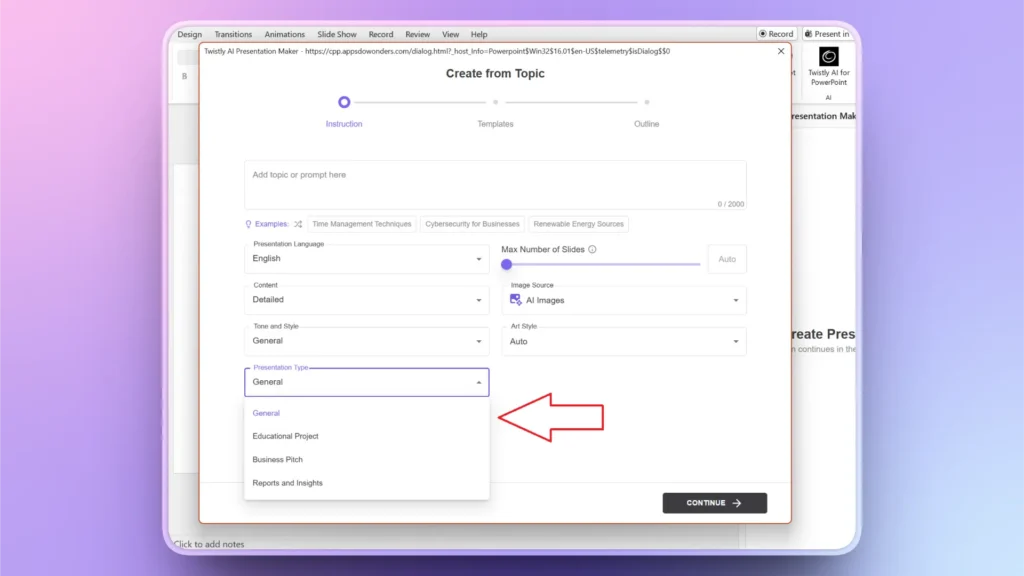
Con Twistly, crear una gran presentación en PowerPoint no debería ser un problema. Tienes múltiples opciones para elegir en cuanto a tipos de presentación.
En la fase de entrada, puedes definir el tipo de público, el tono, el estilo y el tipo de presentación. Elegir el tipo de presentación adecuado ayudará a la IA a generar contenido y datos relevantes para lograr una mayor participación.
Conclusión
Conocer estos 10 tipos de presentaciones más comunes te ayuda a adaptar tu mensaje para lograr el máximo impacto. Si no sabes qué tipo de contenido o de elementos visuales son más adecuados para tu presentación, deja que la IA te ayude.
Puedes dar tus propias instrucciones personalizadas, pero aunque no lo hagas, Twistly analizará el tema y el contexto para generar las diapositivas más relevantes y útiles para tu presentación.
¿Eres nuevo en Twistly? Descarga la versión de prueba gratuita desde el enlace de abajo y descubre un ChatGPT personalizado para PowerPoint sin tarjeta de crédito ni compromiso. La prueba es gratuita, pero solo durante un tiempo limitado.
Crear diapositivas de PowerPoint con IA
Crea presentaciones basadas en IA a partir de cualquier mensaje, documento o vídeo











Empieza a hacer presentaciones con IA en segundos
Acceso instantáneo
Empieza a explorar inmediatamente todas las funciones de Twistly
Sin compromisos
No necesitas tarjeta de crédito y puedes cancelar cuando quieras
Asistencia dedicada
Nuestro equipo te ayudará en cada paso durante tu periodo de prueba