


¿Cómo utilizar la IA para encontrar ventajas competitivas en las plataformas de lanzamiento?

Una gran idea y la pasión por la startup no bastan en los mercados competitivos modernos. Los inversores y las partes interesadas quieren conocer los puntos únicos que diferencian a tu empresa. Los "pitch decks" se han convertido en elementos cruciales que marcan o rompen futuras oportunidades.
Pero no a todo el mundo se le da bien hacer pitch decks increíbles. ¿Cómo utilizar la IA para encontrar una ventaja competitiva en los pitch decks? La ventaja competitiva se convierte en la columna vertebral de un pitch deck ganador.
En este artículo, exploraremos la importancia de los pitch decks para conseguir inversiones para tus proyectos empresariales y cómo utilizar Twistly para crear un pitch deck increíble.
Ventaja competitiva para las plataformas de lanzamiento
Los inversores y ejecutivos revisan varios pitch decks, y la mayoría de estos pitch decks fracasan porque todos se parecen, centrándose en las mismas cosas genéricas. Somos más rápidos, somos los mejores y somos más innovadores. Este tipo de frases no aportan ningún valor añadido a tus presentaciones.
Las afirmaciones son inútiles a menos que disponga de los datos y cifras adecuados para respaldarlas. Tienes que demostrar tu competencia ofreciendo una presentación clara y optimizada. Un pitch deck ideal debe responder a estas preguntas principales.
¿Qué problema resuelve?
¿Por qué está usted en una posición única para resolverlo?
¿Por qué los competidores no pueden replicar fácilmente su ventaja?
Twistly es un creador de presentaciones inteligente con IA que cuenta con plantillas ideales para presentaciones personales y profesionales. Solo tienes que pedirle a la IA que cree presentaciones para tu próxima aventura empresarial y ella se encargará de todo.
Cómo ayuda la IA a identificar las ventajas competitivas
La IA ha cambiado nuestra forma de investigar, recopilar datos y hacer presentaciones. Normalmente, para estos pasos se necesitan tres herramientas diferentes.
Con Twistly, todas estas herramientas y funciones de IA están integradas en PowerPoint. En lugar de cambiar entre aplicaciones, herramientas y sitios web, puedes hacer que todo suceda dentro de PowerPoint. Estas son algunas de las principales ventajas de utilizar herramientas de IA como Twistly para obtener una ventaja competitiva en los pitch decks.
Análisis del mercado y de la competencia
Analizar incluso el nicho más pequeño puede llevar días o semanas. Hay que revisar diferentes conjuntos de datos y recursos para analizar las tendencias actuales y futuras. Las herramientas de IA pueden encontrar fácilmente los resultados deseados en muy poco tiempo. Las herramientas de IA pueden ayudarle a encontrar las lagunas del mercado y las posibilidades futuras de su negocio.
Extracción de información sobre los clientes
Para el éxito de cualquier negocio, las opiniones de los clientes son la columna vertebral de toda la empresa. Pero lo más difícil es analizar y detectar el margen de crecimiento a partir de las opiniones de los clientes. Las herramientas de IA pueden analizar:
- Reseñas
- Encuestas
- Tickets de soporte
- Conversaciones en las redes sociales
Las herramientas de IA le ayudan a identificar los puntos débiles de los usuarios para que pueda presentar fácilmente posibles soluciones a estos problemas. El uso de esta información en tus presentaciones puede convencer a inversores y partes interesadas.
¿Cómo crear un Pitch Deck con Twistly?
Twistly combina la potencia de los redactores de contenidos AI, los generadores de imágenes AI y las herramientas de presentación profesionales. No es solo un diseñador de diapositivas o una herramienta de formato, sino un completo ChatGPT para PowerPoint.
Tanto si quieres hacer una presentación para un proyecto de clase como un pitch deck para inversores, Twistly puede hacerlo todo por ti. Incluso con herramientas de IA como Twistly, la revisión manual de la presentación final es muy recomendable.
Sigue estos pasos para crear un pitch deck profesional para inversores con Twistly. Todo este proceso sólo te llevará uno o dos minutos. Una vez que tengas la presentación, todavía puedes añadir o editar materiales para las diapositivas, y te sugerimos que lo hagas para conseguir un enfoque más personalizado.
Paso 1: Abra PowerPoint e inicie Twistly
Inicie una presentación de PowerPoint en blanco y, a continuación, ejecute Twistly. Puedes elegir cualquier método de entrada para la presentación. Ya hemos realizado nuestra investigación y utilizaremos el archivo de datos para crear un pitch deck.
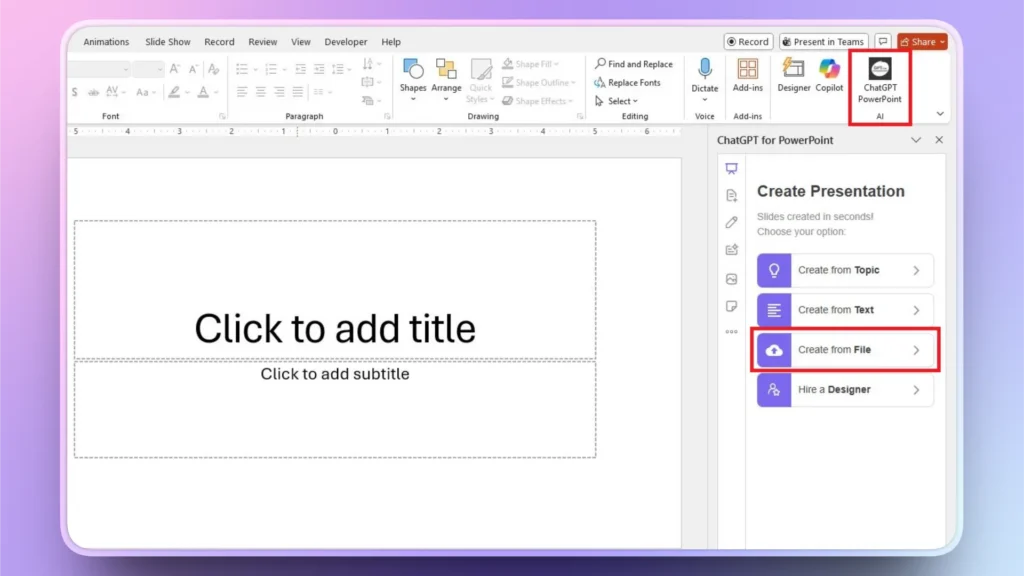
Paso 2: Cargar el archivo de investigación
Elija hacer una presentación a partir de un archivo y, a continuación, cargue un archivo desde su ordenador que contenga todos los datos y el análisis de mercado. Asegúrate de tener el archivo listo antes de iniciar el proceso de presentación.
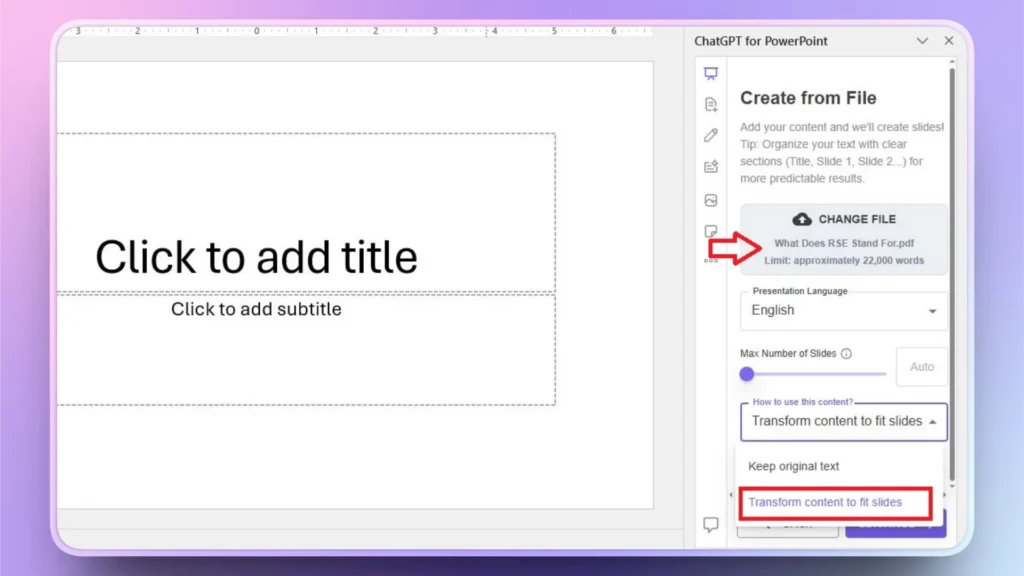
Paso 3: Revisar el esquema y seleccionar un tema
Twistly te dará un esquema generado por AI para las diapositivas. Revise esta diapositiva y haga cambios si es necesario.
Apruebe el esquema y, a continuación, seleccione una plantilla PowerPoint AI de la biblioteca Twistly. También puede cambiar el color de la plantilla.
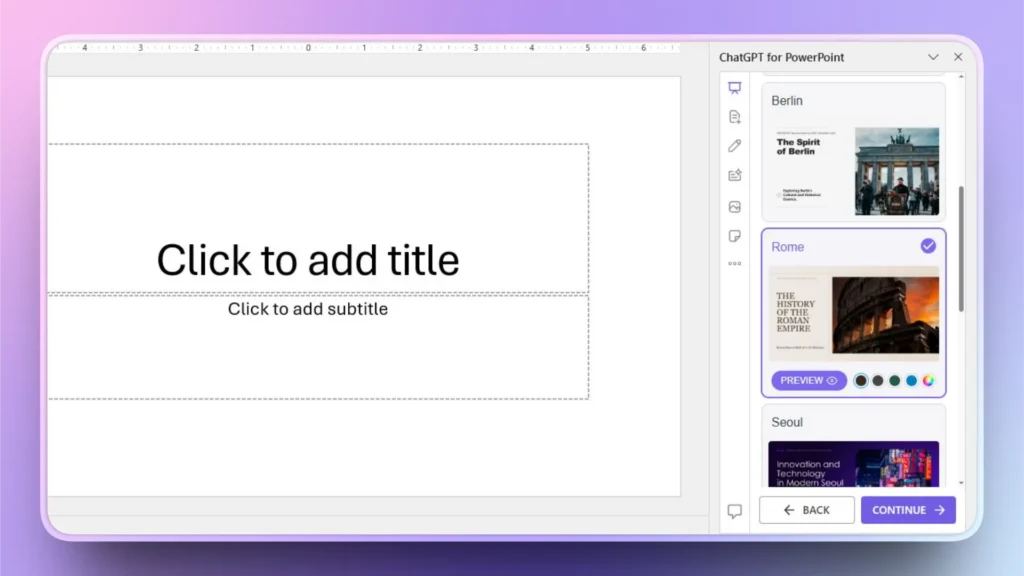
Paso 4: Revise su Pitch Deck final
En cuestión de segundos, Twistly te proporcionará un pitch deck listo para presentar. Tómate un momento para revisar las diapositivas y, si quieres añadir visualización de datos, puedes hacerlo con Twistly.
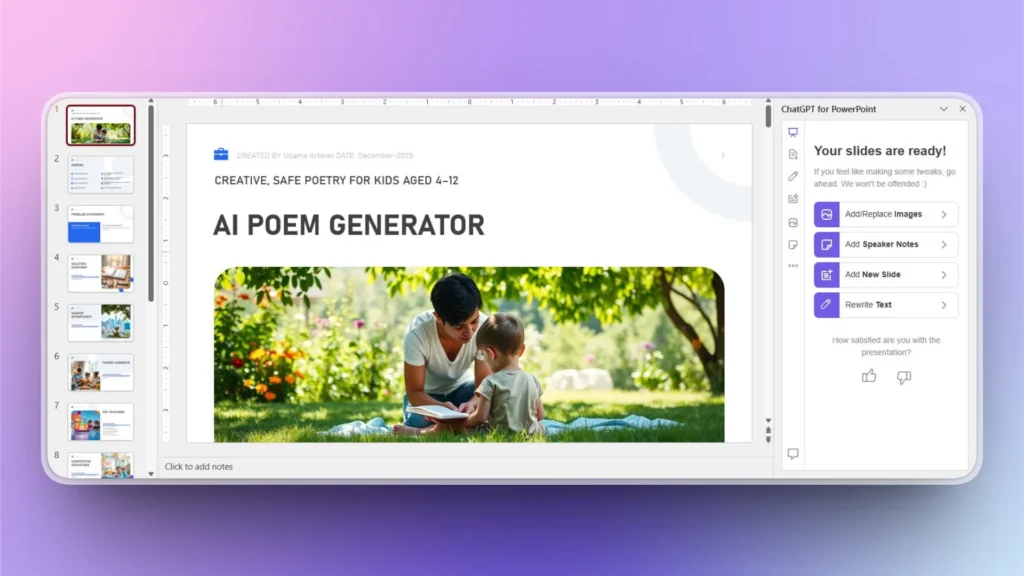
¿Cómo respaldar tu Pitch Deck con datos?
Una vez que tu presentación esté lista, puede que quieras añadir más datos, gráficos, hechos o cifras a tu diapositiva. Puedes hacerlo con unos pocos clics en Twistly.
Ya que tenemos el pitch deck básico listo para los inversores, digamos que necesitamos añadir un nuevo gráfico al pitch deck. Siga estos pasos para añadir una nueva diapositiva/gráfico al pitch deck.
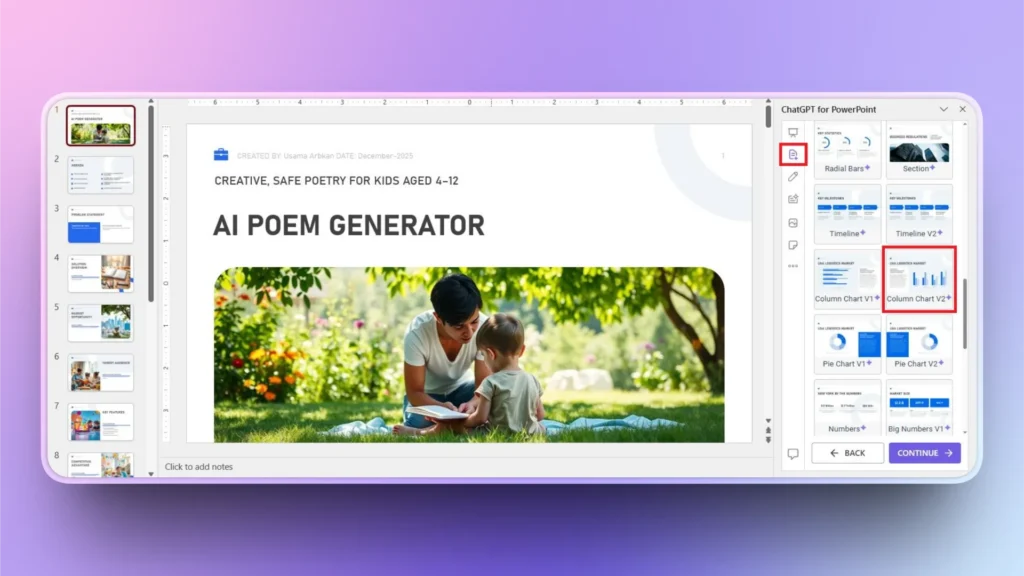
Paso 1: Añadir nueva diapositiva >> Seleccionar diseño
Haga clic en el botón ”Añadir diapositiva" del menú Twistly de la izquierda y seleccione el diseño de diapositiva que desee añadir a la presentación. En este ejemplo hemos seleccionado el gráfico.
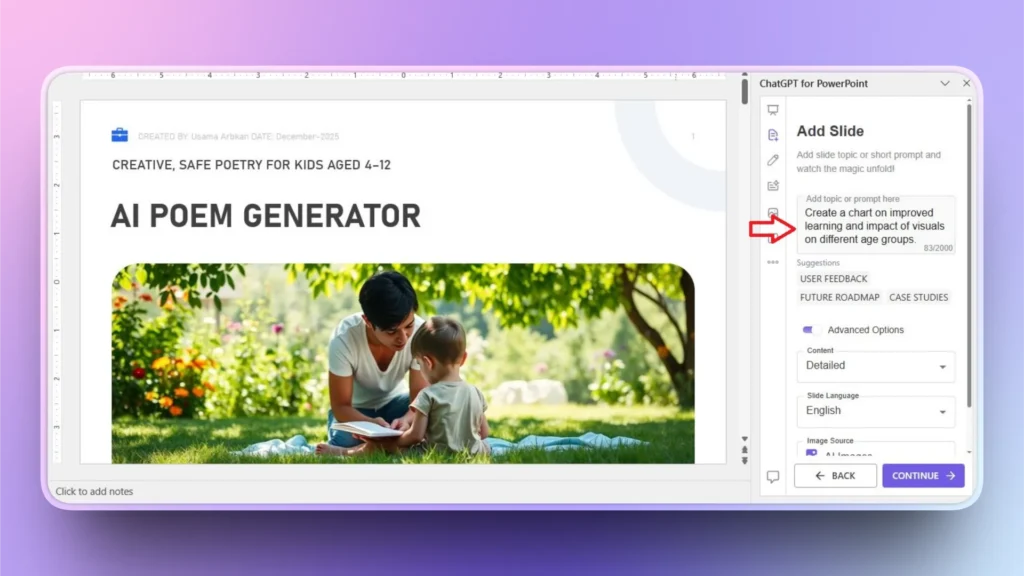
Paso 2: Defina su gráfico
En pocas palabras, defina lo que desea en esta diapositiva y luego seleccione otras opciones si lo desea. Haga clic en Continúe en para pasar al siguiente y último paso.
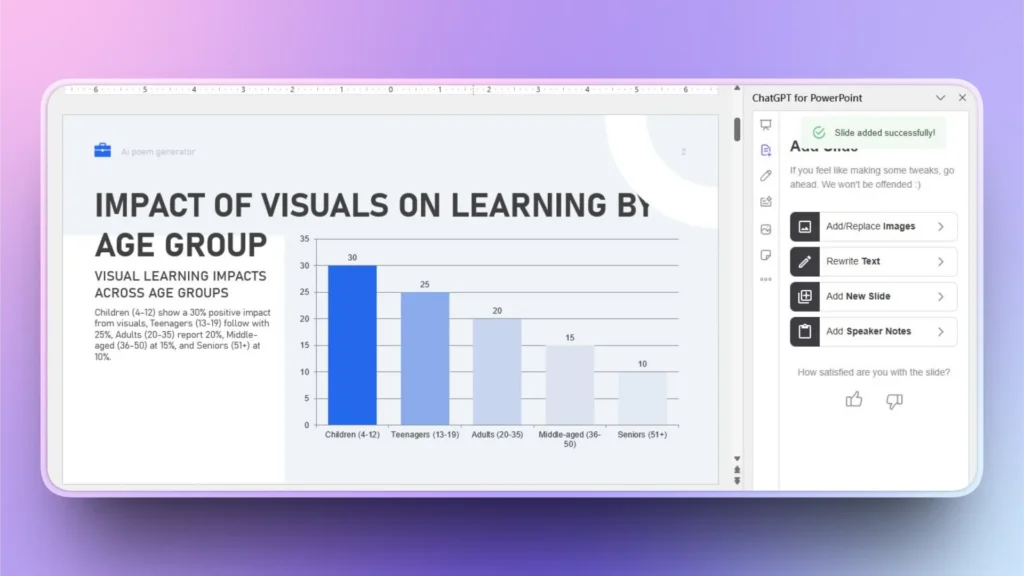
Paso 3: Su gráfico está listo
En unos segundos, tu gráfico estará listo y, como puedes ver, tendrás una atractiva visualización de datos que añadirá valor a tu presentación.
Palabras finales
La IA ha cambiado la forma de descubrir las ventajas competitivas, y Twistly puede ayudarte a presentarlas de forma atractiva a los inversores. Herramientas como Twistly pueden mejorar tus posibilidades de éxito en cualquier presentación de inversión. Los nuevos usuarios pueden descargar Twistly gratis y probar las increíbles funciones de IA de forma gratuita haciendo clic en el siguiente enlace.
Crear PowerPoint
Diapositivas con IA
Cree presentaciones basadas en IA a partir de
cualquier mensaje, documento o vídeo


Empieza a hacer presentaciones con IA en segundos
Acceso instantáneo
Empieza a explorar inmediatamente todas las funciones de Twistly
Sin compromisos
No necesita tarjeta de crédito y puede cancelar en cualquier momento
Asistencia dedicada
Nuestro equipo está aquí para ayudarle en cada paso del camino durante su juicio.