


Creating a corporate presentation using AI helps to automate the process, generate slides automatically, and write content that delivers value. Using ChatGPT or Claude for creating corporate presentations in PowerPoint won’t work. You need a more powerful and personalized tool for PowerPoint presentations, like Twistly.
Corporate presentations are not just visual slides on screen but professional communication tools. These presentations are used for several purposes, including:
- Secure investments
- Align stakeholders
- Present quarterly reports
- Onboard teams
- Pitch solutions
- Influence on executive decisions
If you need one AI tool for PowerPoint that can do all these tasks, we have the perfect solution: Twistly. What is Twistly, and how to create a corporate presentation using AI with Twistly. All these questions are answered in this article.
Importance of AI in Corporate Presentations
Twistly AI is not just about speed or automation, but well-structured presentations and valuable content for any topic. Newest AI models in our add-in create a balance between information, strategy, and visual communication for corporate presentations. This custom ChatGPT for PowerPoint helps professionals:
- Structure presentations logically
- Generate slide content quickly
- Maintain a professional tone
- Create visually consistent slides
- Reduce manual formatting work
You get a personalized and professional presentation with improved storytelling and data visualization. If you are tired of spending hours creating boring presentations, now is the right time to start creating a corporate presentation using AI.
Create PowerPoint
Slides with AI
Build AI-powered presentations from
any prompt, doc, or video


Step-by-Step Guide for Corporate Presentations with AI
We will use Twistly to create a complete and professional corporate presentation from available information. Instead of using a topic, we will input available information to Twistly to generate a corporate presentation.
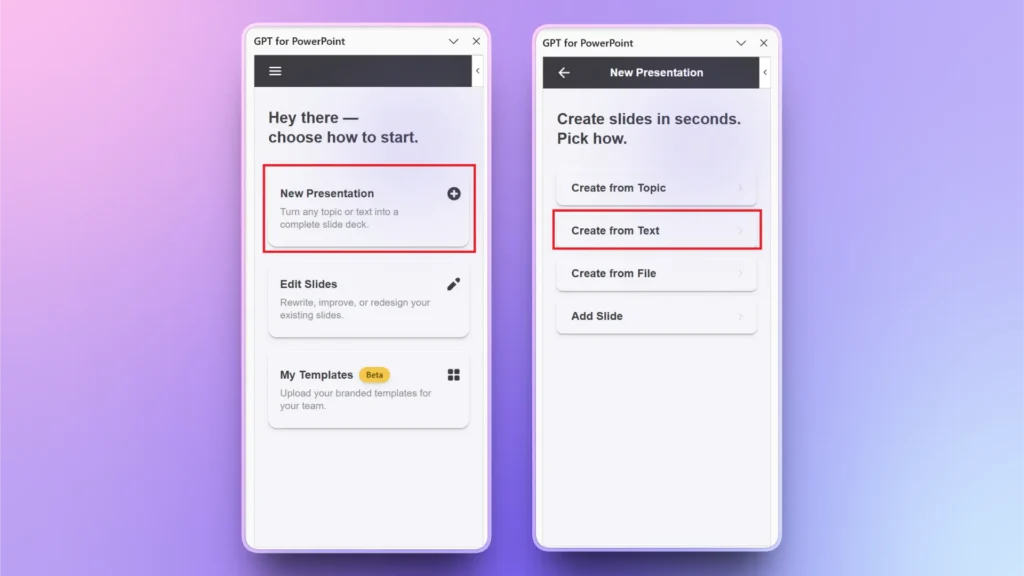
Step 1: Open Twistly >> Create from Text
Open a new blank PowerPoint presentation and launch Twistly by clicking the GPT for PowerPoint icon in the right corner of the Home tab. Click New Presentation >> Create from Text. You can choose any other input depending on the available data and information.
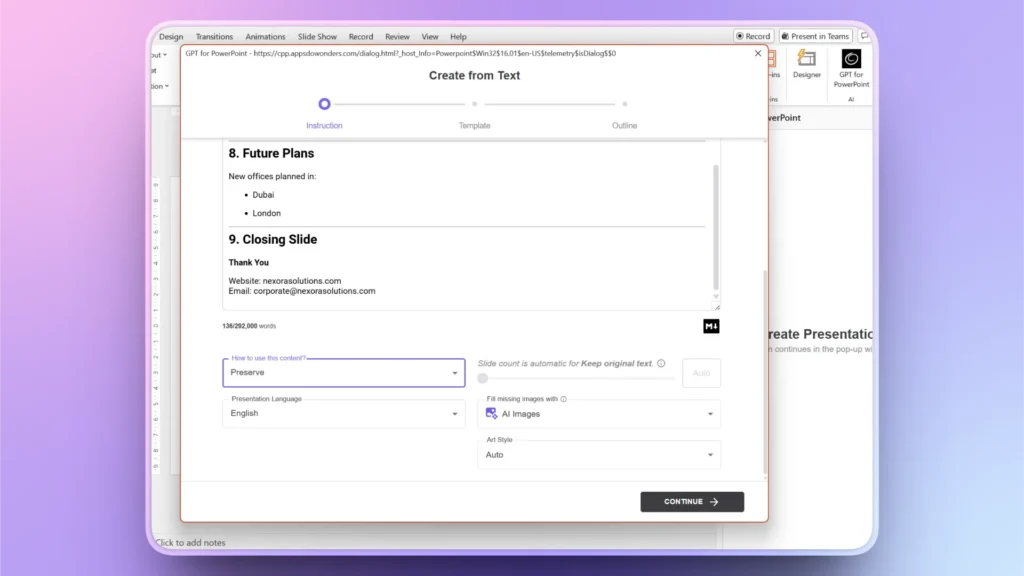
Step 2: Input your Text or Data
A new window will open where you can paste your information or other data related to your presentation. Choose image style and content style for the presentation.
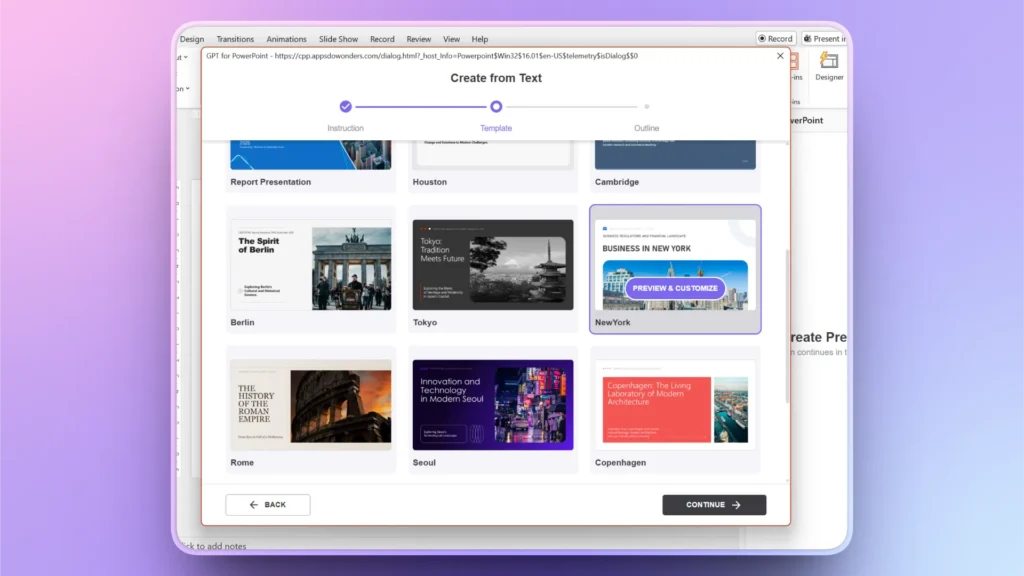
Step 3: Choose an AI PowerPoint Template
From available AI PowerPoint templates, pick one or upload your brand presentation, and Twistly will create a reusable template inspired by the uploaded presentation.
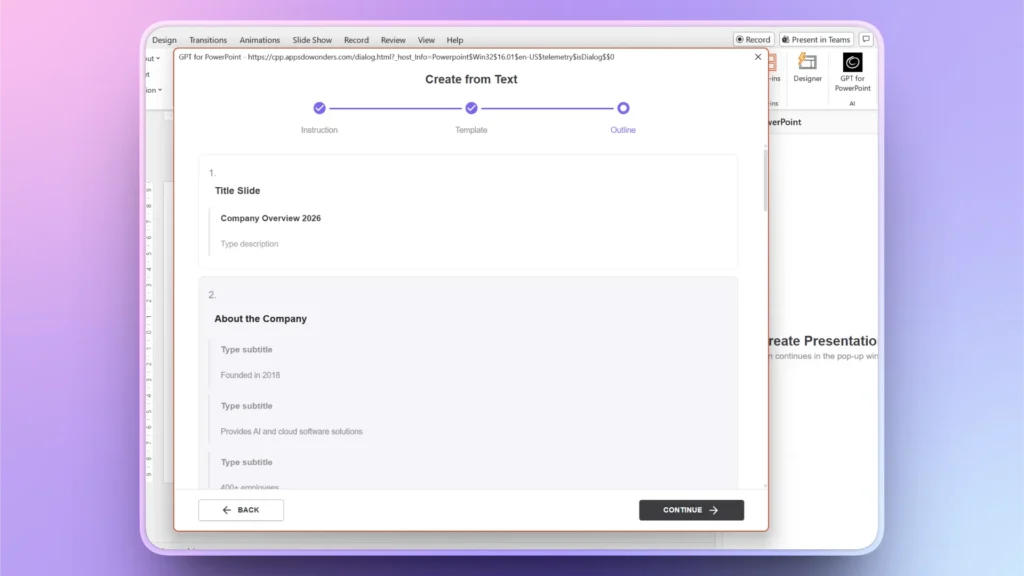
Step 4: Review the Slide Outline
Within seconds, you will have the outline ready for all slides in the presentation. You can rearrange, delete, or add slides. If everything seems fine for now, click Continue, as you can go back at any step or edit slides later on.
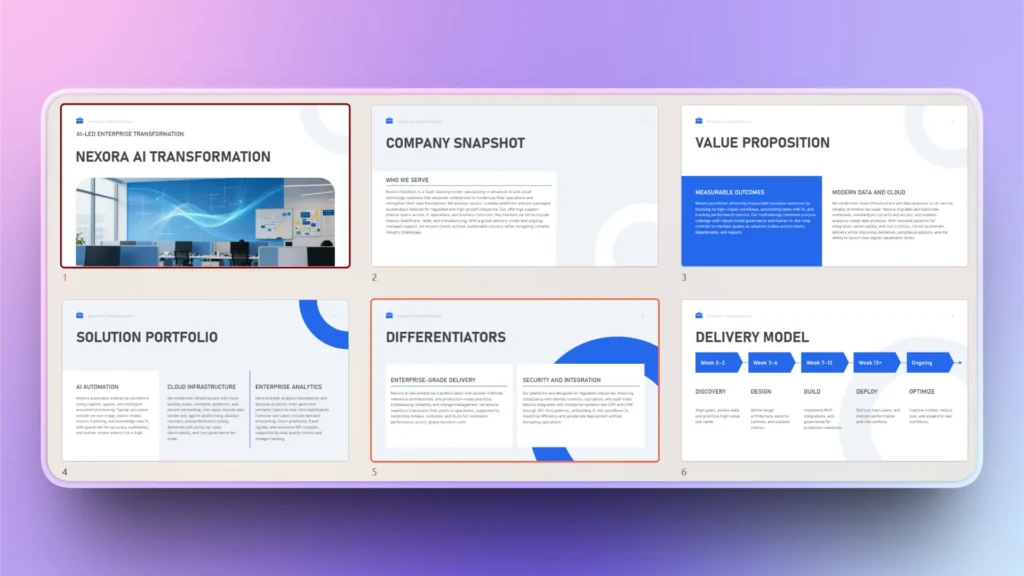
Step 5: Review your Final Corporate Deck
Your final slides for the corporate presentation are ready for you to review, edit, or optimize using Twistly.
Data Visualization for Corporate Presentations
Reports, charts, graphs, and timelines add value to corporate presentations. If any such slides are missing in the initial corporate presentation, here is how to add data charts, graphs, or similar slides to your presentation.
Step 1: Edit Slides >> Add Slide
Open Twistly pane and click Edit slides for the existing presentation. Click the ” Add Slide button and then choose any of the available slide layouts that you want to add to your corporate presentation.
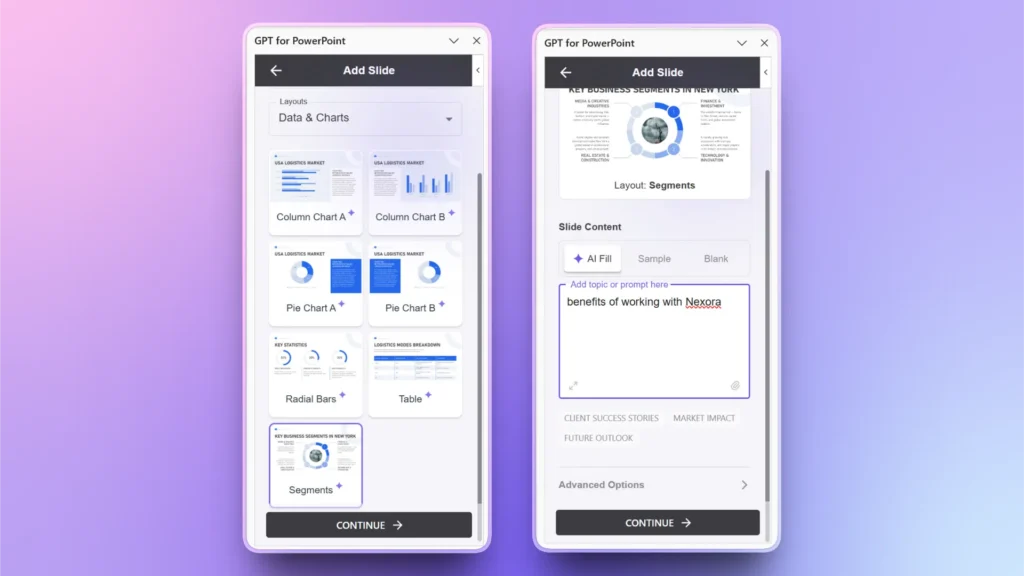
You can explain your requirements in this section or let AI decide the best approach to create a slide according to the context.
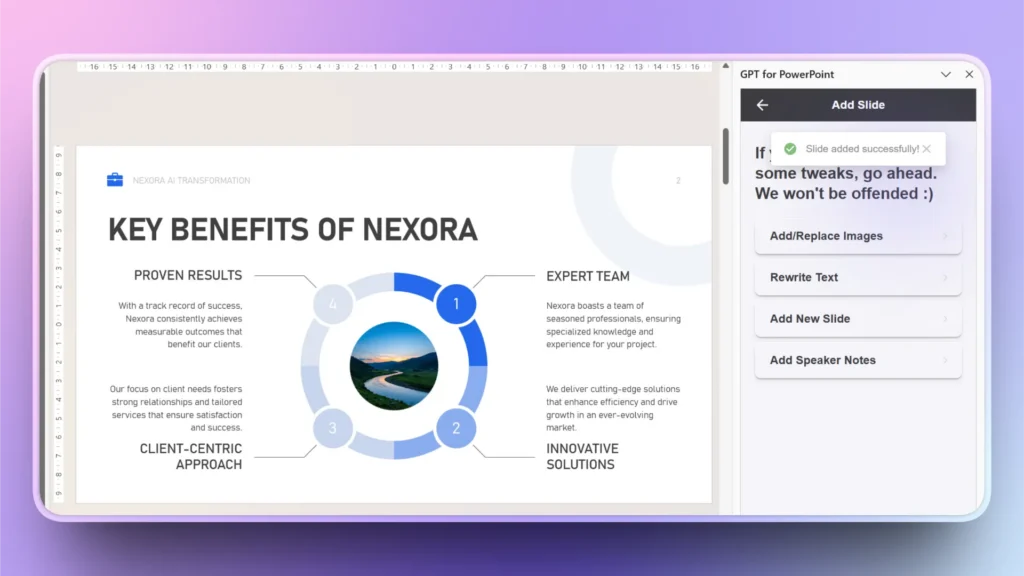
Step 2: Review your Data Slide
Your data slide is ready with a professional design and well-structured data visualization. Similarly, you can create any slide, chart, graph, or table with Twistly for corporate presentations.
Must-haves for a Corporate Presentation
AI can help you create a corporate presentation with the least manual effort, but you must understand the core elements of a corporate presentation. Without basic knowledge, you cannot get the desired results, even with the latest AI tools.
The output of any AI tool is based on the accuracy of the AI prompt. Users must understand the core idea behind a corporate presentation before using AI to create one.
Clear Business Objectives
Your presentation should clearly define the outcome that you are trying to achieve. You might want to create a corporate presentation for different purposes, including:
- Winning client approval
- Presenting company growth
- Securing investment
- Training employees
When the outcome is clear, it becomes easier for you to customize and personalize your presentation for the audience.
Executive-friendly Structure
Are you presenting your corporate deck to executives and senior managers? Have you included an executive summary slide in your presentation? Corporate audiences prefer concise, structured communication.
Don’t forget to add the title, summary, problem-solution, and other necessary slides to your presentation outline. AI tools like Twistly can automatically organize presentation content into logical sections.
Benefits of Using Twistly for Creating Corporate Presentations
Why must you use Twistly for creating a corporate presentation with AI? What are the potential benefits of Twistly for general and corporate presentations? This summarized table will help you make informed decisions.
| Benefit | Description |
| Faster Production Time | AI significantly reduces the time spent on writing, formatting, and structuring slides. |
| Improved Professional Quality | Businesses can maintain polished presentation standards without relying entirely on design teams. |
| Better Consistency | AI helps maintain consistent branding, tone, and formatting throughout the deck. |
| Enhanced Communication | Clearer slides improve audience understanding and engagement. |
| Increased Productivity | Teams can focus more on business strategy rather than repetitive presentation tasks. |
Conclusion
Creating a corporate presentation using AI and Twistly now takes less than a few minutes. Try Twistly now for free. Businesses can streamline presentation development, generate professional content quickly, and maintain executive-level quality across every slide with Twistly.
Faster workflow and accurate presentations help with better productivity at work. You can get more work done in less time and focus on things that matter the most. Use the link below to download a free trial version of Twistly. This custom ChatGPT for PowerPoint is designed to be useful for every PowerPoint user.
Create PowerPoint Slides with AI
Build AI-powered presentations from any prompt, doc, or video












Start Making AI Presentations in Seconds
Instant Access
Begin exploring Twistly’s full suite of features immediately
No Commitments
No credit card required, and you can cancel anytime
Dedicated Support
Our team is here to assist you every step of the way during your trial.