



To rewrite and improve existing PowerPoint slides, you can use 3rd party AI platforms or Twistly within PowerPoint. Twistly works inside PowerPoint, so you don’t need to switch between multiple apps or AI content writing tools to make your content sound more professional or change its tone.
From fixing grammar, turning paragraphs into bullet lists, making your text sound more professional, to rewriting whole slides, there are lots of cool things that you can do with Twistly. How to use Twistly AI to rewrite and improve existing PowerPoint slides? Let’s find out.
Do Existing Slides Need Text Improvements?
Within the first few minutes, the audience decides if your presentation is engaging or not. Make sure to take a good start, and the very first slide should attract the audience. There are some common problems when presenters may need to use AI to rewrite and improve existing PowerPoint slides:
- Too much text on slides
- Outdated information
- Weak storytelling
- Poor slide structure
- Repetitive content
- Inconsistent formatting
Imagine you prepared a presentation for a general audience; the language will be informal.
Now, the same topic needs to be presented to executives and managers. Now, you can use Twistly to make your text sound more professional within seconds. Instead of writing new text from scratch, you can easily improve existing content with AI.
How AI Improves Existing Presentation Content
Every user has different requirements when it comes to content optimization. The ideal AI tool for rewriting and improving existing slide text should offer multiple optimizations and editing options. Twistly analyzes your existing content, understands the goal and context, and then offers meaningful improvements.
1. Content Simplification
Is your content too long and hard to digest for the audience? Breaking it down into bullet lists might help with content simplification. Conventionally, you will have to read the entire slide and then summarize the long text to create bullet lists.
How to Simplify Text with Twistly?
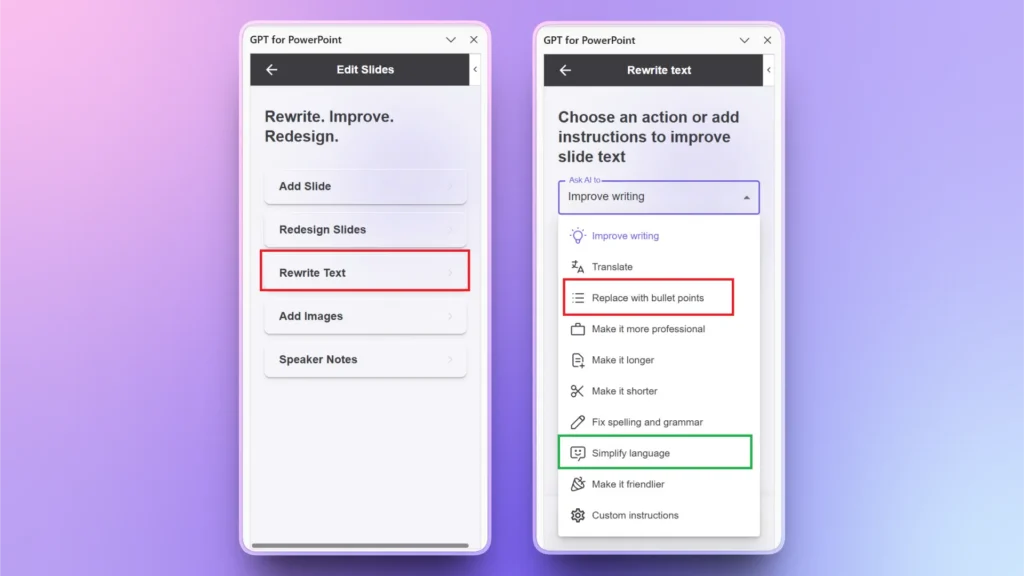
Twistly can turn any content into bullet lists or simplify it in general language with a single click.
Launch Twistly >> Edit Slides >> Rewrite Text >> choose the Editing Option that you like.
2. Improve Content Tone
If there are multiple contributors to a presentation, the writing tone may vary in one presentation. You can easily make your content sound more professional with a single click.
AI will analyze your entire presentation and then make the best possible changes to improve the use of words, grammar, and sentence structure to improve overall message delivery.
How to Improve Content Tone with Twistly?
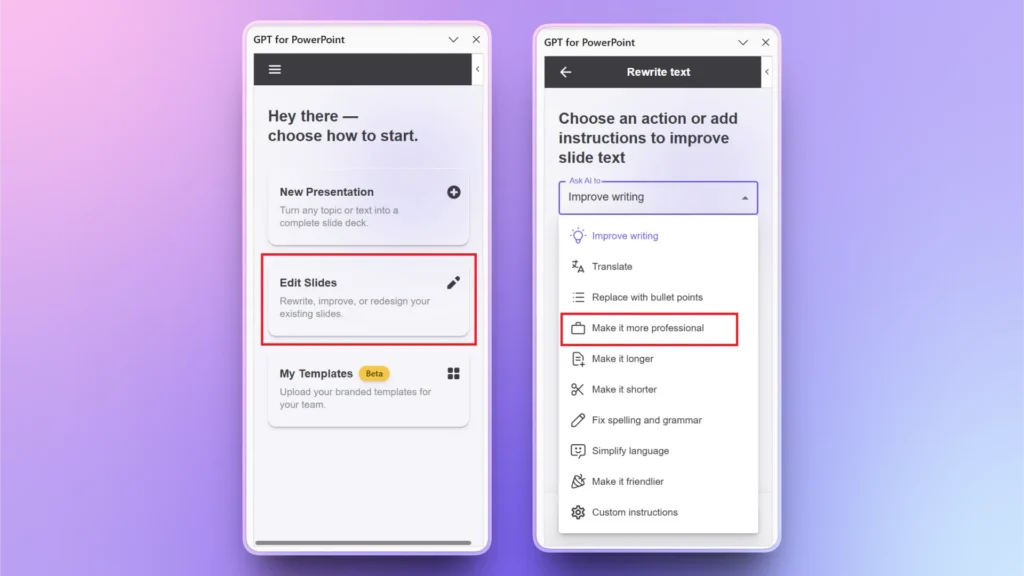
Choose the slide that you want to make sound more professional, and then choose a relevant option from the list. For this task, click the “Make it more professional” option and see the instant results.
3. Better Audience Alignment
Different audiences appreciate different messaging. Executives may like a professional tone, but general audiences engage best when your content tone is friendly and conversational.
Follow the same steps as the above actions and choose the “Make it Friendlier” option from the list. Twistly will instantly change the overall tone of your content.
4. Translate your Presentation
Making your presentations accessible to a broader audience requires you to translate slides into other languages. Most users try other AI writing tools, but that changes the context of the slides, and you must manually copy and paste text from slides to the tool and vice versa.
How to Translate Text with Twistly?
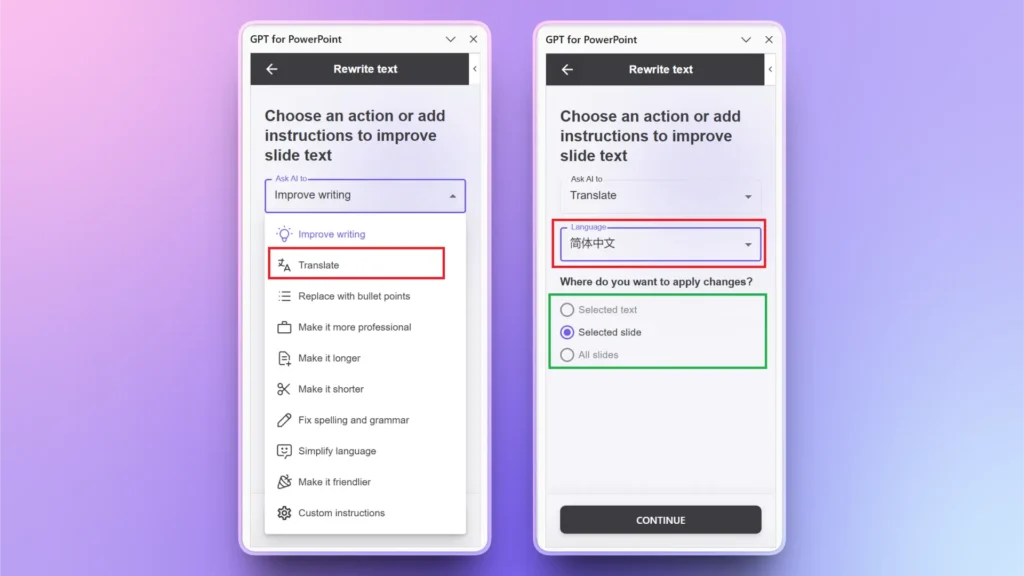
Twistly offers a built-in AI translator that can translate any selected slide, text, or entire presentation into 20+ other languages.
Go to Twistly >> Edit Slides >> Rewrite Text >> Translate >> choose Translation language >> select whether to translate selected text, slide, or entire presentation.
Clean and Reorganize Your Presentation Content with Twistly
Twistly is not just a slide designer but a complete AI solution pack for every aspect of presentations.
Whether you want to create a complete presentation from scratch, an individual slide, generate AI images, change slide layout, translate text, or improve existing content and write speaker notes, Twistly does it all.
Go to Rewrite Text and then choose any AI action related to text editing and rewriting, and get instant results without switching between multiple tools or AI applications.
Whenever you are out of ideas or struggling with writer’s block, let Twistly help you with the presentation creation process. Little changes to your existing presentations can give a whole new life to your boring presentations.
Create PowerPoint
Slides with AI
Build AI-powered presentations from
any prompt, doc, or video


Traditional AI Tools vs Twistly
Why get Twistly when you have other AI content tools? First, Twistly is not just an AI content writer but a complete AI solution for presentations.
Other AI content writers work as standalone platforms, offering simple content-related services and features only. On the other hand, Twistly works inside PowerPoint and offers tons of other features.
Using conventional AI text editors makes your job harder as you have to:
- Copy slide text manually
- Rewrite each slide separately
- Transfer content back into PowerPoint
- Rebuild formatting
- Reorganize slides manually
Twistly takes care of these issues and offers a smooth integration of an AI content writer and editor inside PowerPoint. Presentation-focused AI platforms offer a more efficient approach.
Get Twistly, Enjoy Seamless Content Optimization
Do you want a single AI tool that can replace many AI tools? Would you like to have ChatGPT-like capabilities in your PowerPoint software? Download Twistly for free and enjoy the free trial version.
New users can claim their free trial version without any credit card or payment details. We want you to experience the best AI presentation maker for PowerPoint for free. There is no catch involved; give it a try for free and enhance messaging for the target audience.
Create PowerPoint Slides with AI
Build AI-powered presentations from any prompt, doc, or video

Conclusion
Use Twistly AI to rewrite and improve existing PowerPoint slides and make your text more professional, crisp, and concise. If you are facing any issue related to visuals, slide design, or layout, Twistly has your back.
Twistly provides a streamlined way to rewrite, enhance, and optimize PowerPoint slides directly within its workflow. Get your free trial version now and start making meaningful presentations within a few clicks.









Start Making AI Presentations in Seconds
Instant Access
Begin exploring Twistly’s full suite of features immediately
No Commitments
No credit card required, and you can cancel anytime
Dedicated Support
Our team is here to assist you every step of the way during your trial.