



Los directivos, consejeros delegados y ejecutivos no pueden sentarse durante horas a escuchar largas presentaciones; quieren claridad. La diapositiva de resumen ejecutivo ofrece una visión general de los puntos principales descritos en la presentación. ¿Cuáles son las plantillas de diapositivas de resumen ejecutivo con IA perfectas? ¿Cuál es la ventaja de utilizar plantillas de PowerPoint con IA?
Con herramientas como Twistly para PowerPoint, los usuarios no necesitan crear diapositivas de resumen manualmente. Las plantillas de AI de la biblioteca de Twistly tienen cubierta la diapositiva de resumen ejecutivo para los directivos y otros ejecutivos.
¿Qué es una diapositiva de resumen?
Un resumen ejecutivo es una visión general de alto nivel de un informe o documento detallado. La diapositiva del resumen ejecutivo está diseñada para ofrecer el resultado de la presentación de un vistazo.
Esta diapositiva de resumen desempeña un papel importante en la toma de decisiones y la elaboración de estrategias. Muchos tipos de presentaciones pueden tener diapositivas de resumen ejecutivo, incluyendo:
- Presentaciones del Consejo
- Presentación a inversores
- Revisiones estratégicas
- Actualizaciones del proyecto
- Informes de ventas y resultados
Por qué se quedan cortas las diapositivas de resumen manual
Puedes añadir manualmente una diapositiva de resumen ejecutivo a tu presentación, pero te enfrentarás a diferentes retos y problemas. Diseñar una diapositiva optimizada y la más importante de la presentación te llevará horas.
Los usuarios tienen que repasar todas las diapositivas para identificar los puntos más importantes relacionados con los directivos y ejecutivos. El segundo reto es diseñar diapositivas atractivas para que el lector pueda procesar los datos con facilidad. Algunos problemas habituales de las diapositivas de resumen convencionales son:
- Texto sobrecargado y diseños con muchas viñetas
- Mala jerarquía visual
- Mensajes incoherentes entre equipos
- Dificultad para extraer los puntos clave
- Falta de experiencia en diseño
Con las plantillas de diapositivas de resumen ejecutivo basadas en IA, no tendrás que preocuparte por la edición y redacción manuales. Las herramientas de IA analizarán la presentación completa y, a continuación, generarán automáticamente una diapositiva de resumen basada en la plantilla seleccionada.
Por qué plantillas de diapositivas de resumen ejecutivo con IA
Las plantillas PowerPoint con IA son mucho más flexibles y optimizadas que las plantillas normales. Editar y dar formato a las plantillas AI es fácil y rápido. Twistly ofrece algunas de las mejores plantillas de diapositivas de resumen ejecutivo con IA.
Los usuarios pueden crear una diapositiva de resumen individual para una nueva presentación o añadir una diapositiva de resumen a una presentación existente con un solo clic.
He aquí algunas razones prácticas por las que las plantillas de diapositivas de resumen ejecutivo con IA de Twistly son preferibles para la mayoría de las presentaciones.
1. Resumen inteligente y automático de contenidos
En función de lo que introduzcas, Twistly analizará automáticamente la fuente y el contenido de la presentación para crear un resumen de contenido AI. En lugar de revisar manualmente toda la presentación, los usuarios pueden añadir una diapositiva de resumen ejecutivo a la presentación con un solo clic.
2. Estructura de diapositivas de fácil manejo
Existe un determinado tipo de estructura preferido para las plantillas de diapositivas de resumen ejecutivo en el que los directivos y directores generales pueden identificar fácilmente los puntos principales. El marco probado para las plantillas de diapositivas de resumen ejecutivo incluye:
- Objetivo / Contexto
- Principales resultados
- Impacto empresarial
- Recomendaciones / Próximos pasos
3. Diseño profesional y limpio
Un texto fácil de leer, un diseño limpio, un espaciado equilibrado y algunos otros factores importantes dan forma a una diapositiva de resumen perfecta. Twistly puede generar una diapositiva de este tipo en cuestión de segundos.
4. Datos destacados
También se añaden a la diapositiva del resumen ejecutivo importantes indicadores clave de rendimiento, métricas y otras cifras, para que los lectores puedan acceder fácilmente a los puntos clave.
¿Cómo añadir una diapositiva de resumen ejecutivo con Twistly?
Twistly dispone de funciones y herramientas de IA que pueden mejorar la experiencia de cualquier usuario de PowerPoint. Tanto si quieres añadir una diapositiva individual como hacer una nueva presentación desde cero, Twistly tiene funciones de IA para cada propósito.
Twistly es una herramienta de AI fácil de usar para presentaciones de PowerPoint y, siguiendo estos sencillos pasos, puedes insertar una diapositiva de resumen ejecutivo en tu presentación nueva o existente.
Paso 1: Abrir PowerPoint y Twistly
Abra la presentación existente en la que desea añadir una diapositiva de resumen y, a continuación, inicie el complemento Twistly. Verá una ventana de control dedicada para Twistly.
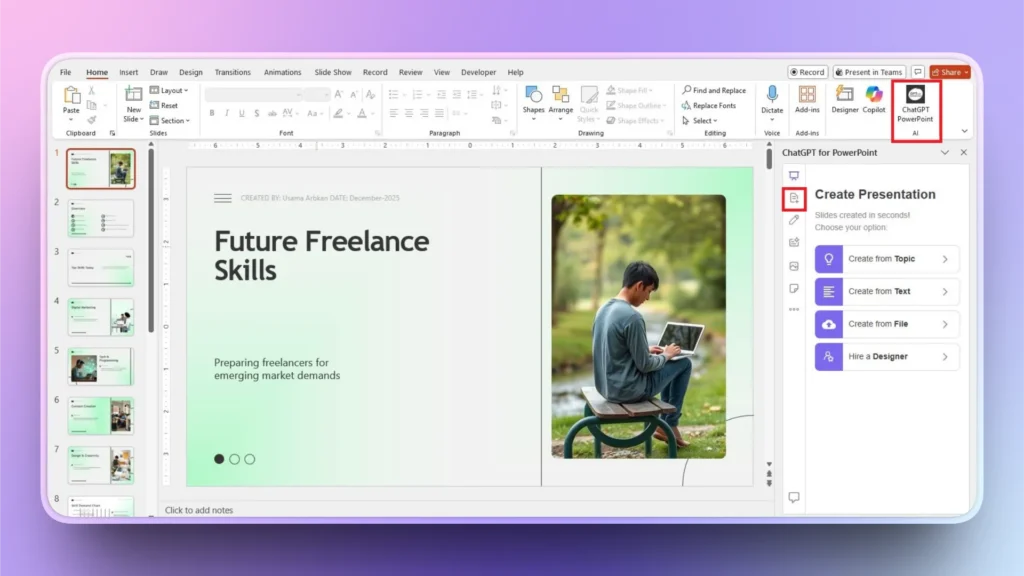
Paso 2: Haga clic en Añadir diapositiva >> Añadir diapositiva de resumen
En el menú de la izquierda de la ventana de Twistly, haga clic en el botón Añadir diapositiva y, a continuación, entre las plantillas de diapositivas disponibles, elija la plantilla Resumen y haga clic en Continuar. También puede elegir cualquier otra plantilla AI de acuerdo con su presentación.
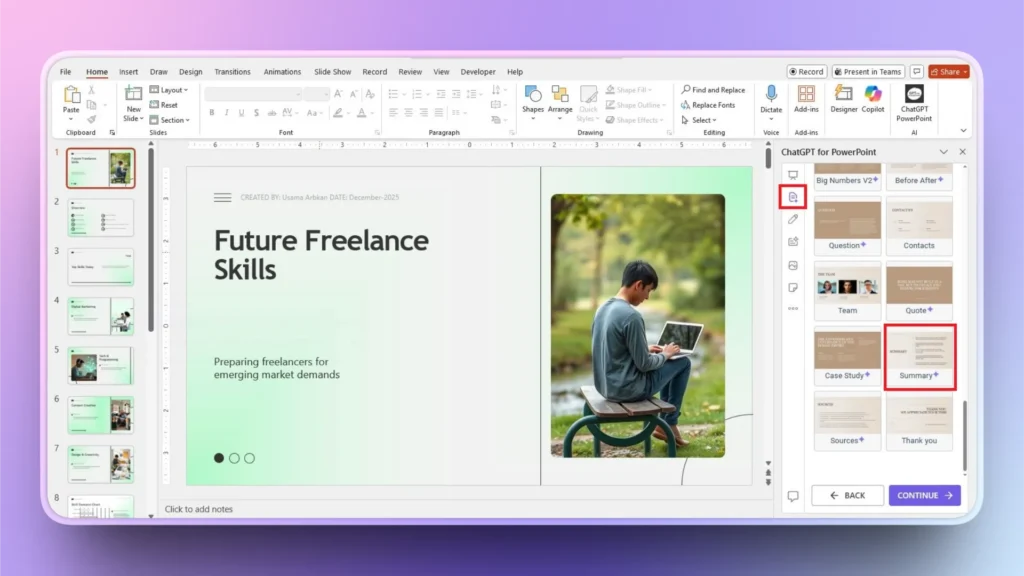
Paso 3: Enhorabuena, se ha añadido una diapositiva de resumen
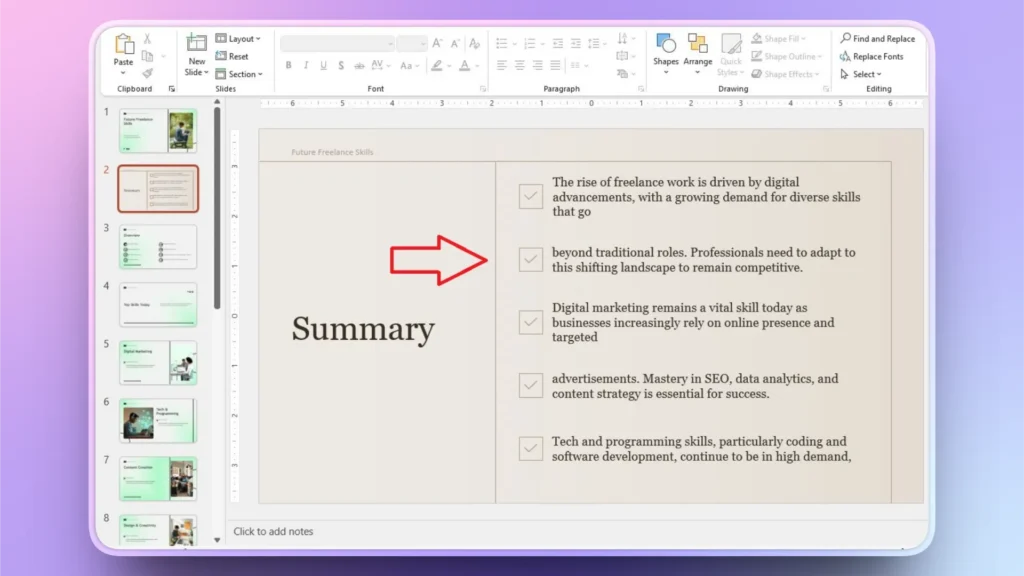
En unos segundos, Twistly añadirá una diapositiva de resumen ejecutivo a tu presentación analizando el contenido de toda la presentación. Puedes revisar, editar o pulir esta diapositiva.
Si desea cambiar el texto, mejorar, acortar o ampliar el contenido, Twistly le ofrece todas estas funciones.
Consejos para plantillas de diapositivas de resúmenes ejecutivos
La diapositiva de resumen es la parte más importante de tu presentación, por lo que debes prestar mucha atención a los pequeños detalles de la diapositiva. Twistly es un creador de presentaciones inteligentes con IA para PowerPoint, pero recomendamos encarecidamente utilizar la IA de forma responsable para obtener los mejores resultados.
He aquí algunos consejos comunes que pueden mejorar aún más tus diapositivas de resumen ejecutivo para presentaciones de gran impacto.
- El texto debe ser conciso; los ejecutivos prefieren contenidos escaneables.
- Centrarse en los resultados, no sólo en las actividades
- Utilice elementos visuales para reforzar los puntos clave
- Revisar y perfeccionar los contenidos para garantizar su exactitud
- Alinear los resúmenes con los objetivos de la toma de decisiones
Descargar Twistly es gratis
¿Estás cansado de hacer presentaciones de PowerPoint manualmente? ¿Quieres presentaciones AI más rápidas, atractivas y profesionales? Descarga la versión de prueba gratuita de Twistly y empieza a crear increíbles PPT sin ningún tipo de diseño, escritura o formato.
Twistly no solo diseña las diapositivas, sino que también redacta el contenido, optimiza las diapositivas y da formato a toda la presentación, incluidos los elementos visuales y las imágenes de las diapositivas.
Es una solución completa de IA para usuarios de PowerPoint. En otras palabras, Twistly es un ChatGPT personalizado para PowerPoint.
Descargue Twistly haciendo clic en el siguiente enlace o encuéntrelo en Microsoft AppSource, en el sitio web de Twistly o en la biblioteca de complementos de PowerPoint.
Crear PowerPoint
Diapositivas con IA
Cree presentaciones basadas en IA a partir de
cualquier mensaje, documento o vídeo


Conclusión
Las diapositivas de resumen ejecutivo suelen ser las primeras, y a veces las únicas, que leen los responsables de la toma de decisiones. Deja que Twistly te ayude con estas diapositivas. Las plantillas basadas en IA garantizan que esas diapositivas sean claras, estén bien enfocadas y tengan un diseño profesional.
Ahorra tiempo y reduce esfuerzos creando diapositivas de resúmenes ejecutivos con Twistly. A medida que las empresas avanzan más rápido, la demanda de una comunicación clara y de alto impacto no hará más que crecer. Twistly se asegura de que te mantengas por delante de la competencia con soluciones inteligentes y basadas en IA.
Empieza a hacer presentaciones con IA en segundos
Acceso instantáneo
Empieza a explorar inmediatamente todas las funciones de Twistly
Sin compromisos
No necesita tarjeta de crédito y puede cancelar en cualquier momento
Asistencia dedicada
Nuestro equipo está aquí para ayudarle en cada paso del camino durante su juicio.