



To create analytic presentations fast with AI, you need an AI tool that can turn a large volume of data into meaningful presentations. Turning data and massive numbers into impactful slides can take hours. A single chart showing trends can take an hour or two to design.
Now, imagine you need 20-30 slides per presentation. How much time are you required to make all these slides and analytics presentations? Is there any faster and easier way to create analytics presentations fast with AI?
Yes, Twistly is the easiest and most efficient tool to create analytics decks fast with AI. An add-in can be installed in PowerPoint, and it works just like a custom-made ChatGPT for PowerPoint.
Why are Analytics Presentations used?
Normal business presentations mainly focus on content and message delivery in general. Analytics presentations are slide decks designed to translate complex data and metrics into clear, actionable business insights.
Use of charts, graphs, tables, and other elements makes it easier for non-technical audiences to understand the data. A well-structured analytic presentation helps the audience:
- Understand performance trends quickly
- Identify opportunities and risks
- Make data-driven decisions
- Align teams around business goals
- Improve organizational transparency
But the only problem is the complexity of these presentations. Data collection is easy, but turning that data into insights and slides is the real challenge.
Best AI Tool to Create Analytics Presentations
There are many AI tools that somehow assist in the slide creation process, but only a few offer a true AI assistant. Twistly is an AI add-in that integrates AI capabilities into your existing PowerPoint software. One add-in combines the power of multiple AI tools, including:
- AI chart and graph designer
- AI content writer
- AI slide designer
- AI presentation maker
- AI image generator
- AI speaker notes writer
- AI slide editor
- AI text rewriter
- AI grammar checker
All these AI tools and many more useful AI features are combined into one add-in, Twistly. If you haven’t tried Twistly for PowerPoint, give it a try now. A free trial is available for new users.
Create PowerPoint
Slides with AI
Build AI-powered presentations from
any prompt, doc, or video


Is Twistly Fast for Creating Analytics Presentations?
Yes, Twistly is stunningly fast and can generate a complete presentation in less than 5 minutes. If you already have the data available for the presentation, you can get the first draft of the analytics presentation in less than 90 seconds. A few clicks and you are done.
Creating Analytics Presentations with Twistly
Do I need to be good at designing or writing to use Twistly? Luckily, Twistly is equally useful for all types of PowerPoint users, requiring no prior experience.
Using the AI add-in is easy, and its simple interface makes it convenient for anyone to get the desired results. Simply follow these steps to create analytics presentations with Twistly fast.
Step 1: Define the purpose of your Presentation
The accuracy of AI output depends on the details provided in the AI prompt. You need to identify the purpose of the presentation before anything else.
One more thing, you need to have the data ready for the presentation. Twistly will process your provided data and create slides based on the fed data.
Open PowerPoint >> Launch Twistly >> Create Presentation from Text >> Input Data
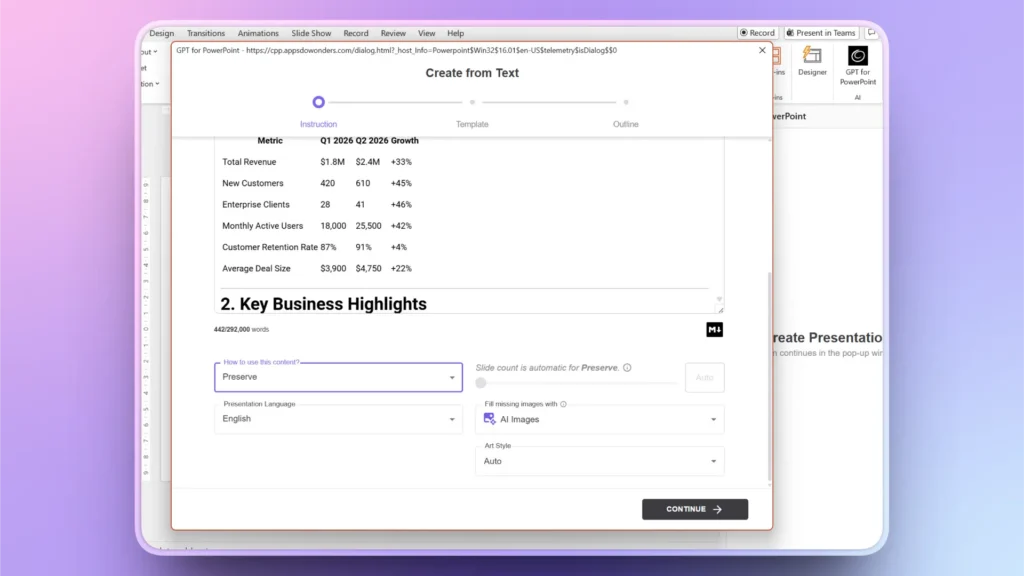
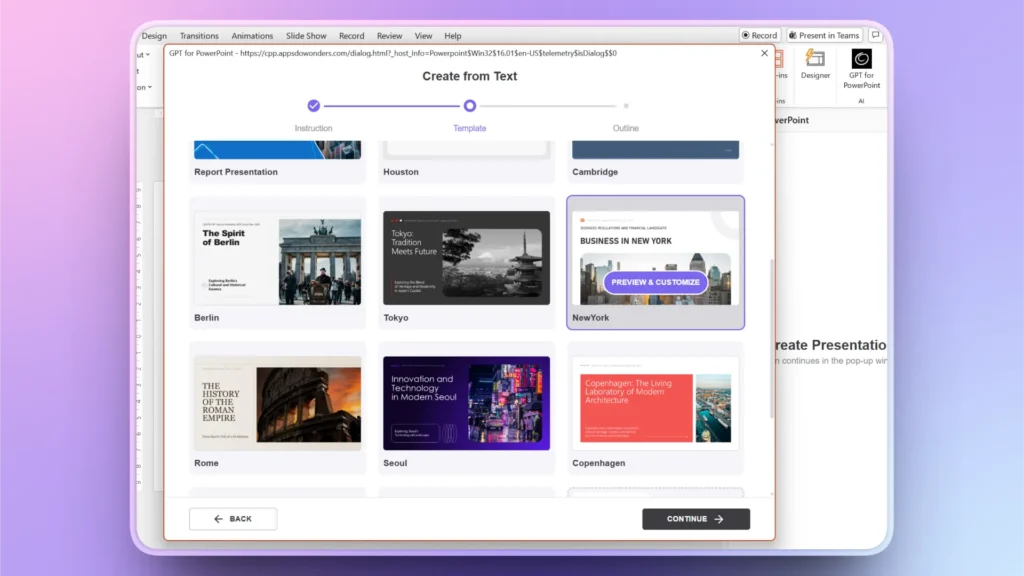
Step 2: Pick a Template and Review Outline
After providing data and instructions, click Continue and pick a template from the Twistly library. Custom colors can also be set for the theme.
AI will generate the best possible slide structure based on your topic and data. Review the outline and make changes if needed.
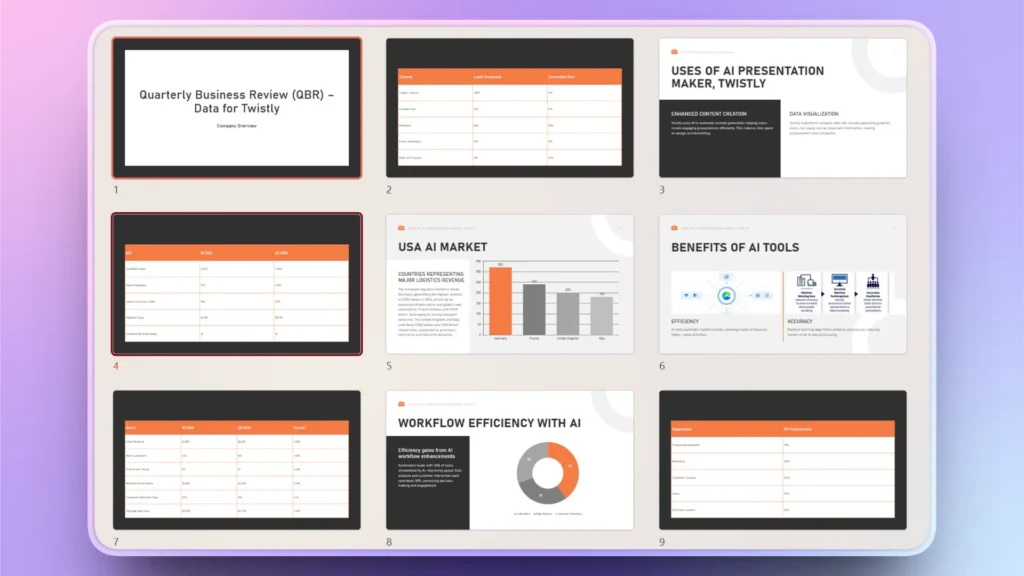
Step 3: Review your Final Analytics Presentation
Within a few seconds, you will have your final slides. These slides cover charts, trend graphs, tables, and other data visualization tools according to the provided data.
Edit, Improve, or Optimize Analytics Presentations with AI
First draft of analytic presentation made with Twistly may have some slides missing. Or you might want to add more slides in the future. You might also want to change the image, improve the text, or redesign the slides in your existing presentation.
For all these possible actions, Twistly has the appropriate AI features. Simply go to the Edit Slides option and then choose any AI action that you want to perform. Within seconds, you will get a faster response.
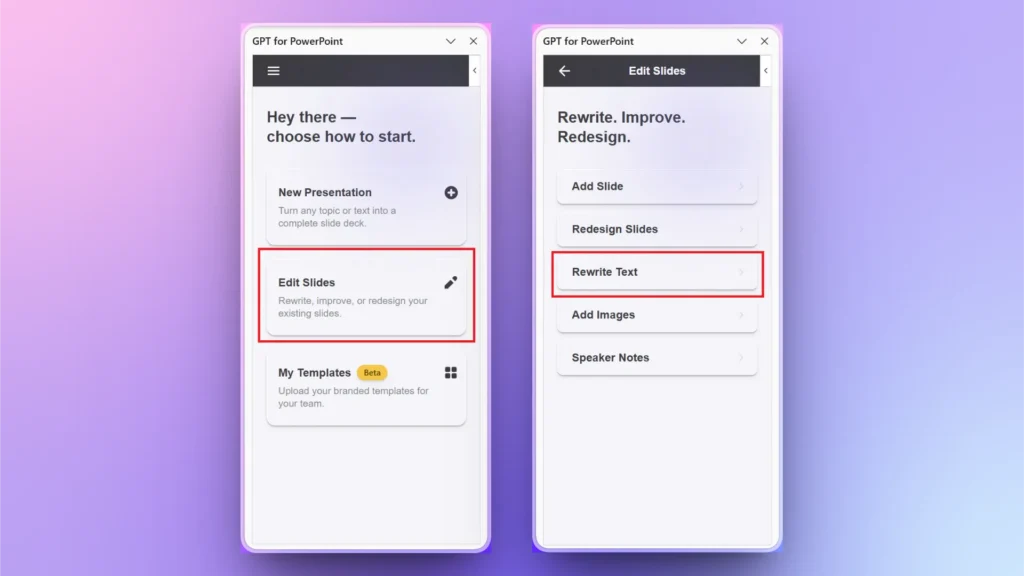
Key Benefits of Using Twistly for Analytics Presentations
The first benefit of using Twistly for analytics presentation is the faster response time. It takes only a few minutes to create an analytics presentation fast with AI. AI dramatically reduces the time required to create recurring reports. Other benefits include:
- Better executive communication and storytelling
- Improved productivity across teams
- Enhanced presentation quality
- Scalable reporting process
- AI tools to improve your output
While creating analytics presentations or other decks, use clear KPI prioritization and always review the AI output. Manual reviewing can help you avoid possible mistakes.
Download Twistly for Free
Are you tired of using random AI tools for your presentations and want a reliable AI presentation maker? Twistly offers a free trial version that new users can claim without a credit card.
Businesses adopting AI presentation workflows early gain significant advantages in speed, communication quality, and operational efficiency.
Download Twistly now and get started immediately. Upgrade your subscription anytime and unlock all premium features of AI for PowerPoint presentations. You get to enjoy:
- Slide structuring
- Content generation
- Data summarization
- Executive messaging
- Visual hierarchy
- Chart recommendations
- Design formatting
- Presentation flow optimization
Create PowerPoint Slides with AI
Build AI-powered presentations from any prompt, doc, or video

Conclusion
Twistly helps organizations and individuals create analytics presentations fast with AI by automating slide creation and data visualization. From content to charts and images, everything is handled by Twistly. Download your own ChatGPT for PowerPoint.











Start Making AI Presentations in Seconds
Instant Access
Begin exploring Twistly’s full suite of features immediately
No Commitments
No credit card required, and you can cancel anytime
Dedicated Support
Our team is here to assist you every step of the way during your trial.