


Last updated
SlideSpeak is a browser-based AI presentation platform that turns documents into decks. Twistly is an AI add-in that builds and edits slides inside Microsoft PowerPoint, with a browser version as well. Both produce editable PowerPoint files. The real difference is where you work and what you pay to use your own company template.
Choose SlideSpeak if you want to start from a PDF, Word or Excel file in a web app, or you need AI video, document chat or an API. Choose Twistly if PowerPoint is already where you build and present decks and you want AI help without switching apps.
Disclosure: Twistly publishes this comparison. To keep it fair, every price and rating below links to its source and was checked on November 4, 2026. SlideSpeak’s strengths are listed as plainly as ours.
Key Takeaways
- SlideSpeak runs in the browser and leads on inputs and extras: PDF, Word and Excel to slides, AI video presentations, document chat and a developer API.
- Twistly runs inside PowerPoint, so you create, rewrite and redesign slides in the file you already have open.
- Entry pricing (US, billed monthly): SlideSpeak Premium is $29/month for 1,000 credits; Twistly Starter is $16/month with unlimited AI credits but a 15-slide cap per deck.
- Using your own template costs a $129 add-on per template on SlideSpeak; on Twistly it is part of the $20/month Pro plan.
SlideSpeak vs Twistly at a glance
| SlideSpeak | Twistly | |
|---|---|---|
| Where it runs | Web app; exports native .pptx | PowerPoint add-in, plus a browser app |
| Best starting point | PDF, Word, Excel or text | A topic, a document, or a deck already open in PowerPoint |
| Editing | SlideSpeak online editor with the “Charles” AI assistant | Directly in PowerPoint: single-slide creation, rewrite, redesign |
| Extras | AI video with voiceovers, document chat, translation, API | AI images and speaker notes (Pro), shared team templates (Team) |
| Free option | 100 credits at sign-up, about 3 presentations | Free to generate and download as PDF; editable .pptx on a 7-day free trial |
| Cheapest paid plan (US, monthly) | $29/month (Premium) | $16/month (Starter) |
| Your own template | $129 add-on per template | Included in Pro ($20/month) |
| Best for | Document-to-deck conversion, video, automation | People who build and present in PowerPoint |
Sources: SlideSpeak pricing, SlideSpeak features, Twistly pricing and Twistly homepage, all checked November 4, 2026.
What is SlideSpeak?
SlideSpeak is a web-based AI presentation platform that converts PDFs, Word documents, Excel spreadsheets and plain text into structured slide decks, then exports them as native PowerPoint files. You don’t need PowerPoint installed to use it.
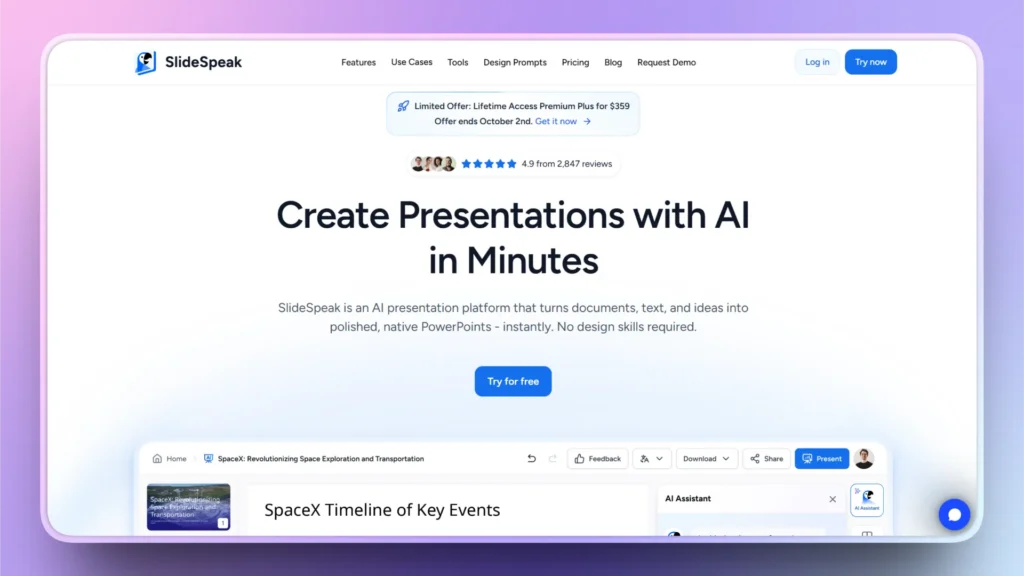
Its in-editor assistant, Charles, rewrites wording, adjusts tone, summarizes data and generates AI images or infographics. Beyond slides, SlideSpeak offers AI video presentations with voiceovers, a document chat bot, presentation translation, brand kits and a developer API, according to its feature page. That breadth is its biggest strength. If your job starts with a 40-page report and ends with a deck or a training video, SlideSpeak covers more of that path in one place.
What is Twistly?
Twistly is an AI presentation maker that works as a Microsoft PowerPoint add-in, so you generate, edit and polish slides without leaving PowerPoint. It is distributed through Microsoft AppSource, and a browser version at app.twistly.ai turns a topic or a dropped-in document into an editable .pptx for people who aren’t in PowerPoint.

The main advantage is workflow continuity. If you already draft, review and present in PowerPoint, Twistly adds AI inside that file instead of asking you to move work to another site and export it back. Features on the pricing page include single-slide creation, AI text rewriting, slide redesign, AI images, speaker notes and template upload.
For the in-PowerPoint use case, Twistly’s closest competitors are other add-ins. If that’s your shortlist, see our comparison of ChatGPT for PowerPoint vs Twistly.
SlideSpeak vs Twistly pricing
Twistly’s paid plans cost less per month and include unlimited AI credits, while SlideSpeak’s plans are credit-based and include more non-slide features such as AI video. All figures below are US list prices checked on November 4, 2026. Both vendors may show different prices or currencies by region at checkout.
SlideSpeak pricing
| Plan | Monthly billing | Annual billing (per month) | What you get |
|---|---|---|---|
| Free | $0 | $0 | 100 credits at sign-up (about 3 presentations), 50 MB file limit |
| Premium | $29 | $24.65 | 1,000 credits/month (about 27 presentations or 13 AI videos) |
| Premium Plus | $34 | $28.90 | 2,500 credits/month (about 67 presentations or 33 AI videos), brand kits with custom fonts |
| Enterprise | Custom quote | Custom quote | Multiple custom templates, SSO, priority support |
Source: SlideSpeak pricing page, checked November 4, 2026.
Two costs sit outside the plans. Importing your own PowerPoint template is a $129 add-on per template, and extra credits come in bundles starting at $10 for 500 credits. SlideSpeak also offers verified students and educators 25% off.
Twistly pricing
| Plan | Monthly billing | Annual billing (per month) | What you get |
|---|---|---|---|
| Starter | $16 | $9.60 ($115.20/year) | Up to 15 slides per presentation, unlimited AI credits, single-slide creation, rewrite, redesign |
| Pro | $20 | $12 ($144/year) | Up to 50 slides per presentation, upload your own templates, speaker notes and AI images for all slides |
| Team | $20 | $12 ($144/year) | All Pro features, unlimited team members, shared team templates, central billing, priority support |
Source: Twistly pricing page, US prices checked November 4, 2026.
You can start without a credit card: generating a presentation and downloading it as a PDF is free, and editable .pptx export comes with a 7-day free trial. Paid plans carry a 14-day money-back guarantee.
The real cost of a branded deck
For most business users, the deciding cost is not the entry plan but what it takes to build decks in the company’s look. On SlideSpeak that means a paid plan plus the $129 template add-on, or Premium Plus brand kits if fonts, colors and logos are enough. On Twistly it means the Pro plan.
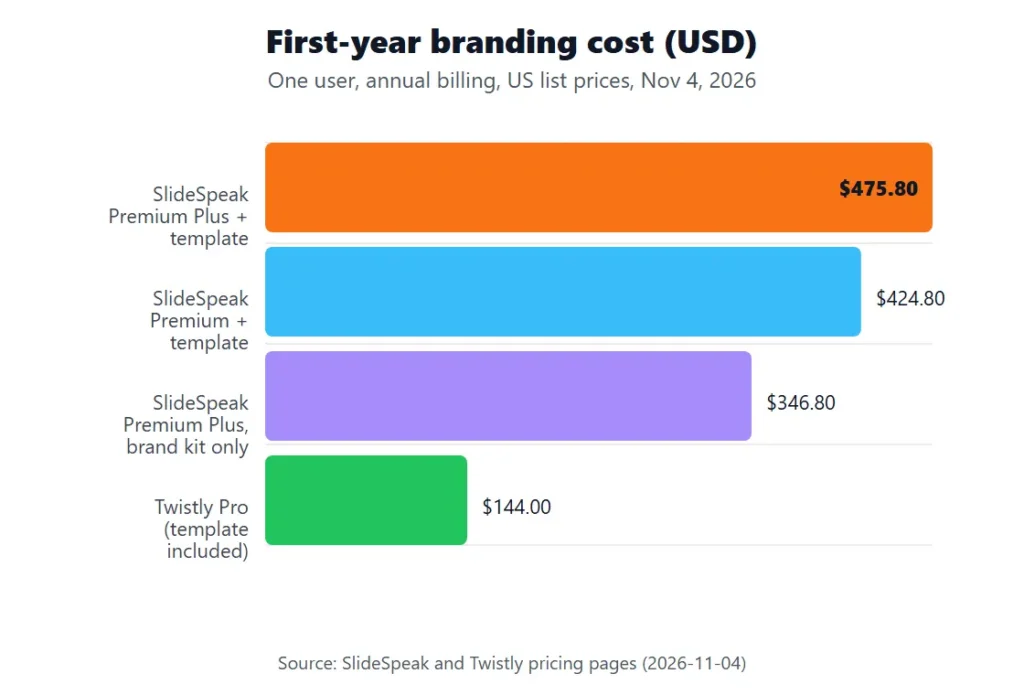
Over the first year, one user pays $424.80 to $475.80 on SlideSpeak to import a company template, against $144 on Twistly Pro. Teams that use several templates pay SlideSpeak’s add-on for each one.
One nuance in SlideSpeak’s favor: Premium Plus includes brand kits (fonts, colors, logos, image and icon libraries) without the add-on, for $346.80 a year. If on-brand colors and fonts are enough and you don’t need your exact slide master, you may not need the template import at all.
Pros and cons of SlideSpeak
On Trustpilot, SlideSpeak holds a TrustScore of 2.3 out of 5 from 12 reviews (Trustpilot, checked November 4, 2026). SlideSpeak’s homepage shows a self-reported 4.9 rating from 2,847 reviews. With samples this different, treat ratings as one input and run your own trial on a real deck.
SlideSpeak pros
- Turns PDFs, Word documents, Excel files and text into slides
- Works entirely in the browser, with no PowerPoint license needed
- Broader feature set: AI video with voiceovers, document chat, translation and an API
- Brand kits on Premium Plus, plus SSO and multiple templates on Enterprise
SlideSpeak cons
- Editing happens in SlideSpeak’s editor, so PowerPoint-centric users export and re-open files
- Credit-based plans make heavy months harder to budget; running out means buying top-ups (from $10 for 500 credits)
- Importing your own template costs $129 per template on top of the plan
Pros and cons of Twistly
On Trustpilot, Twistly holds a TrustScore of 4.7 out of 5 from 65 reviews (Trustpilot, checked November 4, 2026). Twistly’s homepage also reports a 4.7 rating from more than 440 reviews on Microsoft AppSource.
Twistly pros
- No app-switching: create, rewrite and redesign slides inside PowerPoint
- Unlimited AI credits on every paid plan, so monthly costs are predictable
- Lower entry price: $16/month for Starter versus $29/month for SlideSpeak Premium
- Your own templates are included in Pro, and Team adds shared templates
- Free to try with no credit card
Twistly cons
- Starter caps decks at 15 slides; you need Pro for decks up to 50 slides
- No AI video, document chat or public API, the areas where SlideSpeak is broader
- Editable .pptx export on the free option is limited to a 7-day trial
- Like SlideSpeak, it needs an internet connection for AI features
Templates and brand consistency
Both tools can produce on-brand decks, but they price it differently. SlideSpeak splits branding into brand kits (included in Premium Plus) and full template import (a $129 add-on per template, with multiple templates on Enterprise). Twistly includes template upload in Pro and adds shared team templates on the Team plan, with no per-template fee.
In practice, PowerPoint users usually care about keeping the company slide master, with its layouts, placeholders and footer rules. Because Twistly works inside PowerPoint, generated slides sit in the same file as your master. A web tool has to import the template and export the result back. Whichever tool you choose, check the first generated deck for off-template fonts and stray text boxes. Those are among the most common mistakes with AI-generated slides.
Which should you choose?
Match the tool to how you actually build decks:
- You build and present in PowerPoint every week. Choose Twistly. You avoid the export and re-open loop, and Pro covers your company template for $20/month.
- Your decks start from long PDFs, reports or spreadsheets. SlideSpeak is built around document-to-deck conversion and document chat. Twistly’s browser app also accepts documents, so test both with the same file.
- You need training videos or narrated presentations. Choose SlideSpeak. AI video with voiceovers is part of its paid plans, and Twistly doesn’t offer it.
- You want to automate deck generation from your own software. Choose SlideSpeak for its developer API.
- You’re on a tight budget and make short decks. Twistly Starter at $16/month ($9.60 billed annually) with unlimited AI credits is the cheaper entry point, as long as 15 slides per deck is enough.
Comparing other web-based tools too? See Beautiful.ai vs Twistly and Presenti vs Twistly.
How we compared
We compared both tools on the criteria that most often decide a purchase: where the tool runs, which inputs it accepts, how you edit the output, what it costs to use your own template, and published user ratings. Prices and plan limits come from each vendor’s public pricing page, using US prices. Ratings come from Trustpilot. Everything was checked on November 4, 2026. Prices change often, so confirm on the vendor’s site before you buy. Questions or corrections are welcome through our contact page.
FAQ
Is SlideSpeak free?
Yes, with limits. SlideSpeak’s free plan gives 100 credits at sign-up, which it estimates is enough for about 3 presentations, and caps uploads at 50 MB. Paid plans start at $29/month billed monthly.
Does SlideSpeak work inside PowerPoint?
SlideSpeak is a web app. It exports native .pptx files that you open in PowerPoint, but you create and AI-edit the deck in SlideSpeak’s own editor. Twistly is the option that runs as a PowerPoint add-in.
Can Twistly use my company’s PowerPoint template?
Yes. Uploading your own templates is included in the Pro plan ($20/month, or $12/month billed annually), and the Team plan adds shared templates for everyone on the account.
Which is cheaper for branded presentations?
For one user over the first year on annual billing, Twistly Pro costs $144. SlideSpeak costs $424.80 (Premium) or $475.80 (Premium Plus) once you include one $129 template add-on, or $346.80 on Premium Plus if brand kits are enough. These are US list prices checked November 4, 2026.
The verdict
If you live in PowerPoint, Twistly is the more natural fit. It’s cheaper to start, includes unlimited AI credits, and covers your own template in Pro. If your work starts from documents, ends in video, or needs an API, SlideSpeak’s broader web platform is worth its higher price. The better tool is the one that gets your deck ready with the fewest content corrections and the least layout repair, so run both trials on the same real deck before you commit.
About the author: Diana Umarov is the CEO and founder of Twistly, the AI add-in for PowerPoint. Because she leads a company named in this comparison, every competitor claim above links to a public source. Learn more about Twistly.
Create PowerPoint Slides with AI
Build AI-powered presentations from any prompt, doc, or video









Start Making AI Presentations in Seconds
Instant Access
Begin exploring Twistly’s full suite of features immediately
No Commitments
No credit card required, and you can cancel anytime
Dedicated Support
Our team is here to assist you every step of the way during your trial.