



You need Twistly to prep a board presentation fast with AI. Walking into a boardroom without a professional presentation or polished deck is like losing potential opportunities. Your audience may consist of board members, managers, CEOs, executives, and other high-level employees.
Do you think it would be nice if you went with a simple presentation, with just a few paragraphs and irrelevant images? They expect clear, concise, and data-driven decks where each slide helps them make quick decisions.
Board presentations aren’t like General PPTs.
Making board or executive presentations like general slides would be a mistake. The major difference is the audience in your presentation. Board presentations are not standard internal reports but strategic action plans and measurable insights. Members usually focus on:
- Business performance
- Revenue growth
- Financial health
- Risk management
- Market positioning
- Operational efficiency
Only high-impact information goes into slides, skipping unnecessary data and content. Every slide should answer critical business questions. Twistly is the only AI tool that is equipped with the right AI models to entertain your industry-related needs.
What is the Best AI Tool for Board Presentations?
Choosing the right AI tool for your project is the key decision that affects the output. The definition of the best AI tool may vary depending on your requirements, but for board presentations, Twistly has all the necessary AI features that a user might need.
From structuring slides to writing content and turning raw data into visual insights, Twisty does it all, living inside PowerPoint. You can try Twistly for free before subscribing.
Click the link below to claim your free trial of Twistly. Experience advanced AI features that can be extremely helpful for prepping a board presentation.
Create PowerPoint
Slides with AI
Build AI-powered presentations from
any prompt, doc, or video


Prepping Board Presentation with Twistly AI
Even with advanced AI tools like Twistly, human input is necessary for more effective and accurate results. Board presentations are important for professionals, so review each part manually. If you want to prep a board presentation fast with Twistly, follow these simple steps.
Step 1: Define Objectives of Board Meeting
This part does not affect your presentation, but having a clear understanding of the objectives of meetings can help you personalize AI prompts and other settings for creating presentations. Board presentations are usually made for:
- Quarterly business review
- Financial performance update
- Strategic growth presentation
- Investment proposal
- Operational review
As Twistly allows you to create presentations from a topic or an AI prompt, you can start your presentation from a prompt like:
“Create a board presentation focused on quarterly revenue growth, operational efficiency, and expansion strategy.”
Step 2: Collect Key Business Information
First step, using an AI prompt to create a board presentation, may get you generic output. You will have charts, graphs, data, and other elements, but with dummy content. You will have to replace dummy content with the actual values and information. It is better to have these key datasets ready before creating a board presentation:
- Revenue data
- KPI metrics
- Market insights
- Department updates
- Strategic initiatives
- Financial summaries
You can then easily replace or change your existing data with the actual information related to your business or company.
Step 3: Use Twistly to Generate Slides
Once you have all the necessary information ready, open PowerPoint and follow these steps:
- Open Twistly and choose your input method
- Write a topic, upload a document, or paste text, and set your presentation preferences
- Pick an AI PowerPoint template and then review the AI outline for slides
- Review your final slides and make changes if needed
Step 4: Review Executive Summary Slide
Having an executive summary slide is a must for board presentations. High-level board members usually focus on the executive summary slide first. This single slide helps them make the actual decision.
If your board presentation does not have an executive summary slide, here is how to add one:
- Open Twistly and click Edit Slides, then Add Slide
- Choose the summary or executive summary slide layout
- Input data or let AI write content
- Twistly will create a summary slide according to your existing template
Step 5: Focus on Strategic Insights
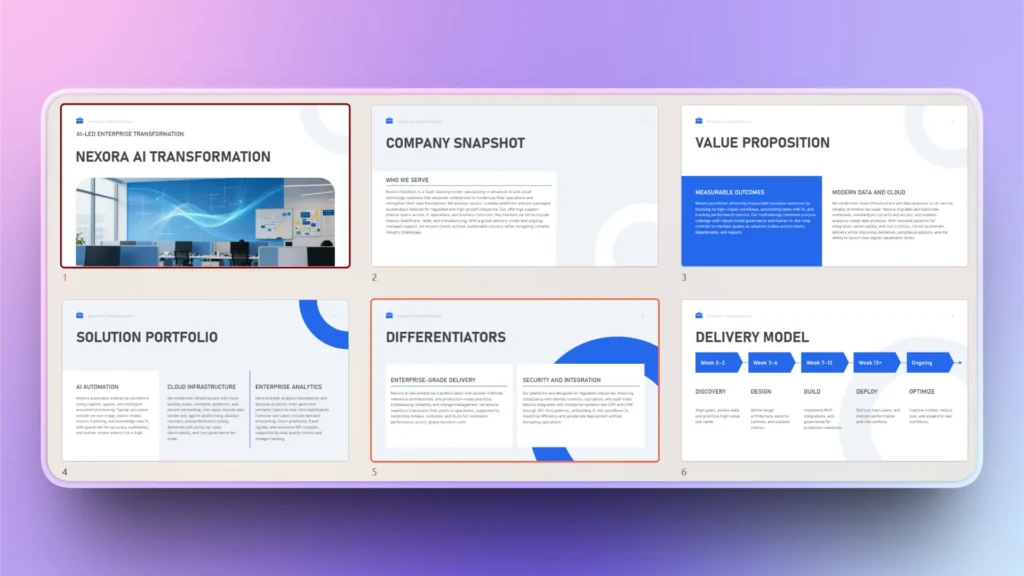
If your slides have long paragraphs and chunks of data, turn that data into meaningful insights. Twistly can turn any information into charts, graphs, or tables. Use this feature to simplify complex data and improve the clarity of message delivery.
Why Use Twistly for Board Presentations
As the title suggests, our goal is to get quick results for prepping board presentations, and Twistly is fully equipped with all the tools. From creating title slides to writing content and generating an entire board presentation, Twistly does it all in less than a few minutes.
If you can make a board presentation in less than 5 minutes, is it fast enough for you? Apart from timesaving, here are some other major benefits of using Twistly for prepping board presentations:
- Accelerate and automate the presentation creation process
- Maintain and follow all standards of board and executive presentations
- Support business storytelling
- Increased productivity across teams and departments
These and many more perks are waiting for Twistly users. If you haven’t tried Twistly yet, download the free trial version now and start making faster presentations with Twistly, inside PowerPoint.
Join Twistly Community of Productive Users
With millions of active users, Twistly has become the most popular AI add-in for PowerPoint users. The team behind the development of Twistly is actively adding new features and AI options to improve the PowerPoint workflow.
You might get to experience some advanced features in the future, including:
- Real-time business data integration
- Automated KPI visualization
- Predictive business insights
- Dynamic executive summaries
- AI-powered presentation coaching
Conclusion
You can prep a board presentation fast with AI using Twistly to structure your slides, write content, format slides, and generate PPTs. You can also customize your target audience and presentation style with Twistly.
For a real-time experience of all premium features of Twistly, download the trial version for free and start making faster presentations. The future of board presentation preparation is not manual versus AI. It is business expertise enhanced by AI-powered productivity.
Create PowerPoint Slides with AI
Build AI-powered presentations from any prompt, doc, or video









Start Making AI Presentations in Seconds
Instant Access
Begin exploring Twistly’s full suite of features immediately
No Commitments
No credit card required, and you can cancel anytime
Dedicated Support
Our team is here to assist you every step of the way during your trial.