



You copied an attractive sales deck template from the internet and expect it to work in the modern B2B sales environment, where personalization and speed are expectations. Well, you are mistaken, as for an effective response from the audience, sales teams are expected to learn how to create a sales deck template with AI tools.
One beautiful presentation is not enough, as you are supposed to make customized and unique sales decks for investors, prospects, stakeholders, enterprise buyers, and different segments of buyers.
The ideal approach is to create a sales deck template with AI tools that can be edited and customized easily. While maintaining brand consistency, you can customize almost every aspect of sales deck templates with AI tools.
Basics of Sales Deck Template
A sales deck template is a reusable presentation framework that can be used to communicate ideas and pitch your products to users and the audience. You can create a sales deck template to support:
- Product demonstrations
- Client pitches
- B2B sales meetings
- Partnership proposals
- Enterprise onboarding
- SaaS presentations
There are some major differences between normal PowerPoint presentations and sales decks. These personalized presentations communicate value quickly and address consumer pain points. You get to communicate while establishing credibility and driving conversions. An effective sales deck template consists of:
- Strategic messaging
- Visual storytelling
- Buyer psychology
- Performance metrics
Method 1: Using AI to Create a Sales Deck Template
You don’t have any inspiration and still want a quick sales deck template. Twistly got you covered because there are many AI PowerPoint templates available in the Twistly add-in that combine all the aspects of a great sales deck template, including:
- Title slide
- Problem-solution
- Product features
- Benefits
- Core uses
- Social proof
- Pricing and offers
- Call to action
A sales deck having all these slides can deliver true value, but making such a professional template will take hours or even days. By following these given steps and our recommended tool, you can create a sales deck within minutes.
Create PowerPoint
Slides with AI
Build AI-powered presentations from
any prompt, doc, or video


Step 1: Define the Objective of your Sales Deck
What is the primary goal of your presentation? Selling products is not the only possible use of sales decks. Common objectives for creating sales decks include:
- Lead conversion
- Enterprise outreach
- Investor communication
- Product onboarding
- Agency pitching
- SaaS demonstrations
Clearly defined goals and objectives help AI tools clearly understand and personalize the messaging according to your needs. Provide as much detail as possible while inputting your AI prompt.
Step 2: Build Faster Slides with AI
You have set presentation goals and understand the core narrative. The next major step is to create personalized slides with AI. Manually, this step takes hours, but with Twistly, a single AI prompt and a few clicks are enough to create AI slides.
- Open PowerPoint and launch Twistly
- New Presentation >> Create from Topic and then explain your presentation topic
- Make different changes to settings for more personalization
- Choose a PowerPoint template and review your slide outline
- Your final sales deck is ready. Review and present
Step 3: Review, Edit, or Add Slides
First draft of sales deck will be ready within seconds. If you see any slide or specific portion missing, you can ask Twistly to generate a single slide according to your specific needs.
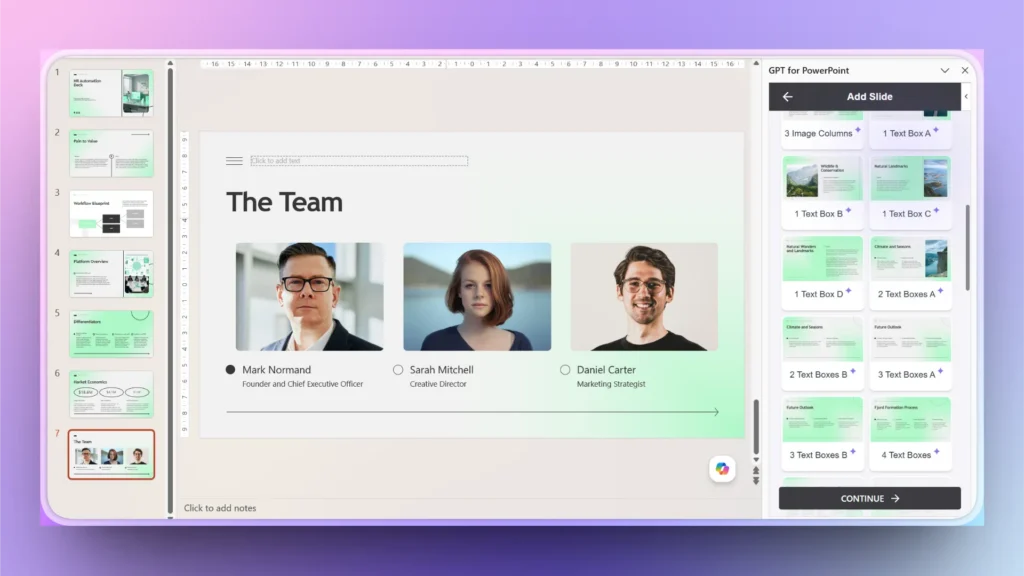
Let’s say the team slide is missing from your presentation. You have the pictures of your team, but need a layout where you can simply upload pictures, and Twistly takes care of the formatting.
- Click Add Slide from the Twistly pane and pick a slide layout
- Provide your content or visuals, or let AI do the work
- Your new custom slide is ready for the sales deck
Step 4: Reuse Template Sections
Your sales deck is ready for the investors, but now you want a new sales deck for an audience that is new to this niche. You might have to simplify complex ideas. Customizing existing sections is way easier with Twistly.
- Select any slide that you want to optimize or reuse
- Select any AI task that you want to perform. Let’s say you want to redesign the slide
- Pick any desired slide layout and provide further instructions

Method 2: Create a Template from an Existing Sales Deck
You found an amazing brand presentation that the previous team designed, and now you want to turn that brand presentation into a reusable PowerPoint template.
Twistly has a built-in My Templates feature where users can upload any presentation, and Twistly will extract elements from the presentation and save them as a reusable Sales Deck Template.
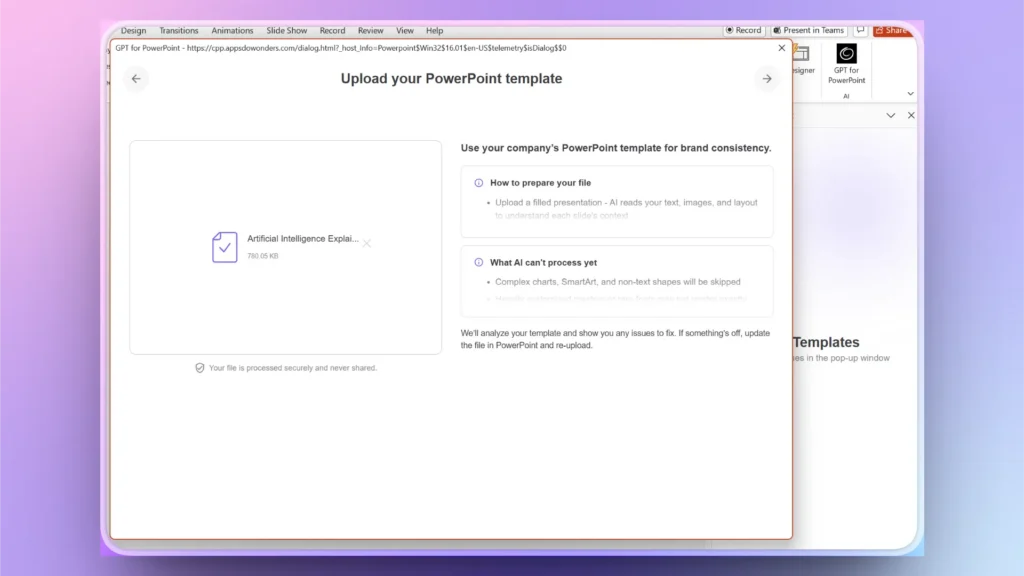
Step 1: Upload your Template/PPT
Open Twistly >> My Templates >> Add New and select your Presentation file from your device.
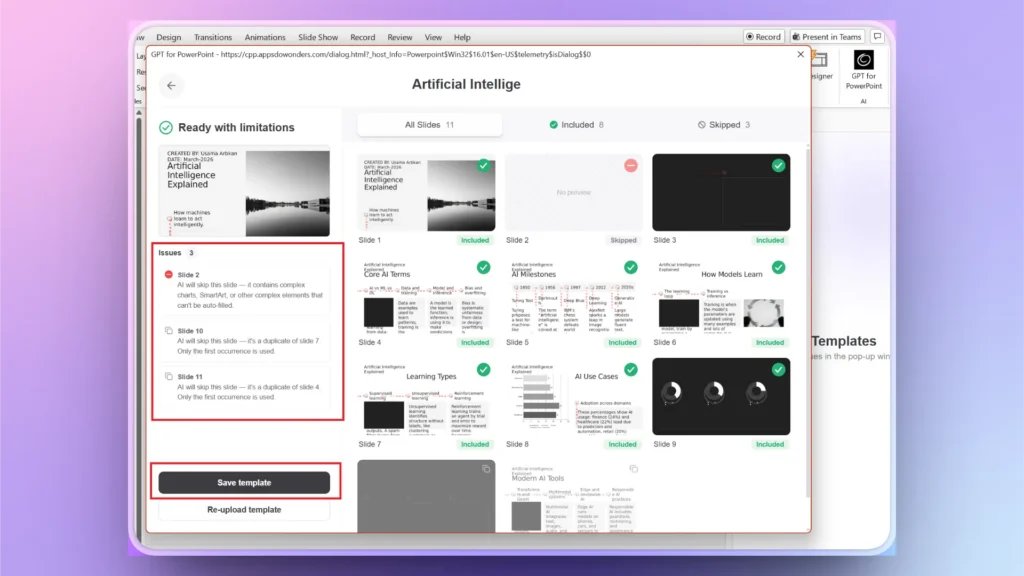
Step 2: Save Template
Twistly will process the uploaded file and extract color, fonts, formatting, and other elements, and then offer a preview and recommendations about how to optimize the template. Click the Save Template button, and your presentation template will be saved for future PPTs.
Step 3: Create a Presentation from a Custom Template
Create a new presentation from a topic or any other input method, and then choose the newly saved custom template. Twistly will create a stunning sales deck based on the saved template.
Get Twistly for Sales Deck Templates
Sales decks, business presentations, tutorials, study assignments, marketing PPTs, and all other presentations can be created, edited, and optimized with Twistly.
For new users, there is a free trial version available that comes with no strings attached. You can download and try the trial version without a credit card. Boost your productivity with the right AI tools for modern workplaces.
Create PowerPoint Slides with AI
Build AI-powered presentations from any prompt, doc, or video

Final Words
Twistly is redefining how you create a sales deck template with AI tools and offers ChatGPT-like features for PowerPoint. As AI-powered presentation technology continues evolving, organizations that adopt these workflows early will gain a significant competitive advantage in sales communication and client acquisition.








Start Making AI Presentations in Seconds
Instant Access
Begin exploring Twistly’s full suite of features immediately
No Commitments
No credit card required, and you can cancel anytime
Dedicated Support
Our team is here to assist you every step of the way during your trial.