


Last updated
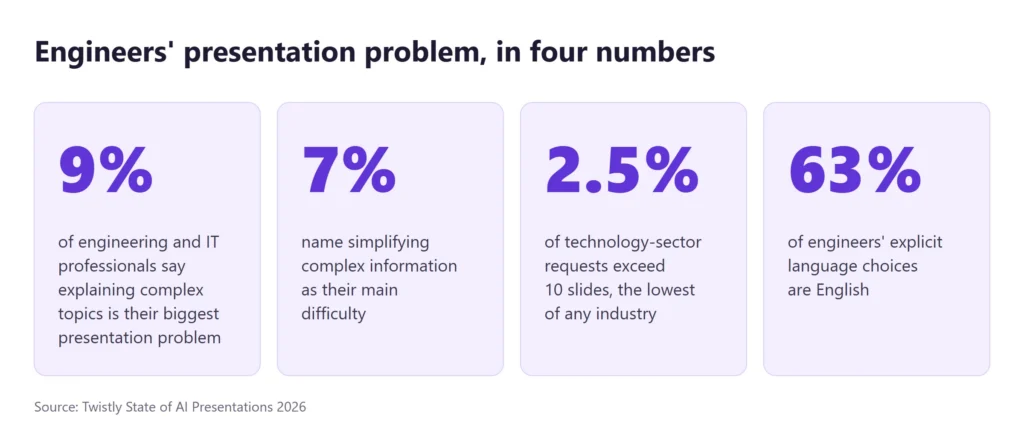
According to the Twistly State of AI Presentations 2026, explaining complex topics clearly is the biggest presentation problem for 9% of engineering and IT professionals, more than double the rate among marketers.
Most advice on technical presentations starts with design: fewer bullets, better fonts, cleaner charts. The data suggests that is solving the wrong problem for engineers. The technical presentation tips below focus on explaining, not designing.
Asked to name their single biggest presentation problem, 9% of engineering and IT professionals chose explaining complex topics clearly. That is more than twice the rate among marketers, and only healthcare scores higher. A further 7% named simplifying complex information as their main difficulty, also above average.
What the Data Says About How Engineers Present
They ask for short decks.
Measured by industry rather than job role, technology requests the shortest presentations: just 2.5% of requests exceed 10 slides, the lowest of any sector. Engineers are not trying to impress with volume. They want to say the thing and move on.
That instinct is right, but brevity alone does not produce clarity. A short deck that is dense, abbreviation-heavy, and organized by how the system was built rather than by what the audience needs will still lose the room.
They work overwhelmingly in English.
Engineers are among the most English-language groups, with 63% of explicit language choices going to English. For many, English is a shared working language across international teams, vendors and customers, not a first language.
That raises the stakes on plain wording: idioms, long nested sentences and unexplained acronyms cost more when the audience is listening in a second language.
The inverted profile: engineering versus consulting
Engineers ask for short decks and worry about being understood. Consulting does the opposite: it asks for long decks and worries about looking authoritative. Same tool, inverted requirements.
| Engineering and IT | Consulting | |
|---|---|---|
| Typical deck length | Short | Long |
| Core anxiety | “Will they understand?” | “Will I look authoritative?” |
| What helps most | Translation, analogy, one idea per slide | Structure, evidence, executive polish |
| Risk if ignored | Audience nods, then does not act | Audience is impressed, then unsure what was said |
The practical consequence: a generic presentation template built for persuasion or polish will not fix an engineer’s problem. Engineers need support for explaining.
8 Technical Presentation Tips for a Non-technical Audience
These eight steps show how to explain technical concepts to a non-technical audience, and you can repeat them for any technical presentation.
1. Start with the decision, not the architecture
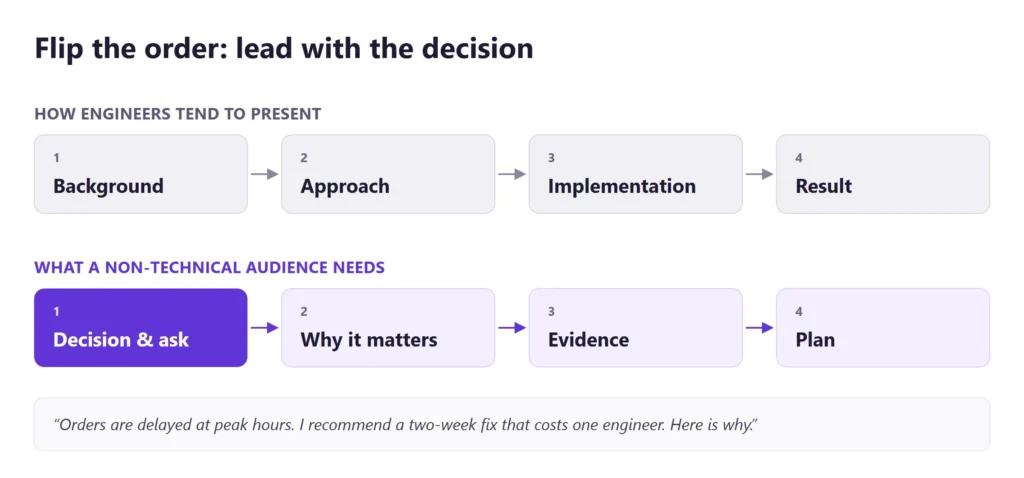
Engineers naturally present chronologically: background, approach, implementation, result. Non-technical audiences need the reverse. Open with the conclusion and what you need from them.
Weak opening: “First, a quick overview of how our current queue system works.”
Strong opening: “Orders are being delayed at peak hours. I recommend a two-week fix that costs one engineer. Here is why.”
Then use the rest of the presentation as evidence for that answer.
2. Define the audience’s question before you build slides
Write one sentence: “After this presentation, you should be ready to approve a two-week fix for the order queue.”
Fill it with a decision, an approval, or a changed behavior, never with “understand how X works.” If a slide does not serve that sentence, it belongs in an appendix.
3. Choose one analogy and stay with it
Analogies are the fastest bridge across a vocabulary gap, but they fail when you mix them. Pick one familiar frame and carry it through.
- A load balancer is a host seating guests across open tables.
- Technical debt is a loan: it lets you move faster now and charges interest later.
- A firewall rule is a building’s access badge policy.
- Caching is keeping frequently used files on your desk instead of walking to the archive each time.
Say where the analogy breaks down, in one sentence, so no one over-applies it.
4. Translate every term once, or remove it
For each acronym or technical term, decide: does the audience need it to make the decision? If not, replace it with plain language.
If yes, define it the first time in under ten words, then use it consistently. Because so many engineering presenters work in English as a shared language, prefer short sentences, concrete verbs, and no idioms.
5. One idea per slide, with the claim as the title
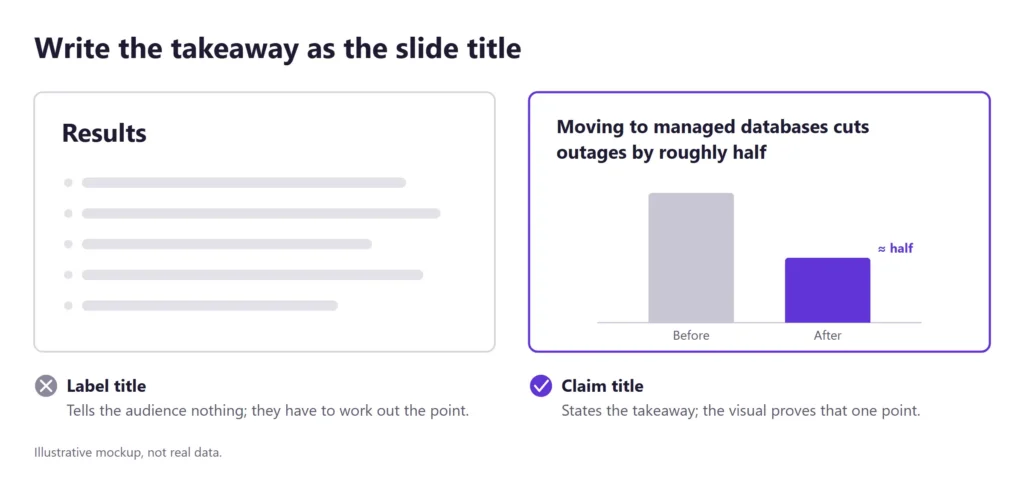
Labels like “Architecture” or “Results” tell the audience nothing. Write the title as a full-sentence takeaway: “Moving to managed databases cuts outages by roughly half.”
The visual beneath it should prove that single point and nothing else. Since technology audiences favor short decks, this discipline keeps you well under 10 slides without losing substance.
6. Show the shape of the data, not all of the data
Replace dense tables and dashboards with one chart that highlights the comparison that matters. Annotate it directly (“Peak load, Black Friday”) instead of relying on a legend. Keep raw detail for a backup slide.
7. Rehearse with a non-expert
The most reliable test is to present to someone outside your field and ask them to repeat the main point back. Where they stumble, the slide needs rework. Ask them to circle every word they would not use in conversation.
8. Prepare an appendix and a one-line answer to “why does this matter?”
Short decks stay credible when depth is available on demand. Keep technical backup slides ready, but do not present them unless asked.
Rehearse a single-sentence answer to the most likely question from leadership: what does this cost, what does it risk, and what happens if we do nothing?
A simple structure for a 7-slide technical presentation
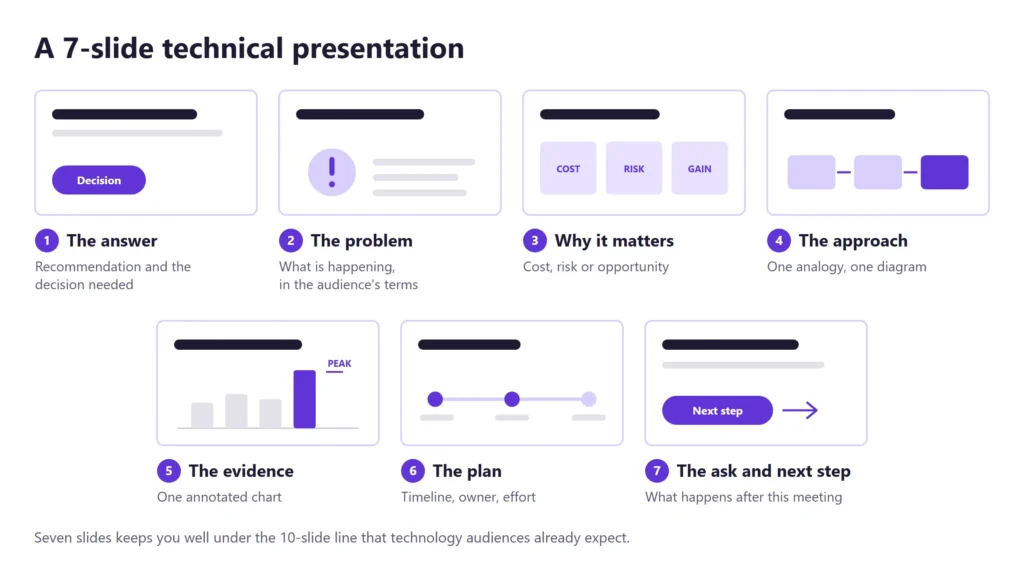
- The answer: recommendation and the decision needed
- The problem: what is happening, in the audience’s terms
- Why it matters: cost, risk, or opportunity
- The approach: one analogy and one diagram
- The evidence: one annotated chart
- The plan: timeline, owner, effort
- The ask and next step: what happens after this meeting
This fits comfortably inside the short-deck norm that technology audiences already expect.
Where AI Presentation Tools Fit
If the core problem is explanation, the best use of AI is not decoration. It is helping with structure: turning a technical document or design spec into a short, audience-aware outline, rewriting jargon into plain language, suggesting analogies, and drafting slide titles as takeaways.
Tools built for this job should start from who is listening rather than from a visual theme. Always verify technical accuracy yourself, since simplification can quietly introduce errors.
Rather than starting with an empty PowerPoint file, engineers can use AI to organize existing information, generate initial slide structures, and turn lengthy technical material into more accessible presentations.
For example, an engineer could use an AI presentation maker to:
- Convert technical documentation into a structured presentation.
- Summarize lengthy project reports into key findings.
- Create diagrams and visuals to explain technical workflows.
- Turn performance data into presentation-ready charts.
- Generate speaker notes to support verbal explanations.
- Rewrite technical text in simpler language for non-technical audiences.
- Produce shorter versions of presentations for management or clients.
Twistly Online is one example. It builds a deck from a .pdf, .docx, .pptx, .txt, .xlsx, .xls or .html file of up to 300 MB (Twistly docs, retrieved 13 November 2026). Before the deck is built, a review step lets you edit chart values and diagram points, within limits of 8 content blocks and 2 diagrams per slide (Twistly docs). On paid plans, Edit Text with AI includes a simplify-language option (Twistly docs), and speaker notes can be generated for one slide or the whole deck (Twistly docs).
Key takeaways
- According to the Twistly State of AI Presentations 2026, explaining complex topics clearly is the biggest presentation problem for 9% of engineering and IT professionals, more than double the rate among marketers and second only to healthcare.
- Engineers also rate above average on simplifying complex information (7%). The struggle is with translation, not with slide design.
- Technology asks for the shortest decks of any sector: only 2.5% of requests exceed 10 slides.
- The fix is a method, not a template: lead with the decision, anchor on one analogy, show one idea per slide, and cut anything the audience cannot act on.
Turn your design doc into a deck a non-expert can follow.
Upload a spec or project report to Twistly Online, review and simplify every slide, then download it as a PowerPoint file.
Conclusion
Engineers do not have a design problem. They have a translation problem, and the research backs it up: a higher-than-average share name explaining complex topics as their top difficulty, while the sector also asks for the shortest decks.
The way forward is to treat every technical presentation as an act of translation: begin with the decision, anchor on a single analogy, give each slide one claim, and measure success by whether a non-expert can repeat your point back.








Start Making AI Presentations in Seconds
Instant Access
Begin exploring Twistly’s full suite of features immediately
No Commitments
No credit card required, and you can cancel anytime
Dedicated Support
Our team is here to assist you every step of the way during your trial.