


Best PowerPoint Presentation Design Trends in 2026

For a perfect PowerPoint presentation, your slides need to follow certain design trends. A PowerPoint template that was popular 10 years ago may not be suitable for a modern presentation. In this article, we will explore some of the best PowerPoint presentation design trends in 2026 that every user needs to follow.
Trends change rapidly due to the latest technologies and AI race, and it is advised to follow resources like Twistly Blog to stay up to date with the new trends. By following these design trends, you can create engaging and professional slides.
Do you need Designing Experience for PowerPoint?
In 2026, human creativity and AI tools will dance together. For a unique and custom presentation, users need a basic understanding of the design tools in PowerPoint. Using shapes, custom colors, and other elements may seem easy, but turning random data into engaging slides is not easy.
One option is to edit readily available PowerPoint templates. PPT templates offer an easy way to kickstart your presentations with predefined styles and slide designs. But professional themes are usually expensive. Free templates are used by millions of other users, too.
Twistly- AI Design Solution
The best option to get the best PowerPoint design for slides is to use Twistly, a complete AI assistant for PowerPoint presentations. This tool helps you create unique and functional PPT slides with AI PowerPoint templates without any prior design experience.
Create PowerPoint
Slides with AI
Build AI-powered presentations from
any prompt, doc, or video


PowerPoint Presentation Design Trends to Follow in 2026
Whether you want to impress your boss at the office or want to shock your classmates with unique slides, following the latest trends can help you stand out.
We have pulled out the most influential design trends that will reshape the presentation niche. Adapt these best PowerPoint presentation trends in 2026 as soon as possible.
1. AI-assisted Slides and Automation
The days of manual PowerPoint presentations are over, thanks to Twistly. Microsoft has also introduced a basic version of AI for PowerPoint, but that feature has no practical use for millions of users. AI-assisted slides help users generate professional results without wasting hours or even days.
AI tools like Twistly automate content writing, slide designing, and other aspects of presentations. Users can input an AI prompt, and Twistly will customize the AI templates within seconds.
2. Soft Curves and Simple Shapes
Visuals will be the most important part of the PowerPoint presentation designs as always. To reduce the cognitive load, you should prefer using simple shapes and soft curves. If you don’t know how to find the desired visuals for PowerPoint slides, use Twistly.
AI image generator in Twistly is a practical and powerful tool that can generate different versions of AI images based on the AI prompt.
Twistly speeds up the whole process, and users don’t need to switch between different apps and sites to use all these AI features. Everything works inside PowerPoint.
3. Accessible Presentation Designs
We have been using different colors as part of communication. For better inclusivity of the diverse audience, you need to work on accessibility as part of the design. Make use of the canvas wisely and optimize the slide for maximum engagement without cluttering the design.
Bigger fonts, easy-to-read headlines, optimized colors, and many other aspects are now crucial for PowerPoint presentations for mass audiences.
4. Smart Visualization and Data Storytelling
Paragraphs, bullet point lists, and tables are cool for PowerPoint presentations, but there are many other ways to visualize data. The SmartArt feature is somewhat complicated to use for most beginners. Use timelines, graphs, charts, and other data visualization tools.
Twistly can generate charts or timelines from AI prompts. You don’t need to manually input data for every box of the Excel sheet.
Users can simply paste the raw data into Twistly or describe the topic in natural language, and Twistly will automatically cover raw data or an AI prompt to engaging charts or timelines.
5. Dark Mode and High-contrast Themes
Some PowerPoint templates are quite useful for users, but you cannot create a unique stage presence with those free templates. In 2026, high-contrast themes will be more popular than conventional templates.
Twistly has a decent range of AI PowerPoint templates that can be used for all types of presentations. You can also change the color of entire PowerPoint templates from the library to match the overall brand theme.
How to Create Trendy PPT Slides as a Non-designer?
Following these best PowerPoint presentation trends in 2026 is the key to successful communication in different sectors of life. Millions of PowerPoint users have no design experience, and they face challenges while designing slides.
For beginners and experts, Twistly resolved the issue of designing attractive slides. Twistly works just like ChatGPT for PowerPoint, where AI performs every task related to your PowerPoint presentation projects.

How to use Twistly for PowerPoint?
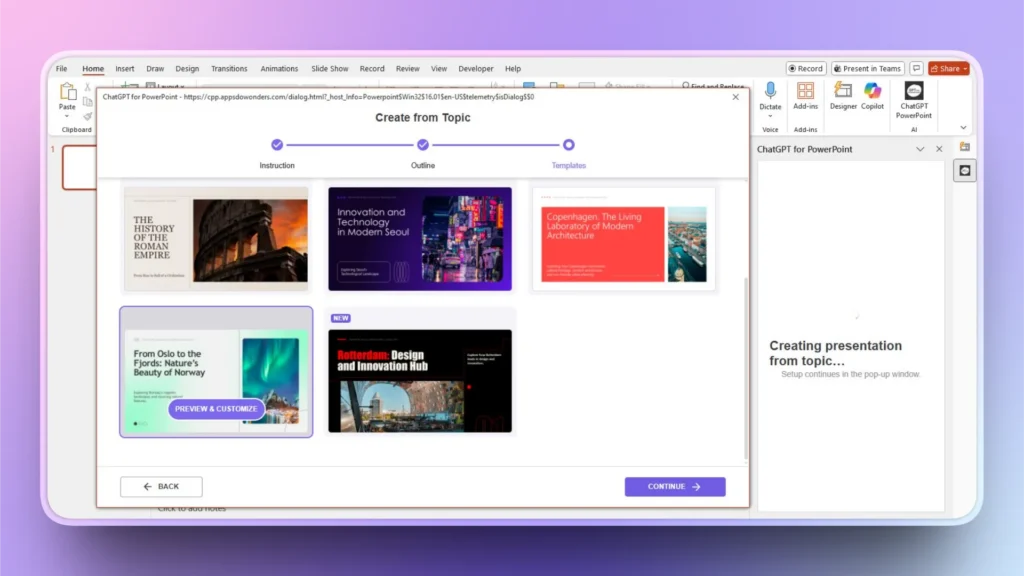
You don’t need any prior experience to use Twistly, as the user interface is simple and clean, meant for every user. As Twistly works inside PowerPoint, no additional resources are required. Simply download Twistly from the add-in library and follow these steps to create engaging PPT slides with the AI presentation maker.
- Open PowerPoint, launch Twistly, and choose your input method
- Provide the topic, AI prompt, and change other settings, if needed
- Review the AI-generated slide outline and delete or add slides
- Select an AI PowerPoint template with a relevant design
- Your slides are ready so that you can edit, modify, or optimize with AI features
Conclusion
The best PowerPoint presentation design trends for 2026 reflect a clear shift from decoration to intention. Use Twistly to supercharge your presentation with catchy and professional slides. Slides are no longer just visual support; they are intelligent, accessible, and story-driven communication tools.
If PowerPoint seems too much of a hassle for you, download Twistly now and start making instant slides for free. The trial version is exclusively available for new users for a limited time. Experience your own ChatGPT for slides and elevate your PowerPoint experience by clicking the button below.
Create PowerPoint Slides with AI
Build AI-powered presentations from any prompt, doc, or video


Start Making AI Presentations in Seconds
Instant Access
Begin exploring Twistly’s full suite of features immediately
No Commitments
No credit card required, and you can cancel anytime
Dedicated Support
Our team is here to assist you every step of the way during your trial.