


How to start a presentation like a pro and impress the audience? This is the skill that everyone wants to master. You don’t need an expensive training session or mentorship program to start a presentation for maximum impact.
With some simple tactics and basic communication steps, you can capture the audience’s attention from the very start of the presentation. Aesthetics of the slides, visuals, graphics, your stage presence, and many other factors play a crucial role in a kickass presentation.
First 30-60 Seconds are Everything
Before your slides and insights even begin to matter, the very first minute determines the final outcome of the presentation. The title of the presentation can also have a huge impact on the mindset of the audience because they will judge based on the presentation title that:
- Is this going to be interesting?
- Is this speaker confident?
- Is this worth my attention?
So, you need to work on the presentation title first. The best way to come up with an interesting presentation title is to use the AI Presentation Title Generator by Twistly. This AI tool can suggest interesting and unique presentation titles based on your input.
Start a Presentation with Impact
The beginning of the PowerPoint presentation sets the tone, builds curiosity, and captures the attention of the audience. A weak start leads to a distracted audience, and that’s what we need to prevent from happening. Here are a few practical tips on how to start a presentation with an impact.
1. Start a Presentation with a Powerful Hook
The idea is to interrupt routine thinking and make people curious about what you have to say or offer. Hooks can be a great communication tool to grab instant attention.
You can ask a thought-provoking question or make any claim that can engage the brain.
Surprising statistics, facts, or results of research papers can also build interest in engagement. Whether you tell a story, present facts, or statistics, always be accurate.
2. Introduction Slide
Reinventing the wheel is not always the best choice. Sometimes, classic tricks offer better results. If powerful hooks are not your thing, go with the basic introduction slide.
It is a simple and clean approach to deliver authority and command on the subject matter. The introduction slide should clearly state a professional introduction, your area of experience, your achievements, and what value you have to offer for the audience.
Is there anything unique about you that might interest the audience? Is there any specific problem or pain point that you can solve for the audience? Let them know what makes you stand out from the rest.
3. Clearly Define the Purpose of your Presentation
Not everyone in the audience has the same level of understanding regarding the presentation topic or title. Some are here to gain the next level of knowledge, while others are new to this subject.
Anyone from the audience should not wonder why he/she is listening to this presentation. It is essential that presenters clearly explain:
- What is the topic is
- Why it matters
- What they will gain
Imagine you are speaking at an AI event where you want to present a tool that can create professional presentations within seconds. A perfect and clear example to reduce resistance can be:
“Today, you’ll learn about the best AI presentation tool to start your presentations confidently and keep your audience engaged from the very first word.”
4. Outline the Main Points
Before diving into the details, you need to create a roadmap for the audience so they can set their expectations for what they will get to learn from your presentation. Keep the summary or outline short.
There is no need to explain every slide because you can simply use slide headings or hints to give an idea of the overall presentation.
5. Establish Relevance
Everyone from the audience wants to learn something that is relevant to his situation, condition or problem. Connect your presentation topic directly to the needs of the audience. If you are speaking to students, talk about grades.
If you are promoting health-related products and services, let them know how their life will change after this product.
6. Control your Body Language
Presentation topics, slides, visuals, insights, and everything else related to presentation are important, but the most important thing is maintaining a strong stage presence. Your body communicates even before you speak a single word.
Be original, confident, and authentic with your body posture and physical stance. You should:
- Stand tall
- Make eye contact
- Pause before speaking
- Smile naturally
- Speak slightly slower at first
Focus on Presentation Slides
There are many tips on how to start a presentation and what common mistakes you need to avoid. All of these tips are related to communication skills and interpersonal skills.
Apart from these tips, focusing on the presentation slides is also very important. You shouldn’t expect great results if your slides are not visually attractive.
We understand that making professional slides is not easy, and not everyone is good at PowerPoint presentations. Here is the perfect solution for all your PowerPoint presentations.
Twistly for AI PowerPoint Presentation
Twistly is a unique AI presentation add-in that lives inside PowerPoint. What does it mean for an existing PowerPoint user? He does not need to learn any new tool, visit any website or install a new software.
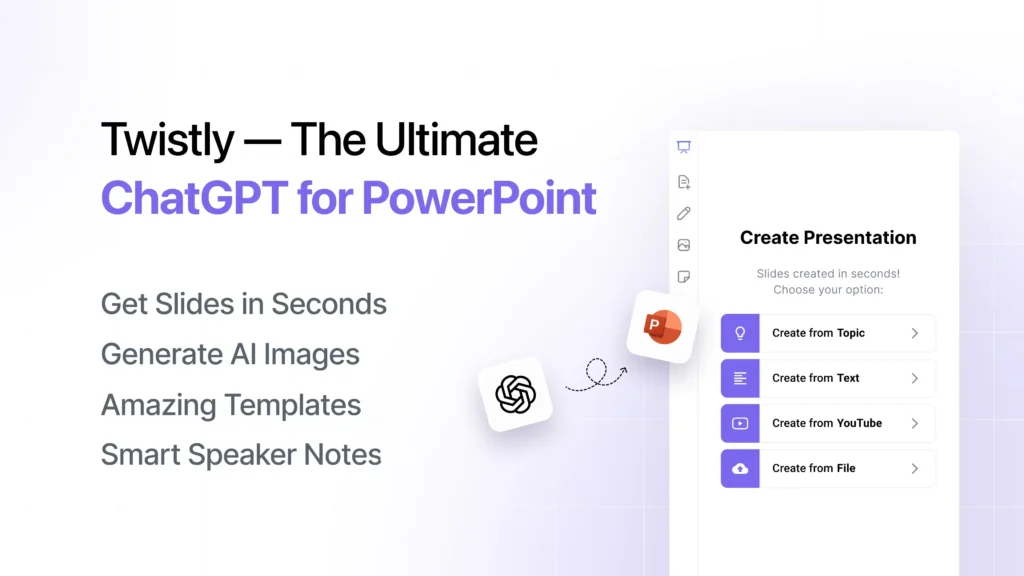
Simply go to the PowerPoint add-in library, install Twistly inside PowerPoint, and get a custom ChatGPT for PowerPoint presentations. This tool can turn any topic, text, file, or AI prompt into a complete presentation within seconds.
You don’t need any prior presentation or designing experience to make professional presentations with Twistly. It’s efficient, AI-powered, advanced, and fully compatible with PowerPoint.
Conclusion
Learning how to start a presentation is a crucial part of professional communication. Twistly can turn your thoughts into attractive slides. You are a successful presenter if you can make people want to listen to you.
Kickstart your presentations with AI and download Twistly now to get your free trial version. Once you have experienced the true power of unique ChatGPT for PowerPoint, there is no going back to conventional presentations.
Create PowerPoint
Slides with AI
Build AI-powered presentations from
any prompt, doc, or video










Start Making AI Presentations in Seconds
Instant Access
Begin exploring Twistly’s full suite of features immediately
No Commitments
No credit card required, and you can cancel anytime
Dedicated Support
Our team is here to assist you every step of the way during your trial.