


An interactive presentation uses a unique approach to ensure two-way communication between the presenter and the audience. With interactive presentation ideas, you can turn passive listeners into active participants.
The challenge here is to find interactive presentation ideas that can grab the attention of the users. A conventional informational presentation topic may not be effective in urging the audience to take part in the process.
Where to find interesting and interactive presentation ideas? Brainstorming to find such ideas can take hours. With our Free Presentation Title Generator, you can get interactive presentation ideas for free.
How to Find Interactive Presentation Ideas?
You need to spend hours finding these ideas. Are you thinking the same? The AI presentation title generator has made it possible for you to gather ideas and presentation titles within seconds.
Follow these simple steps and generate unlimited presentation ideas based on your keyword, boring data, or a generic topic.
Step 1: Visit the AI Presentation Title Generator and input your presentation topic, paste a general idea, or simply write the relevant keywords. More data, better presentation titles.
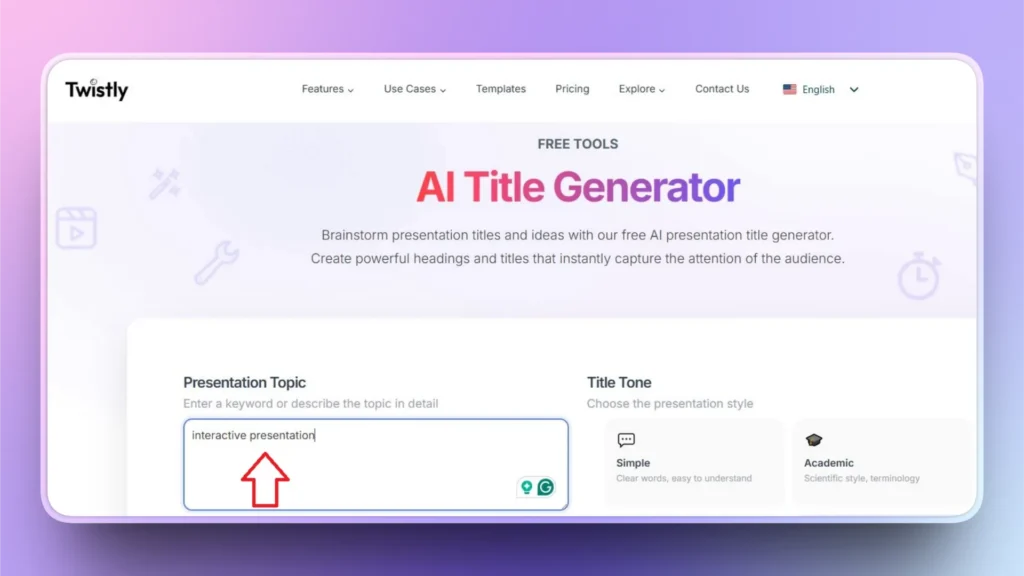
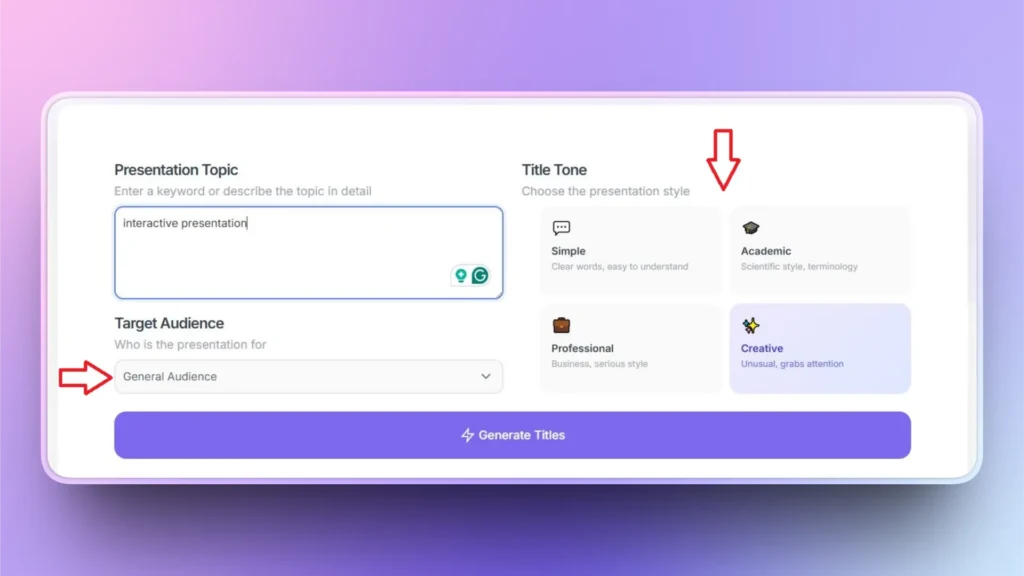
Step 2: You can get customized output or titles based on project requirements. Choose the title tone and also select the target audience. Click Generate Titles once all inputs are ready.
Step 3: Click to copy the desired title for your presentation or click the Regenerate button for more ideas. Get unlimited presentation titles with AI for free.
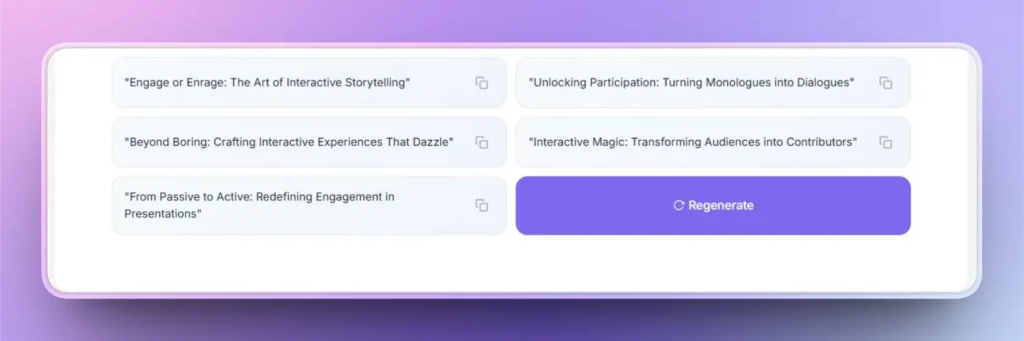
Ideas and Titles for Interactive Presentations
We have created this list of 20 interactive presentation ideas that anyone can use according to the situation, event, or audience. You can generate many more presentation ideas with the AI presentation title generator.
1. Live Poll
Ask the audience to share their opinion through a live poll that you have added to the slide.
Topic: “What Makes a Presentation Memorable in 2026?”
2. Career Guidance Presentation
Give multiple options and choices to the audience and ask them to share their decisions based on their personal opinion and choices.
Topic: “Building a Startup: Funding, Growth, or Product, You Decide”
3. Real-time Q&A
Asking questions from the audience is the best way to urge them to take part in the presentation. Encourage them to actively participate in the presentation.
Topic: “Ask Me Anything: The Future of AI in Daily Work”
4. Prediction Game
Share some interesting and useful insights with the audience and ask them to predict the future of any industry or relevant service.
Topic: “Can You Predict the Next Big Tech Trend?”
5. Workshop on Problem Solving
Everyone wants a possible solution for their problems and challenges. Collect data from the audience regarding problems faced by them and then offer a solution.
Topic: “Fix This Broken Pitch Deck”
6. Myth vs Fact
Present some popular myths and ask the audience to vote if the statements are myths or facts.
Topic: “AI Myths That Are Holding Businesses Back”
7. Title Rewrite Challenge
Write a generic title for any promotion, service, or simple statement, and ask the audience to share their opinions to make statements more interesting and bolder.
Topic: “Turn This Boring Presentation Title into a Click-Magnet”
8. Case Studies
If you have a great idea in mind, present it to the audience and ask if they are interested in the idea as investors.
Topic: “Would You Invest in my Startup?”
9. Before and After Slides
Use two types of slides and ask the audience to share their thoughts about possible changes they notice in both slides.
Topic: “How Small Design Changes Transform Presentations”
10. Audience Persona Builder
Study your audience and then create a fictional character to offer personalized service or a solution for the audience.
Topic: “Designing Slides for Different Audiences in Real Time”
11. Word Cloud Interaction
Collect random words from the audience that appear in their mind when they hear a certain term.
Topic: “What Comes to Mind When You Hear ‘AI’?”
12. Use Game Presentation
Include interesting small games on your slides where the audience has to show their personal skills regarding any topic.
Topic: “How Strong Are Your Presentation Skills?”
13. Live Demo
Let the audience decide what kind of feature they want to learn regarding your product or service.
Topic: “Creating a Winning Presentation Title Using AI”
14. Voting for a Scenario
Explain any situation and ask the audience what they would vote for in this situation.
Topic: “Which Slide Would You Present to Investors?”
15. Slide Redesign Ideas
Let the audience decide what kind of possible changes can make your slides even more engaging and interesting.
Topic: “From Text-Heavy to High-Impact Slides”
16. Story Completion
Share half of the story or any scenario and ask the audience to complete that story.
Topic: “Finish This Presentation Story”
17. Ranking Exercise
Present different options and choices, and let the audience rank these products or choices based on their personal opinions.
Topic: “Rank These Titles from Weak to Powerful”
18. Emotion-driven Presentation
Offer a scenario and let the participants share what they feel about the situation, service, or idea.
Topic: “How Does This Slide Make You Feel?”
19. Roadmap Navigation
What should be the next step in the process? Collect input from the audience and then use the data for the right steps.
Topic: “The Presentation Creation Process, Step by Step”
20. Action Commitment
What possible action do you want the audience to perform during or after the presentation?
Topic: “One Presentation Change You’ll Make Today”
Final Words
All these interactive presentation ideas have a unique element that can urge participants to actively take part in the presentation. You can generate as many presentation titles as you want with the free AI presentation title generator.
Once you have found the right presentation title, download Twistly for PowerPoint and turn that interactive title into a fully functional and professional presentation with AI.
It is the right time to boost your personal skills and workplace productivity with AI tools that simplify complicated tasks for presentations and communication. Try Twistly and the AI Title Generator for free.
Create PowerPoint
Slides with AI
Build AI-powered presentations from
any prompt, doc, or video













Start Making AI Presentations in Seconds
Instant Access
Begin exploring Twistly’s full suite of features immediately
No Commitments
No credit card required, and you can cancel anytime
Dedicated Support
Our team is here to assist you every step of the way during your trial.