


Raising capital for a SaaS startup is not just about having a visionary idea or a great product. You cannot attract the right investors unless you have the resources to tell the right story in the right order. There are certain points that you need to consider while creating a slide structure for SaaS pitch decks.
Potential investors review hundreds of SaaS pitch decks, and you should work on an optimized presentation of the ideas to make your slides memorable.
Presentation elements like executive summary, charts, infographics, and relevant visuals with accurate information play an important role in convincing investors for your SaaS startup.
Why SaaS Pitch Decks are Different
SaaS, or Software as a Service, is a cloud-based model where providers host applications and make them available to customers over the internet.
You have an amazing PowerPoint template that looks great and has dedicated slides for text, visuals, and other elements. A regular presentation is different from SaaS pitch decks. SaaS startups operate on:
- Recurring revenue models
- Long-term customer value (LTV)
- Metrics-driven growth
So, they require a unique slide structure, different from regular business presentations. Predictability, scalability, and potential growth are the elements that a SaaS pitch deck should clearly define and highlight.
Ideal Slide Structure for SaaS Pitch Decks
Finding the right template can make your job easier for creating a SaaS pitch deck. For a customized presentation, you need to understand the basics of creating the ideal slides for the investors.
Note: Ideal Length of SaaS Pitch Deck
An ideal pitch deck for a SaaS startup can have up to 10-14 slides. These slide numbers are good enough to tell the complete story while maintaining the attention and engagement of the audience, stakeholders, and potential investors.
Depending on the requirements or instructions, you can vary the number of slides in your SaaS pitch deck. Make sure you don’t add irrelevant and filler content to your slides just to make your presentation longer.
1. Cover Slide- First Impression
The cover slide gives an idea about who you are and what you are about to present. Cover slide for SaaS pitch decks can include details like:
- Company name & logo
- One-line value proposition
- Presenter name and title
- Optional: website URL
The tagline or title of the presentation should clearly define the product in one line; don’t overcomplicate it with buzzwords and terminologies.
Example: “We help PowerPoint users automate presentations and reduce manual efforts by 95%.”
2. Problem- Pain Points
You need to show your grip over the subject matter, and this slide should indicate the urgent problem that requires a solution or attention.
This slide might be more detailed than other slides, as you need to explain the problems faced by the target audience and the gaps that exist in the current market.
Example: “Regular PowerPoint users waste 70% of their time manually updating slides, leading to missed deadlines and inaccurate presentation data.”
3. Solution- Your SaaS Product
Explain how your SaaS product can solve the problems faced by the audience. Also, highlight the points and benefits that make your product better and more effective than the competitors. For more details, explain:
- What your product does
- How it solves the problem
- Key workflows or benefits
If you think these details take up too much space, use visuals, a screenshot of the product, or even some charts explaining these details. You need to maintain a balance between visuals and text on every slide.
4. Product Demo Slide
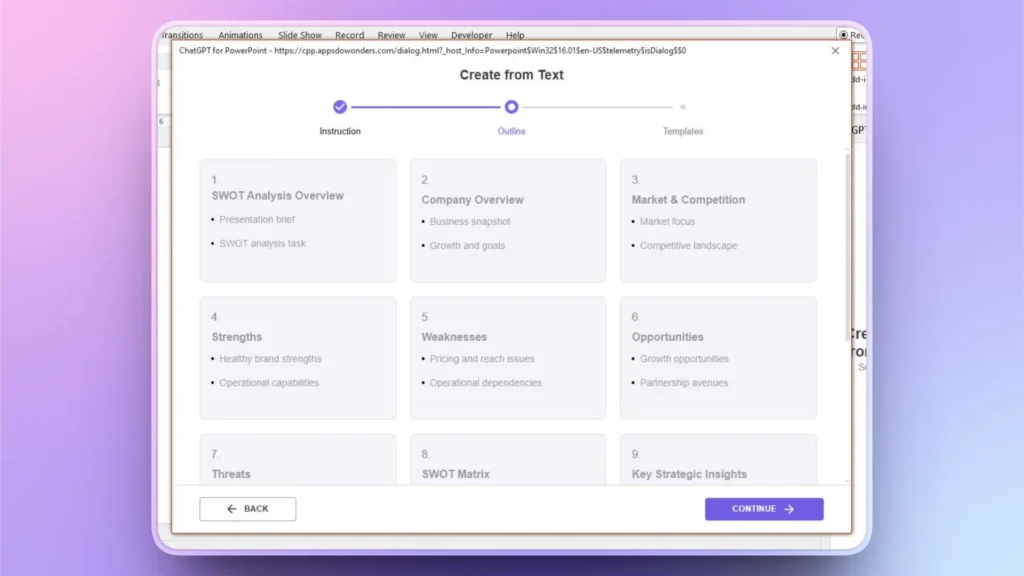
Stakeholders might want to know about the real-time working of your product. Explain the product overview in simple steps. Another great way is to add a demo video of your product options and features.
This simple video can quickly explain the signup process, dashboard elements, and automation flow. A screenshot like this gives a clear idea of how users can perform the desired tasks while using Twistly.
5. Market Opportunity
Investors take an interest in SaaS startups that are scalable and have potential for future growth. This slide will be more technical and data-heavy as you need to cover aspects like:
- Total Addressable Market
- Serviceable Available Market
- Serviceable Obtainable Market
Use graphs and charts for clear identification of the growth potential. Charts and graphs make it easier for the audience to grasp the main idea at a glance on the slide.
6. Business Model
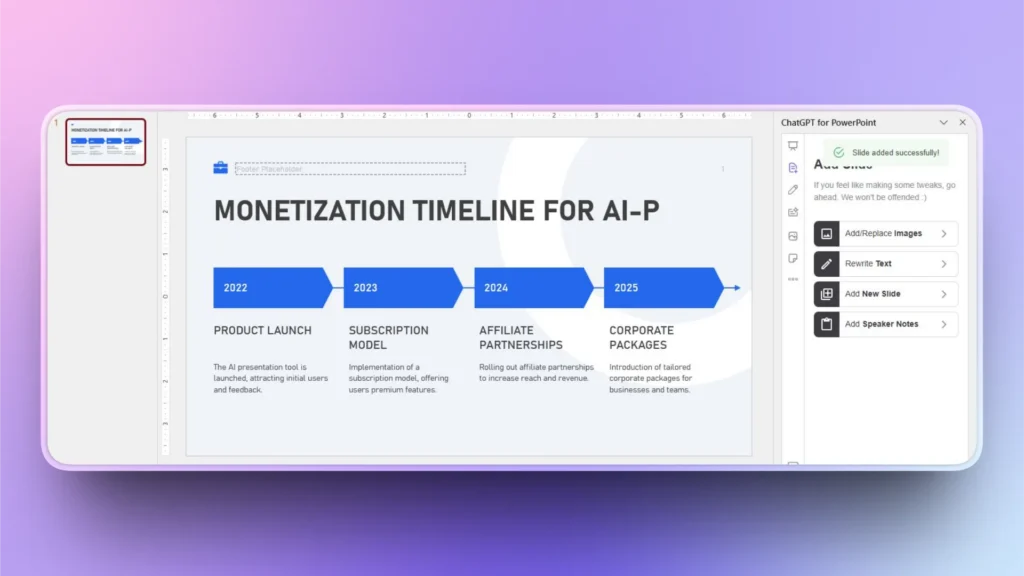
How is your business going to make money for the investors? What monetization channels are available for the business? Using timelines or other data visualization tools is a great way to convey the message.
Pro Tip: Use AI for SaaS Pitch Decks
You can use Twistly, an AI add-in for PowerPoint, to create individual slides or a complete SaaS pitch deck for your startup. As you can see in the image below, Twistly generated a timeline within seconds.
What Else to Cover in Slides?
Your SaaS pitch decks have now covered almost every important detail about your startup idea, but there are many other useful details that you can include in your slides. This table gives you an idea about possible slides and what to cover in these slides.
| Slide | What to Cover in the Slide? |
| Traction | Build investor confidence with real data. Prove that the model works. |
| Go-To-Market Strategy | Show how you acquire and scale customers. |
| Competitive Landscape | Prove you understand your competitors. |
| Unique Advantage | Explain why you’ll win long-term. |
| Team Members Slide | Build trust in execution capability. |
| Executive Summary | End on inspiration and clarity. |
Conclusion
SaaS pitch decks that follow the given slide structure are more likely to secure investments from the stakeholders and potential investors. Add value to every slide and keep your content optimized and relevant.
Let’s be honest, creating a pitch deck for a SaaS startup requires attention to detail and higher knowledge of the field. If you want a quick and easier way to generate a professional pitch deck for any business, including SaaS startups, use Twistly, as it has AI PowerPoint templates that are designed to focus on these slide structures.
Download Twistly’s free trial version and give it a try, and experience the true power of AI for creating professional SaaS pitch decks.
Create PowerPoint
Slides with AI
Build AI-powered presentations from
any prompt, doc, or video











Start Making AI Presentations in Seconds
Instant Access
Begin exploring Twistly’s full suite of features immediately
No Commitments
No credit card required, and you can cancel anytime
Dedicated Support
Our team is here to assist you every step of the way during your trial.