


30 Creative Presentation Ideas
A great presentation does not start with an attractive slide but with a creative title. Before seeing the slides or reviewing the detailed charts, audiences make up their mind based on the presentation idea. But how to come up with 30 creative presentation ideas for your next project?
You can either spend hours on brainstorming presentation titles or use the Free AI Presentation Title Generator by the Twistly team for unlimited presentation titles and ideas. This one AI tool can help with presentation titles that spark curiosity, engage the audience, and set expectations.
Creative Presentation Ideas
You are free to use the AI title generator for presentation ideas, but in this list, we are going to share the top 30 creative presentation ideas that we have generated for our readers.
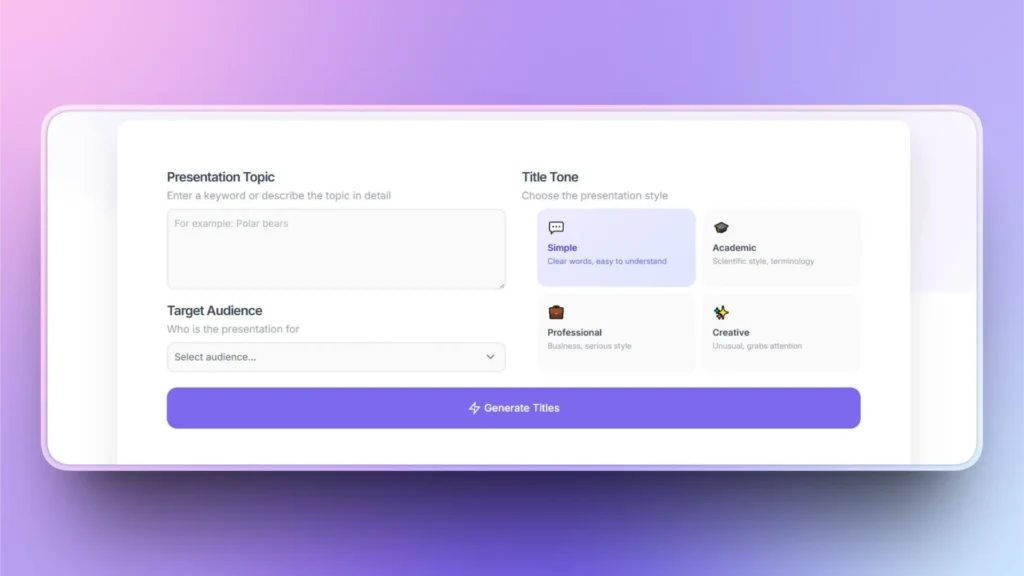
Remember that a poorly selected presentation title can undermine the strongest and most solid slides. We gave simple keywords to this AI title generator that created this list of 30 creative presentation ideas.
1. Storytelling Arc
Use timelines and process flow diagrams to represent different stages of a story, just like a film. You can make this presentation business-oriented by explaining problem >> struggle >> solution >> happy ending.
2. One Visual Per Slide
Instead of cramped slides, use one visual or image per slide and add data related to that visual. You can use this presentation idea at any event related to friends and family or any other fun event.
3. Before and After Slides
Compare any two events, entities, or other objects to show transformation.
4. Polls and Live Q&A
You can use presentation slides to collect feedback from users and ask them questions related to your service or product.
5. Timeline Journey
Timeline SmartArt is an amazing tool for this type of presentation, where you can visually represent the journey of any process or person.
6. Minimalist Slides
Simply add one or two quotes to each slide so audiences can easily focus on the main point or quote.
7. Metaphor Presentations
Simplify your ideas and thoughts with metaphor-based presentations by connecting them to real-life examples.
8. Case Studies
Audiences are always eager to learn from experts. If you have done something amazing, use case study presentations to explain your strategy and technique.
9. Animated Explainer Slides
Animations are great visual tools for simplifying complicated topics or concepts. You can use animations for entertainment and marketing slides, too.
10. Problem-first Opening
Grab the attention of the audience by opening your presentation with a problem statement. Explain a pain point that is affecting the audience.
11. Data Visualization Story
There are multiple data visualization tools in PowerPoint that you can use to create a complete story, with minimal text.
12. Persona-driven Slides
You can use a fictional character or create a presentation around your custom persona to explain any business process.
13. Question-led Presentation
The ideal presentation keeps the audience engaged, and there is no better way to engage with the audience than by asking them questions.
14. Split-screen Comparison
Compare any two services and products to help the audience make an informed decision.
15. Visual Roadmap
Help the audience or students choose the right product, service, career, or any other aspect of their lives.
16. Speaker Notes and Minimal Text
Keep the text minimal for slides, but use the speaker notes section for supporting materials and data.
17. Live Demos
With video tutorials and screenshots, make presentations that walk the audience through the detailed steps of any process.
18. Bold Typography
Instead of simple font families, be creative with typography and use bold headlines and taglines for slides.
19. Myth vs Reality Format
Create slides that bust popular myths by explaining the reality against myths.
20. Progress Reveal Presentations
Explain or reveal something in a dynamic way by using slides to show each step in a slideshow.
21. Color-coded Sections
Apply different colors to show multiple phases, statuses, or conditions of the process. Best for showing losses and profits in any project.
22. Quote-driven Slides
Best for motivational events where speakers can use quote-driven slides to explain their point.
23. Infographics
Create engaging and interesting infographics by using built-in or external tools.
24. Scenario-based Presentation
Present different “what-if” situations and outcomes.
25. Checklist Slides
What are the requirements for a process to be successful? Create checklist slides for the audience.
26. Audience Challenge
Give challenges and tasks to the audience and ask them to come up with the solutions.
27. Visuals and Icons
Represent companies, brands, or businesses with their branded visuals and icons so others can easily identify the target brand.
28. Summary Slide
At the end of any project, create a summary slide for the executives and managers summarizing the project or outcome.
29. Interactive Map or Flow Diagram
Diagrams and maps can be created in PowerPoint to present information non-linearly.
30. Call-to-action Ending
Tell your audience what to do at the end of the presentation by adding a call to action slide.
How to Turn Ideas into Professional Presentations?
Once you have selected a creative presentation topic, the next step is to turn that idea into a fully functional and professional presentation. For this step, use Twistly.
Twistly is an AI add-in for PowerPoint where users can generate a complete presentation based on the input. You simply write the topic, AI prompt, paste the text, or upload a document, and Twistly will automatically turn that input into a complete presentation.
From creating interesting presentation titles to making attractive presentations from those titles, Twistly is an all-in-one AI solution for PowerPoint users. Try Twistly now for free and start making awesome presentations that inspire and engage.
Create PowerPoint
Slides with AI
Build AI-powered presentations from
any prompt, doc, or video


Conclusion
Turn these 30 creative presentation ideas into visually appealing slides with Twistly or generate more ideas with the free AI title generator.
These creative presentation ideas cover diverse niches and fields, so anyone from any field of life can use these ideas for their next presentation. Let AI redefine how you communicate in casual and professional events.










Start Making AI Presentations in Seconds
Instant Access
Begin exploring Twistly’s full suite of features immediately
No Commitments
No credit card required, and you can cancel anytime
Dedicated Support
Our team is here to assist you every step of the way during your trial.