


Every company needs a master presentation template in 2026 if growth is the ultimate goal. In business communication, presentations are the most important tool.
Making presentations from scratch can drain your resources. If you want to thrive in the current markets without allocating resources to routine presentations, get a master presentation template now.
Unstructured slides are damaging your business, even though you don’t realize the real damage caused by these operational tasks. In this article, we will analyze the importance of a master presentation template for businesses and how to get one for your team.
What is a Master Presentation Template?
A master presentation template is the top-level blueprint that controls the theme, fonts, colors, background, and layout consistency across all slides. A master presentation template usually includes:
- Official brand colors
- Company fonts
- Logo placement
- Slide layouts
- Chart styles
- Table formatting
- Icon and visual standards
Instead of making slides from a blank page, users start modifying an existing layout, and it speeds up the presentation process. Most companies spend thousands of dollars on professional designers, but we can help you make one with an AI tool called Twistly.
Crear PowerPoint
Diapositivas con IA
Cree presentaciones basadas en IA a partir de
cualquier mensaje, documento o vídeo


Does your company need a Master Presentation Template?
If your employees make presentations more often and you care about consistent branding across all presentations, then you definitely need a master presentation template. Almost every small to medium-sized business or company generates more than 10 presentations per month. These 10 presentations are not a small operational task.
Your team might be spending 4-5 hours per presentation, and that’s a lot in a competitive market. If you make any of the reports mentioned or presentations, you need a master presentation template:
- Monthly performance reports
- Sales updates
- Marketing analytics reports
- Product strategy decks
- Presentaciones a clientes
- Executive summaries
With a standardized brand template, every presentation might look different and inconsistent, and that’s bad for the business image. A Master Presentation Template ensures every slide reflects the company’s brand identity and professional standards.
5 Reasons Why Companies Need a Master Presentation Template
Underestimating the problems caused by the lack of a master presentation template led to long-term damage to brand image. The audience starts losing trust in your message or presentations.
What if a company does not invest in a master template? Here are 5 things that could go wrong with your company if there is no brand presentation template for your business.
1. Inconsistent Branding
When different members of a team make independent presentations, inconsistencies are inevitable. They might use different styles, fonts, layouts, and colors. These inconsistencies weaken brand recognition.
When they have a template to follow, the chances of these issues are thin. Everyone follows the same layout, and that results in structured presentations by every member of the team.
2. Wastage of Time on Manual Fixes
Adjusting slides takes time, and when your employees have to do it more often, hours of company time are wasted. There are multiple elements that might need manual changes, like:
- Fixing fonts
- Aligning text boxes
- Adjusting colors
- Reformatting charts
Instead of focusing on other important things, employees waste time on fixing slides, and that is the main reason why manual ways affect workplace productivity.
3. Poor Data Visualization
Charts, graphs, timelines, and other data visualization tools are used for business presentations. Without a proper template, these elements look unstructured and affect smooth message delivery. Different members of the team might use:
- Different color coding
- Different chart styles
- Different label formatting
4. Slower Creation of Presentations
Designing slides and creating presentations from scratch is not easy. Even in 2026, PowerPoint has no significant AI integration. You must do everything manually. If employees have to add every placeholder, text box, image, or graphics manually, it will take more time to create professional presentations.
With the right AI tool and master presentation template, even a new user can generate a complete and professional presentation within a few minutes, or even in less than 2-3 minutes. Yes, it is possible with Twistly for PowerPoint.
5. Increased Workload for Design Teams
Companies have in-house design teams that work on many important tasks, like creating visuals, posters, and graphics for social media and sites. When employees ask them to review their presentations or ask for their help to optimize slides, it increases the workload for designers.
Using the services of professional designers for routine presentations does not seem like a smart decision. Employees should handle their own presentations while designers focus on other important tasks.
How to Create a Master Presentation Template?
If you still don’t have a master presentation template but have a brand presentation, Twistly has the easiest way to turn that presentation into a template.
If your company already has a branded presentation that follows design standards, you can turn that presentation into a template and save it in the Twistly add-in for future presentations.
Steps to Turn Brand Presentation into a Master Template
Twistly is developed for a versatile audience, and it works just like a custom ChatGPT for PowerPoint. No additional skills are needed, and no prior experience is required to use Twistly for making amazing presentations on PowerPoint.
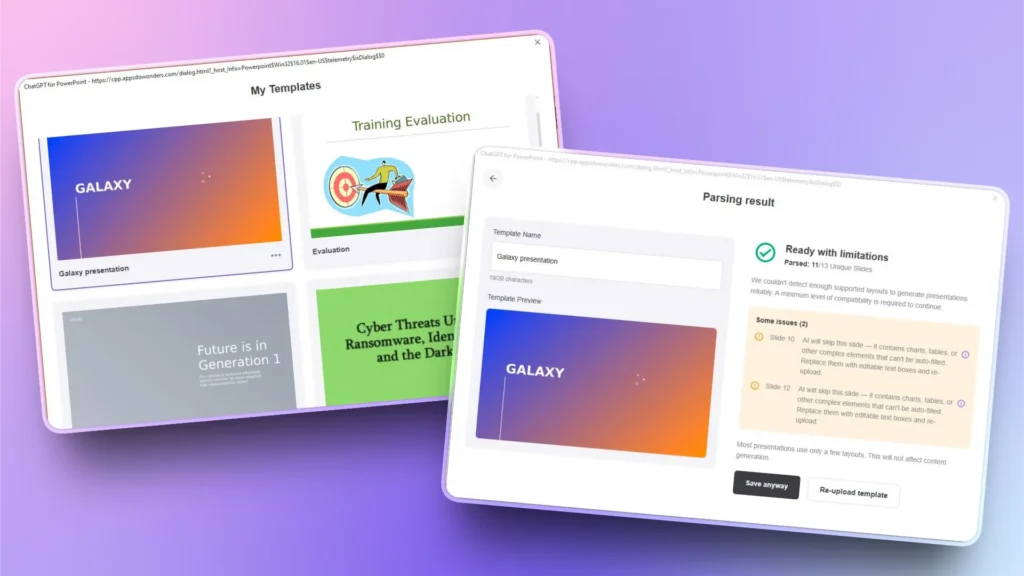
Primer paso: Abrir PowerPoint >> launch Twistly >> click My Templates opción
Segundo paso: Upload your existing presentation and review the suggested changes by Twistly
Tercer paso: Make suggested changes to the brand presentation or save it anyway as a template
Paso 4: Create a new presentation from any input method and choose the recently saved template
Paso 5: Review the outline and wait for a few seconds. Review your final presentation slides
This saved presentation template is now available to all team members who have access to the Twistly add-in. Make sure you have a Team subscription to use the custom template feature in Twistly.
Conclusión
Companies need a master presentation template so that everyone can create brand-consistent presentations without design expertise.
Editing and modifying a template is a lot easier than creating a presentation from scratch. Try Twistly now for free or update your subscription to try the “My Templates” feature for companies.
Crear diapositivas de PowerPoint con IA
Crea presentaciones basadas en IA a partir de cualquier mensaje, documento o vídeo

Empieza a hacer presentaciones con IA en segundos
Acceso instantáneo
Empieza a explorar inmediatamente todas las funciones de Twistly
Sin compromisos
No necesita tarjeta de crédito y puede cancelar en cualquier momento
Asistencia dedicada
Nuestro equipo está aquí para ayudarle en cada paso del camino durante su juicio.