


La coherencia de la marca es la primera víctima de la velocidad en el mundo empresarial moderno. Cuando los plazos se acercan rápidamente, tomar prestadas fotos de archivo y plantillas de PowerPoint gratuitas parece tentador. Las diapositivas incoherentes indican falta de atención al detalle. ¿Cómo utilizar la IA para crear activos de marca coherentes para las diapositivas?
Con las herramientas de IA, no tienes que sacrificar la identidad de la marca por unas diapositivas instantáneas y pulidas. Los activos de marca coherentes para diapositivas incluyen plantillas únicas, logotipo original, diseño personalizado, imágenes personalizadas y otros elementos similares.
Importancia de una marca coherente en el diseño de diapositivas
¿Por qué hay que apostar por una imagen de marca coherente y cuál es su impacto en la audiencia? Invertir en branding produce resultados sostenibles y orgánicos. Estas son algunas de las razones por las que debe utilizar la IA para crear activos de marca coherentes para las diapositivas.
Mejorar el reconocimiento de marca
Utilizar los mismos colores, tipos de letra y logotipos en todos sus materiales de marketing, incluidas las diapositivas, permite al público saber que la misma marca actúa en distintos frentes. Ahora, cualquiera puede reconocer un producto Apple con solo mirar el logotipo. Las grandes marcas prestan especial atención a la coherencia de sus activos para mejorar el reconocimiento de la marca.
Crear credibilidad profesional
Los inversores e incluso los usuarios comunes perciben la coherencia de las diapositivas como parte de una imagen de marca profesional. La atención a estos pequeños detalles tiene un enorme impacto en la mente de los consumidores. Los clientes están más interesados en comprar productos y servicios de marcas que tienen una presencia profesional en los mercados.
Ahorra tiempo
En lugar de utilizar plantillas nuevas cada vez, AI le permite editar plantillas únicas existentes con nuevos contenidos y activos. De este modo, todas las diapositivas tienen el mismo aspecto y coherencia, y los empleados no tienen que dedicar tiempo adicional a la edición nueva.
Creación de activos de marca coherentes con IA
Cuando los usuarios empiezan con plantillas genéricas, no tienen la habilidad ni la experiencia necesarias para mantener todas las diapositivas con el mismo diseño y flujo. Como resultado, las diapositivas de una misma presentación tienen un aspecto diferente y rompen el flujo de la marca. Las plantillas AI PowerPoint son personalizables y consistentes en ese sentido.
¿Qué herramienta es la mejor para crear activos de marca coherentes para diapositivas? Cuál es el mejor creador de PPT con IA para fines profesionales y personales en 2026?
Twistly ha ganado recientemente una enorme atención y reconocimiento como la mejor herramienta de AI para hacer diapositivas consistentes. Las plantillas de PowerPoint con IA son totalmente personalizables, pero dan una sensación de coherencia para garantizar que todas las diapositivas parezcan del mismo mazo.
¿Cómo utilizar Twistly para obtener activos de marca coherentes para las diapositivas?
Twistly es un completo asistente de presentaciones de IA que puede redactar contenidos, diseñar diapositivas, generar imágenes de IA personalizadas y dar formato a las presentaciones.
Los distintos miembros de un equipo pueden elegir una plantilla de la biblioteca de Twistly, y verás que las distintas presentaciones realizadas por distintos miembros tienen un aspecto idéntico, con información única.
He aquí algunos pasos para utilizar la IA con el fin de crear activos de marca coherentes para las diapositivas de tus proyectos profesionales.

Parte 1: Cree los cimientos de su identidad de marca
Incluso las herramientas de IA más potentes necesitan algún tipo de directrices y conjuntos de datos para comprender sus necesidades y objetivos empresariales. Antes de empezar el diseño de la presentación, asegúrate de decidir:
- Colores de la marca
- Logo(s)
- Fuentes primarias y secundarias
- Tono y estilo
- Motivos visuales
Estos elementos no sólo se aplican a los elementos visuales, sino también al mensaje general de la marca. Con Twistly, puedes ajustar el estilo y el tono del contenido de las diapositivas, pero en el caso de los elementos visuales, tienes que ultimar estos aspectos antes de la parte de diseño.
Parte 2: Haz presentaciones con Twistly
Una vez que dispongas de los recursos necesarios, incluidos logotipos y otros elementos de identidad de marca, el siguiente paso es utilizar Twistly AI para crear activos de marca coherentes para las diapositivas. Twistly cuenta con una amplia gama de plantillas AI que puede utilizar o incluso cambiar los colores para que coincidan con los logotipos y la identidad de la marca.
Aquí tienes unos sencillos pasos para hacer una presentación PowerPoint de marca con Twistly utilizando plantillas AI con esquemas de color personalizados.
Paso 1: Elegir el método de entrada para PPT
Inicie una nueva presentación y elija cualquier método de entrada de las opciones disponibles para hacer una presentación. Indique la instrucción, el texto o el tema de la presentación y seleccione el tono y el estilo de la misma.
Paso 2: Revisar el esquema y seleccionar la plantilla
Revise el esquema sugerido para las diapositivas y pase al siguiente paso, en el que tendrá que elegir una plantilla PowerPoint AI.
Puede elegir cualquier color de plantilla de acuerdo con su identidad de marca. Previsualice los diseños de diapositivas y haga clic en Continuar para el paso final.
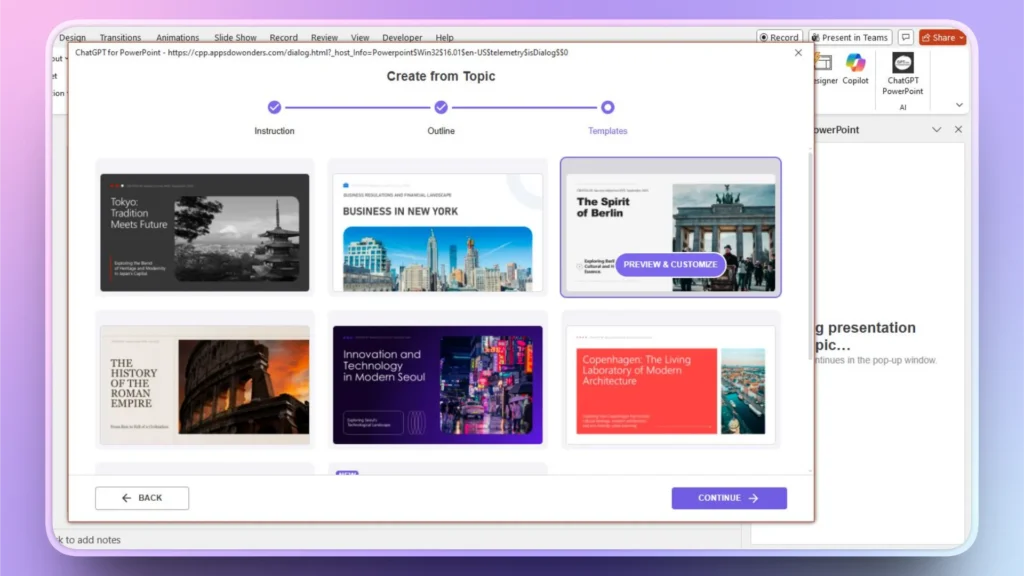
Paso 3: Revisión de las diapositivas PPT
Twistly generará las diapositivas finales en cuestión de segundos. Puedes hacer cambios si es necesario o presentar estas diapositivas con confianza y autoridad.
Parte 3: Generar imágenes personalizadas con Twistly
No quieres añadir imágenes genéricas y de stock a tus diapositivas, y eso está perfectamente bien. No necesitas ninguna herramienta adicional para las imágenes, ya que Twistly integra un avanzado generador de imágenes AI en PowerPoint.
Haga clic en la opción ” Añadir imagen en la ventana de Twistly y, a continuación, elija Imágenes AI como fuente e introduzca la indicación AI. Twistly generará dos resultados de imagen. Puede volver a generar imágenes si necesita más ideas.
Utilizar correctamente la IA
Para obtener mejores resultados, el truco consiste en utilizar una indicación de IA detallada. La precisión de las imágenes generadas por AI depende de la profundidad de la indicación AI. Una vez que tengas la imagen deseada, puedes insertarla en tu diapositiva con un solo clic; no es necesario formatearla ni editarla manualmente.
Conclusión
Desde la redacción hasta el diseño de diapositivas y elementos visuales personalizados, utiliza Twistly AI para crear activos de marca coherentes para diapositivas para presentaciones de PowerPoint. La IA está transformando la forma en que los equipos crean presentaciones de diapositivas. Twistly cuenta con la confianza de millones de usuarios de PowerPoint a los que les encantan las plantillas de IA y las funciones que ofrece este creador de PPT de IA.
En lugar de perder el tiempo con recursos manuales y diapositivas aburridas, lleva la identidad de tu marca a niveles profesionales completamente nuevos y utiliza Twistly para presentaciones PowerPoint.
Utilice el siguiente enlace para descargar la versión de prueba gratuita de Twistly. Ofrecemos una versión de prueba sin riesgo para los nuevos usuarios, donde no necesitan tarjeta de crédito o pago por adelantado para probar este ChatGPT personalizado para PowerPoint.
Crear diapositivas de PowerPoint con IA
Crea presentaciones basadas en IA a partir de cualquier mensaje, documento o vídeo


Empieza a hacer presentaciones con IA en segundos
Acceso instantáneo
Empieza a explorar inmediatamente todas las funciones de Twistly
Sin compromisos
No necesita tarjeta de crédito y puede cancelar en cualquier momento
Asistencia dedicada
Nuestro equipo está aquí para ayudarle en cada paso del camino durante su juicio.