


Twistly is a specialized and dedicated AI add-in for PowerPoint that lives and works inside PowerPoint and can edit and generate slides within seconds. Canva is a full-featured visual design and browser-based presentation platform.
Both tools seem to be offering the same core functionality, but which tool actually fits your workflow? Canva’s flashier homepage does not exactly solve the same problem as Twistly.
Canva Vs. Twistly – The Short Version
¿Qué es Canva?
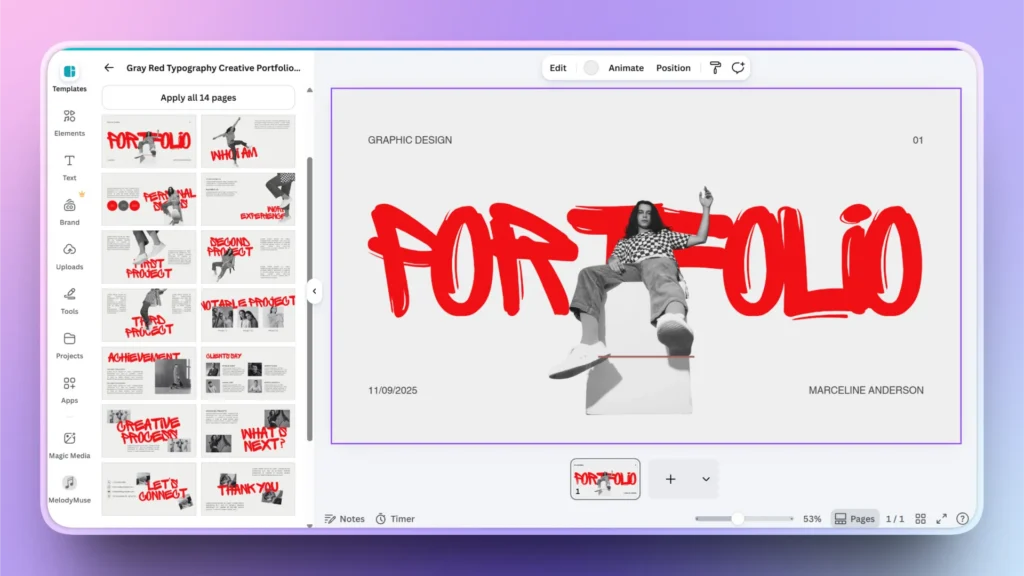
Canva is an all-purpose design platform with a presentation maker as an additional tool. You can use it to make social media posts, flyers, resumes, videos, presentations, brand kits, and dozens of other formats.
Canva offers a browser-based (or app-based) drag-and-drop editor with a massive template library.
¿Qué es Twistly?
Twistly is good at handling all types of presentation-related tasks while living inside PowerPoint. It doesn’t try to be everything. Twistly is designed to do one job very well: turn text, PDFs, Word documents, and topics into a formatted slide deck.
Customer support responses can sometimes take longer than expected.
| Tool | Free plan? | Price from (annual) | G2 rating | Best for |
| Twistly | Yes (7 slides, watermark) | $5/month | 5/5 (5) | PowerPoint users |
Understanding this major difference between both presentation tools will save you from a lot of back and forth.

Capacidades de IA
Users prefer tools that offer AI features to streamline workflow. AI capabilities of both tools make the biggest difference.
Canva AI Capabilities
Magic Studio is a promising AI assistant by Canva to automate the presentation process. This tool offers features like:
- Magic Design
- Text-to-image generation
- Eliminación de fondo
- Magic Resize
These are broad, general-purpose AI tools layered on top of manual design capability. Users eventually must review and redesign most of the slides.
Nota: Most Canva plans include a monthly allotment of AI credits rather than unlimited use. If you make presentations more frequently, you might have to spend a handsome amount on AI credits.
AI Capabilities of Twistly
AI capabilities of Twistly are narrower but arguably deeper for its specific job. You should prefer Twistly if your priority is AI doing the heavy lifting on presentations specifically. Any type of input data or text can be converted into professional slides with Twistly.
Templates and Design Access
Canva
Canva has a larger template library, and it is the biggest selling point. There are thousands of templates used for social media, posters, and presentations.
Digital platforms are flooded with generic Canva designs, so staying different with stock photos and template designs won’t be easy.
Twistly
With limited templates in the library, Twistly has focused on providing more customization flexibility. Its library is scoped specifically to presentations. Once you have chosen any design, Twistly will automatically suggest the layout and other aspects for your slides.
Output Formats and Integration
Canva
Canva supports exporting to a wide range of formats, including PDF, PNG, JPEG, PPTX, and other popular formats. The issue is with the handling of complex data. For visually rich slides with few lines of text, Canva is good enough to create slides.
Creating data-heavy slides with lots of charts and data might be a real challenge for users. Sometimes exporting to PowerPoint might break formatting, and some aspects of Canva slides may not work smoothly in PowerPoint.
Twistly
Twistly’s output is, by design, a native PowerPoint file. If PowerPoint is your final destination, then working inside PowerPoint makes it easier for you to handle more work in less time. There is no switching between web-based apps and PowerPoint.
Twistly works best for a frictionless native PowerPoint workflow. Access to AI features of Twistly and native PowerPoint tools makes it easier for experts and beginners to get their desired results.
Canva and Twistly – Pricing
Canva Packages
Canva offers a usable free plan that can be used for many basic tasks. For professionals, upgrading to paid plans might be a better option. Paid plans have generally trended upward in price through 2025–2026.
Here is a breakdown of Canva pricing. Remember that you cannot buy Canva for Presentations only, as you have to upgrade your package, and the presentation maker comes as part of the plan. These prices are per month/ one person.
Free Plan: 1,000+ design types, 5GB of cloud storage, up to 200 Standard AI uses or 20 Premium AI uses
Pro Plan: US$18 /month for one person, Premium tools, 100GB of cloud storage, 10x more AI than Canva Free
Business Plan: US$25 /month per person, 100 Brand Kits and approvals, 10% discount on print orders, 500GB of cloud storage, 20x more AI than Canva Free
Enterprise Plan: Custom pricing, Priority support, 1TB of cloud storage, 20x more AI than Canva Free
Twistly Packages
Twistly has three pricing tiers that come with unlimited AI credits. Starter package starts at $9.60, billed annually.
- Starter for $16/month (up to 15 slides per presentation and unlimited AI credits)
- Pro for $20/month (up to 50 slides per presentation and unlimited AI credits)
- Team for $20/month
Users can save 40% by choosing annual billing. New users can claim a free trial without a credit card.
Free Plan: Users can create up to 7 slides with a watermark in the free plan.
Which Tool should I Choose?
Now, you have basic information about both AI presentation makers. Twistly and Canva are popular among users for different reasons.
Choose Canva
- You need one platform for many types of visual content
- Your team collaborates across multiple content formats
- You want a large, browsable template and stock assets
Choose Twistly
- Presentations are your primary deliverables
- You already work inside Microsoft PowerPoint
- You want speaker notes, translation, and layout suggestions generated automatically.
- You want AI to handle the heavy lifting of turning raw content
Palabras finales
Choose Canva for broad visual editing and creation, and pick Twistly if you need a dedicated AI tool for PowerPoint presentations. Twistly offers a wide range of text, design, and format optimization tools that PowerPoint users like. Try their free versions to decide which one suits your needs.










Empieza a hacer presentaciones con IA en segundos
Acceso instantáneo
Empieza a explorar inmediatamente todas las funciones de Twistly
Sin compromisos
No necesita tarjeta de crédito y puede cancelar en cualquier momento
Asistencia dedicada
Nuestro equipo está aquí para ayudarle en cada paso del camino durante su juicio.