


¿Cómo crear una propuesta comercial para clientes con IA?

Crear una presentación de propuesta para clientes con IA consiste en usar herramientas de IA como Twistly para automatizar la generación del esquema, la personalización de la plantilla y la creación de diapositivas. Desde el contenido hasta los diseños, cada aspecto de la presentación de propuesta se elabora con una herramienta de presentaciones para ventas.
Para algunos usuarios, la idea de usar la IA para presentaciones de propuestas a clientes puede ser nueva. Por eso hemos explicado cada paso para crear una presentación de propuesta para clientes con IA en minutos.
¿Qué es una propuesta para clientes?
Una propuesta para clientes es un documento formal y persuasivo que se envía a un cliente potencial para explicar cómo un proveedor de servicios puede resolver sus problemas concretos, con el alcance del proyecto, el calendario y los precios.
Twistly es una herramienta excelente que puede generar con IA propuestas para clientes con un alto índice de conversión y, además, agilizar todo el proceso.
¿Por qué cuesta tanto preparar propuestas a mano?
Crear una presentación de propuesta pulida y persuasiva lleva tiempo. No son como las presentaciones sencillas, en las que bastan unas cuantas imágenes y cuadros de texto.
Tienes que empezar con un discurso persuasivo, un esquema convincente, diseñar diapositivas profesionales y atractivas, y después redactar el contenido y añadir elementos visuales a esas diapositivas. Cada aspecto de una presentación de propuesta para clientes requiere personalización.
Conseguir los resultados que buscas con un enfoque manual en PowerPoint puede llevar horas o incluso días hasta tener propuestas eficaces.
La importancia de una propuesta eficaz
La mayoría de los emprendedores, proveedores de servicios, vendedores y fundadores de startups no se dan cuenta de la importancia de unas propuestas profesionales. Un enfoque formal para presentar tu idea o servicio a clientes potenciales puede responder a muchas preguntas importantes que pueden tener las partes interesadas, los inversores y los clientes, como:
- ¿Entiendes su problema?
- ¿Puedes conseguir resultados?
- ¿Cuál es tu estrategia?
- ¿Cuánto costará?
- ¿Qué pasa después?
Una presentación de propuesta bien estructurada que responda a todas estas preguntas puede causar una impresión duradera en tus clientes y ayudarte a convencerlos para que actúen.
Pasos para crear una presentación de propuesta para clientes con IA
La idea de usar Twistly es automatizar todo el proceso y, aun así, obtener resultados personalizados en cada presentación de propuesta. Twistly ofrece varias opciones para adaptar el contenido y el diseño a tu público y mercado objetivo.
¿Ya tienes instalado el complemento de Twistly en PowerPoint? Si no, usa el enlace de abajo para conseguir tu versión de prueba gratuita de Twistly. Una vez instalado, sigue estos sencillos pasos para crear una presentación de propuesta para clientes con IA.
Crear diapositivas de PowerPoint con IA
Crea presentaciones basadas en IA a partir de cualquier mensaje, documento o vídeo

Paso 1: Entiende el briefing del cliente
Incluso antes de abrir PowerPoint, tienes que recopilar todos los datos y la información que te ha dado el cliente. Debes conocer el sector, los objetivos de negocio, los problemas y el público objetivo o los competidores del negocio.
Una vez recopilada esta información, la siguiente fase es definir la estructura principal de la propuesta para tu presentación. Según las necesidades y exigencias del cliente, puedes adaptar la estructura, pero esta es una estructura eficaz que funciona para la mayoría de las propuestas.
Si no tienes claro cuál es la mejor estructura para tu presentación, Twistly puede generar el mejor esquema posible a partir de tus instrucciones.
| Sección de la diapositiva | Propósito |
|---|---|
| Título Diapositiva | Presenta tu propuesta |
| Problema del cliente | Demuestra que entiendes sus problemas |
| Solución propuesta | Explica tu enfoque |
| Estrategia/proceso | Describe los pasos de ejecución |
| Entregables | Aclara qué recibe el cliente |
| Cronología | Fija expectativas |
| Precios | Presenta los paquetes o la inversión |
| Casos de éxito | Genera confianza y credibilidad |
| ROI/ventajas | Destaca los resultados esperados |
| Próximos pasos | Anima a actuar |
Paso 2: Personaliza la presentación para tu público objetivo
Twistly ofrece varias opciones para crear una presentación. Supongamos que queremos crear una presentación sobre un tema.
Ahora puedes adaptar la presentación a tu público objetivo y definir el tipo de presentación y el contenido. Cuanta más personalización, mejores resultados obtendrás para tu proyecto.
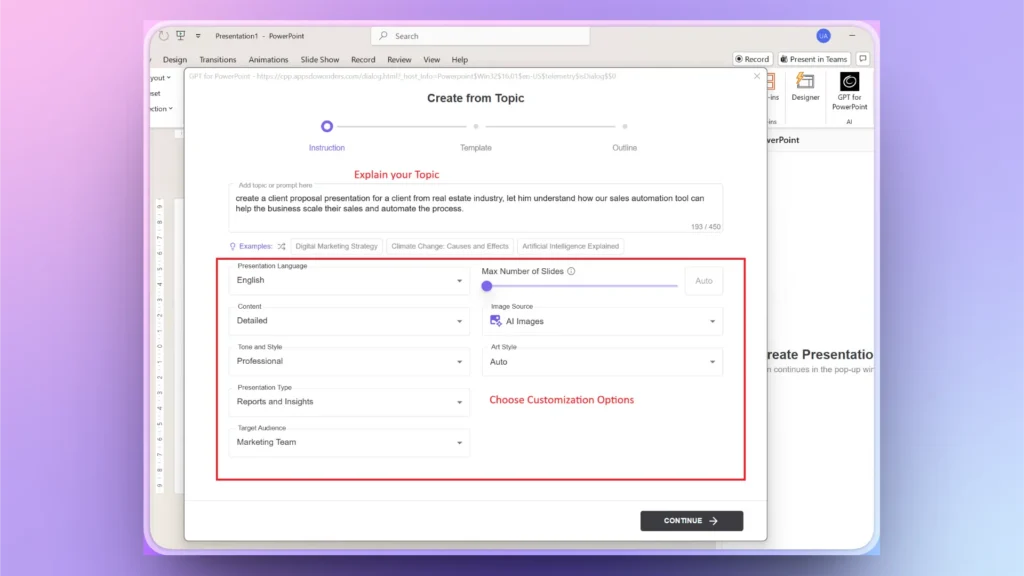
Paso 3: Elige una plantilla profesional
Twistly tiene varias plantillas de PowerPoint con IA totalmente personalizables con IA y con las funciones nativas de PowerPoint. Elige la plantilla que más te guste y previsualiza las diapositivas. También puedes elegir un color personalizado para la plantilla según tu marca.
Nota: Twistly también permite a los usuarios subir sus propias presentaciones de marca y crear plantillas personalizadas con IA para futuros proyectos. Sube tu presentación actual y Twistly extraerá automáticamente los elementos importantes del PPT para crear una plantilla reutilizable.
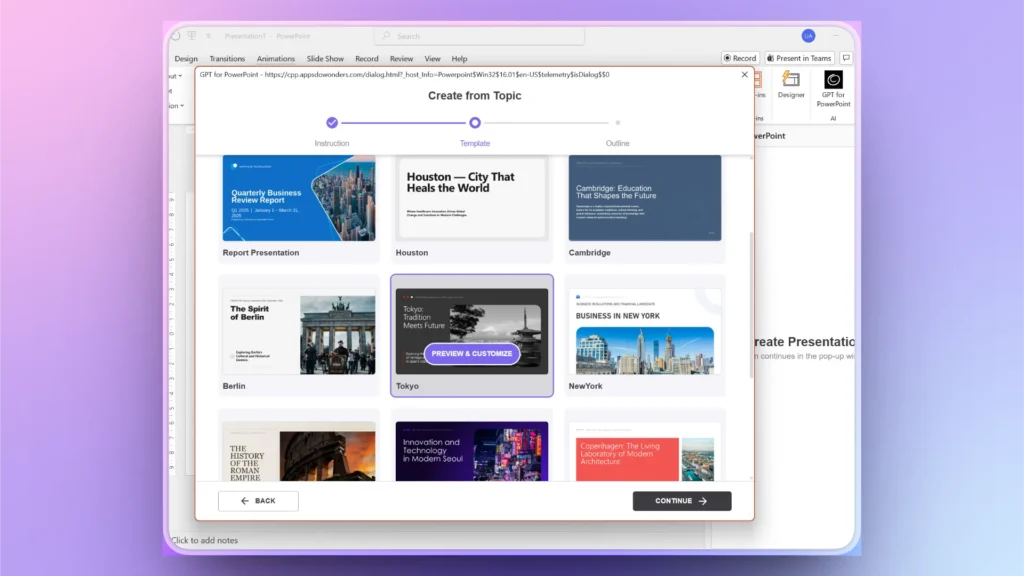
Paso 3: Revisa el esquema de la propuesta
La IA generará un esquema que cubre la mayoría de los puntos, pero si ves que falta alguno, usa las opciones disponibles para eliminar, reordenar o añadir diapositivas al esquema.
Paso 4: Tus diapositivas están listas
En pocos segundos tendrás listas tus diapositivas finales. Según la información que hayas aportado, puede que a la presentación final le falten algunos aspectos. Repasa las diapositivas y añade las que falten.
Si todo está bien, guarda tu presentación de propuesta y preséntala con confianza.
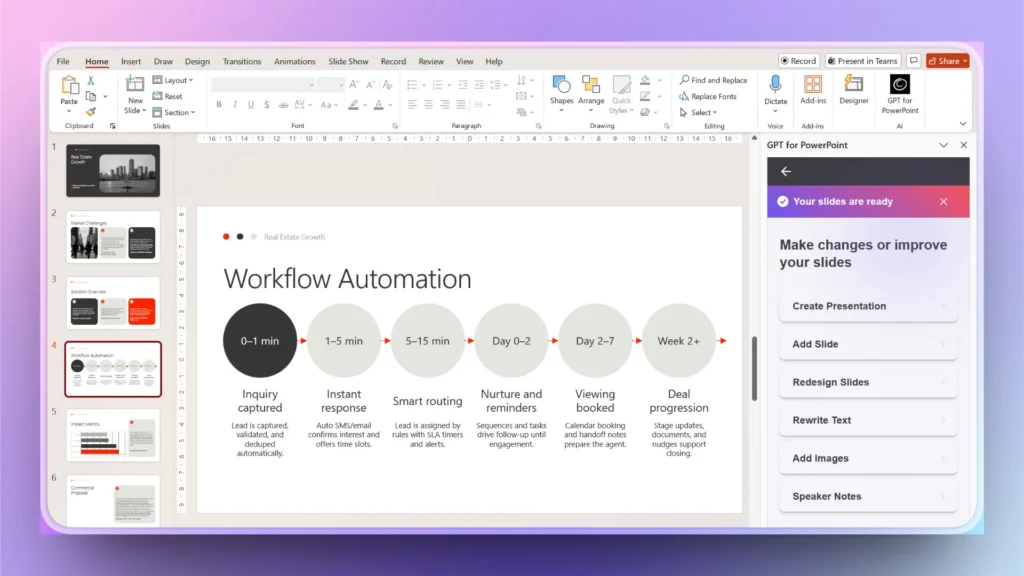
Paso 5: Añadir diapositivas personalizadas
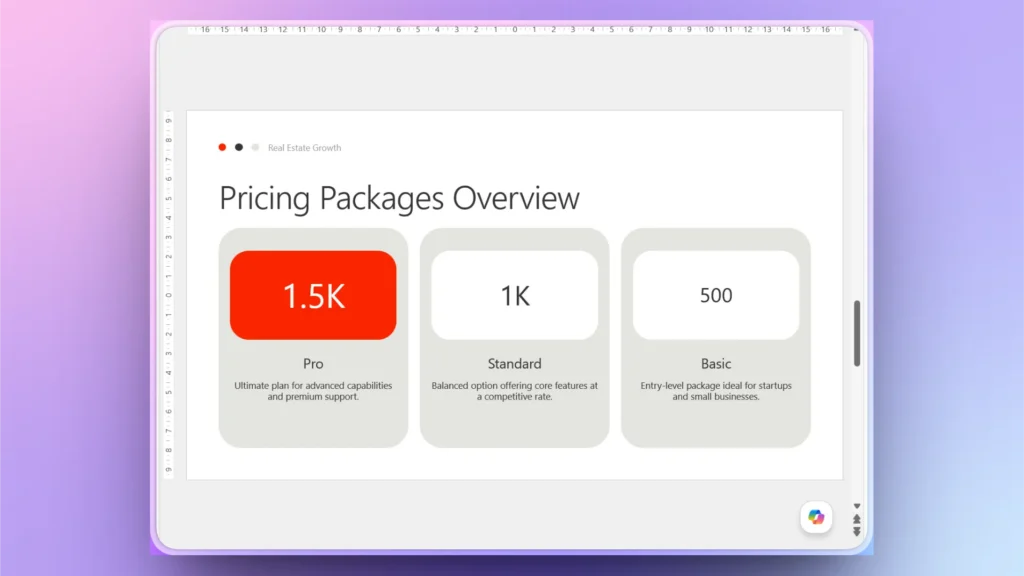
Supongamos que a la presentación final le falta la diapositiva de precios. Puedes usar las funciones de IA de Twistly para crear esta diapositiva personalizada. El proceso es sencillo.
Add Slide >> elige Slide Outline >> describe tu diapositiva.
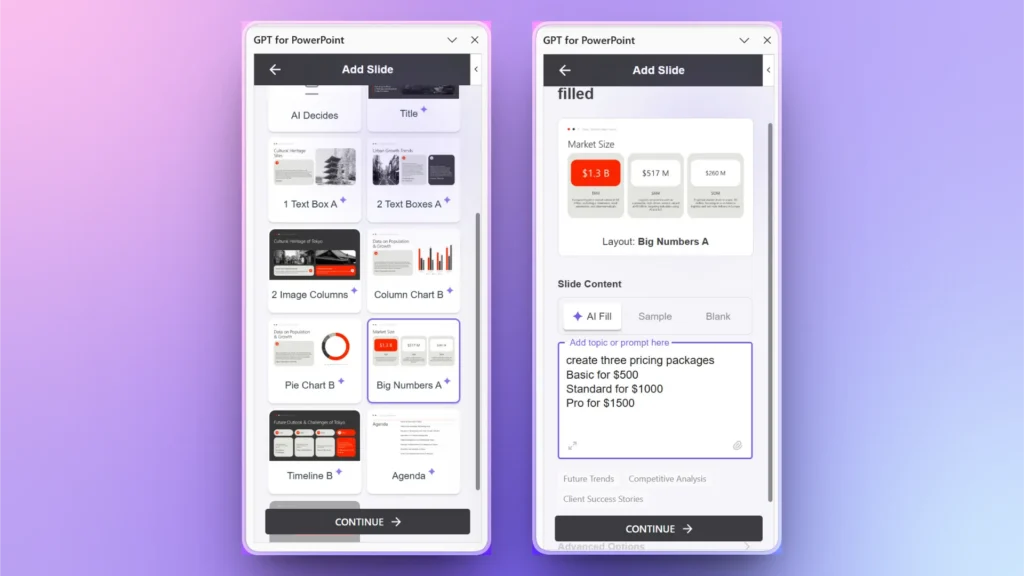
En pocos segundos, Twistly generará una diapositiva de precios personalizada totalmente alineada con el tema de tu propuesta. Aun así, puedes hacer cualquier cambio que quieras en esta o en todas las diapositivas con IA. El único límite es tu imaginación.
Consigue la mejor herramienta de IA para crear propuestas para clientes
Tanto si eres especialista en marketing, comercial, emprendedor o fundador de una startup, Twistly es la mejor herramienta de IA para crear presentaciones de PowerPoint potentes. Con pequeños cambios en tus preferencias de presentación, puedes obtener una presentación personalizada para cualquier nicho o sector.
Descarga ahora tu prueba gratuita y empieza a usar Twistly sin tarjeta de crédito. Pruébalo y, si te convence, mejora tu suscripción a premium por un precio competitivo.
Crear PowerPoint
Diapositivas con IA
Cree presentaciones basadas en IA a partir de
cualquier mensaje, documento o vídeo


Conclusión
Twistly es una de las mejores opciones para crear con IA una presentación de propuesta para clientes si buscas rapidez y un trabajo de calidad. A diferencia de otros creadores de presentaciones con IA, Twistly no te obliga a abandonar PowerPoint.
El complemento vive y funciona dentro de PowerPoint, con automatización completa y la potencia combinada de las funciones de IA y las herramientas nativas de PowerPoint. Descárgalo ahora y empieza a crear presentaciones impresionantes en segundos.










Empieza a hacer presentaciones con IA en segundos
Acceso instantáneo
Empieza a explorar inmediatamente todas las funciones de Twistly
Sin compromisos
No necesitas tarjeta de crédito y puedes cancelar cuando quieras
Asistencia dedicada
Nuestro equipo te ayudará en cada paso durante tu periodo de prueba