


Los jefes de proyecto son fríos porque lo único que hacen es asignar tareas. La mayoría de los miembros piensan así, pero en realidad gestionar un proyecto o supervisar un equipo es el trabajo más duro de la oficina.
Desde una planificación impecable hasta unas operaciones fluidas y una comunicación eficaz, los gestores de proyectos son responsables de muchas otras cosas.
Los verás haciendo presentaciones un día sí y otro también. La falta de tiempo les hace sentirse frustrados porque hacer una presentación profesional puede llevar fácilmente horas.
En 2026, los gestores de proyectos ya no tendrán que perder el tiempo con presentaciones PPT manuales y convencionales. Los flujos de trabajo de presentación de IA para gestores de proyectos están aquí para ayudarte.
¿Qué son los flujos de trabajo de presentación de IA?
El flujo de trabajo de presentaciones con IA es el proceso de integración de herramientas y recursos de IA en la creación y realización de presentaciones. Los gestores de proyectos pueden utilizar estos flujos de trabajo de IA para mejorar su eficiencia laboral y automatizar tareas repetitivas mejorando el contenido y la calidad visual de las presentaciones.
Este enfoque permite a los gestores de proyectos centrarse en los mensajes estratégicos y en las cosas que más importan para el éxito del proyecto. Algunos aspectos importantes de los flujos de trabajo son:
- Generación de contenidos mediante IA
- Diseño y maquetación automatizados de diapositivas
- Mejora visual
- Comentarios y edición en tiempo real
- Visualización de datos e integración de conocimientos
Herramientas de IA como Twistly pueden convertir datos brutos en gráficos significativos, crear resúmenes ejecutivos, crear elementos visuales, dar formato a las diapositivas y optimizar el contenido. Estas son las tareas que requieren horas de trabajo manual.
Ventajas de los flujos de trabajo de presentación de IA para directivos
El uso de Twistly y otras herramientas de IA no se limita a gestores de proyectos y ejecutivos, sino que empleados comunes, usuarios de ordenadores, estudiantes, equipos de RRHH y profesores también pueden beneficiarse igualmente de los flujos de trabajo de presentación con IA.
Las herramientas de IA ofrecen ventajas estratégicas para los usuarios habituales de PowerPoint. Si aún no ha probado Twistly, solicite ahora su versión de prueba gratuita y empiece a crear presentaciones con IA para su próximo proyecto. Entre las principales ventajas se incluyen:
- Ahorro de tiempo y reducción de la repetición de las mismas tareas
- Mayor calidad visual y narrativa
- Mejor comunicación con las partes interesadas
Procesar informes financieros y otros conjuntos de datos en bruto no es fácil para los interesados que no tienen conocimientos financieros. Con los flujos de trabajo de presentación de IA para gestores de proyectos, el procesamiento de datos resulta más sencillo y visualmente atractivo.
Flujos de trabajo de presentación de IA más fluidos con Twistly
Twistly se ha desarrollado para una amplia gama de usuarios, desde jefes de proyecto hasta empleados y miembros de equipos. Como ya hemos hablado de los componentes clave de los flujos de trabajo de IA, ahora veremos cómo Twistly ayuda a conseguir estos elementos.
1. Generación de contenidos de IA
Twistly puede generar contenidos precisos y relevantes sobre cualquier tema. También puedes cargar tus propios materiales o pedirle a la IA que escriba el contenido desde cero. A diferencia de otros creadores de PPT, Twistly no se basa únicamente en las indicaciones de la IA. Se analizan los datos completos de la presentación y el contexto para escribir contenido relevante.
Una vez que tenga el primer borrador del contenido generado por IA, aún tiene posibilidades ilimitadas de mejorar y potenciar ese contenido.
Las funciones de IA le ayudan a corregir errores, ampliar, acortar, traducir, cambiar el tono del contenido y realizar muchas otras tareas.
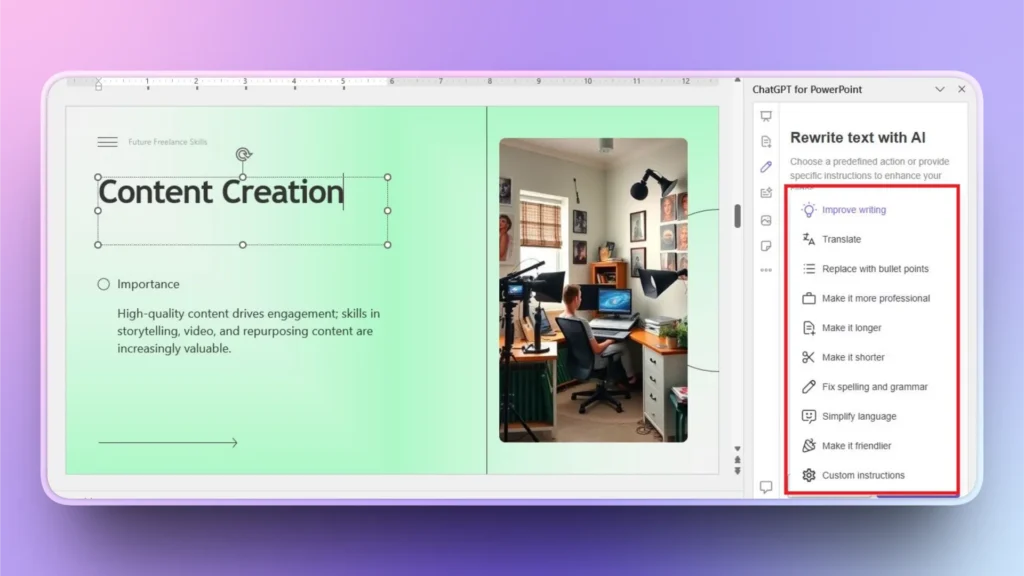
Como puede ver en la imagen, hay una larga lista de acciones predefinidas que puede realizar relacionadas con el contenido de las diapositivas. Si la acción que desea no está en la lista, explique sus acciones mediante indicaciones e instrucciones personalizadas de IA.
2. Diseño y maquetación automatizados de diapositivas
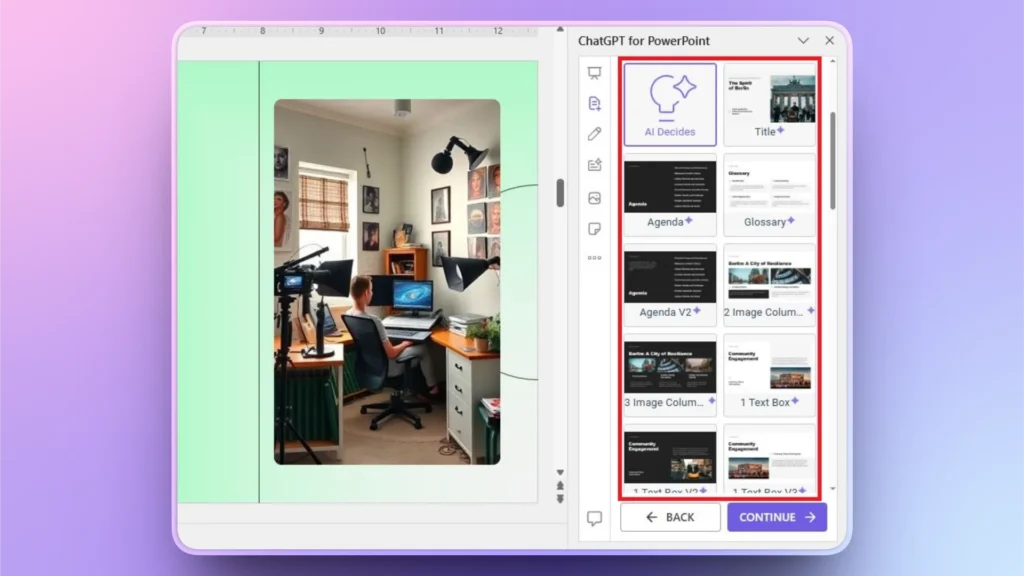
Cuando elijas cualquier plantilla de la biblioteca de Twistly, no tendrás que diseñar, editar o formatear manualmente el diseño. La IA evaluará automáticamente los datos e insertará elementos visuales y texto en los campos pertinentes. Convertir una plantilla de IA en un PPT listo para presentar no te llevará más de 90 segundos con Twistly.
También puede añadir diapositivas individuales a su presentación existente o nueva. Hay varios diseños de diapositivas predefinidos que los usuarios pueden insertar con un solo clic. Si se requieren más cambios que quedan fuera del alcance de AI, los administradores pueden recurrir en cualquier momento a las herramientas nativas de PowerPoint.
3. Visuales personalizados
En lugar de buscar imágenes relevantes y precisas en varios sitios, Twistly permite a los gestores de proyectos encontrar e insertar imágenes directamente en PowerPoint. Hay dos opciones para las imágenes: sitios gratuitos de imágenes de stock o imágenes AI.
Al elegir imágenes de archivo gratuitas, Twistly muestra los resultados pertinentes de los mejores sitios y, a continuación, los usuarios pueden insertar estas imágenes en la diapositiva con un solo clic, sin necesidad de formatearlas manualmente.
Para las imágenes AI, los usuarios proporcionan una indicación AI detallada, Twistly genera dos resultados y los usuarios pueden regenerar las imágenes para obtener más opciones. Desde la búsqueda de imágenes hasta la sustitución de las antiguas, todo se hace automáticamente sin necesidad de edición manual.

4. Visualización de datos y perspectivas
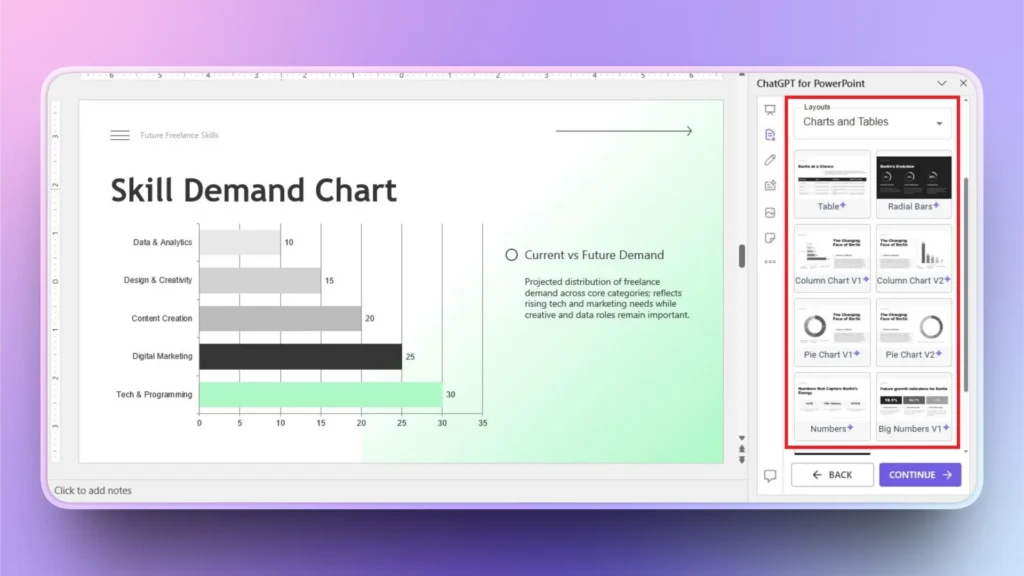
Convertir datos brutos en gráficos y tablas visualmente atractivos siempre ha sido un gran reto para los usuarios de PowerPoint. Manejar grandes cantidades de datos requiere experiencia y tiempo. Las formas manuales son complicadas y agitadas.
Twistly puede convertir fácilmente cualquier conjunto de datos complejo en atractivos gráficos. En la biblioteca de Twistly hay disponibles gráficos predefinidos y otros diseños de visualización de datos.
Sólo tienes que seleccionar el diseño e introducir los datos; la IA se encargará del resto. Desde el diseño del gráfico hasta la disposición de los valores en él, todo está automatizado y sucede con precisión.
Buenas prácticas de los gestores de proyectos para los PPT
Las presentaciones son una parte importante de la comunicación profesional, y los gestores necesitan diapositivas precisas y significativas para sus proyectos y equipos. Aquí tienes algunos consejos prácticos para gestores de proyectos que quieran mejorar su comunicación con presentaciones de PowerPoint:
- Definir objetivos claros y proporcionar directrices pertinentes para la herramienta de IA.
- Utilizar plantillas coherentes para la identidad de marca
- Aproveche un generador de imágenes de IA y contenidos de IA para temas y conceptos complejos.
- Entrenar Twistly y utilizar correctamente las funciones de IA de la herramienta
Palabras finales
Los flujos de trabajo de presentación de IA para gestores de proyectos les permiten transformar datos sin procesar en diapositivas pulidas con el complemento Twistly. Integra funciones similares a ChatGPT en tu software de PowerPoint descargando gratis una versión de prueba de Twistly.
Consigue tu versión de prueba gratuita y disfruta sin riesgos del mejor complemento de IA para PowerPoint. Únete a la comunidad de usuarios inteligentes de PowerPoint que comprenden el verdadero potencial de Twistly para tareas y proyectos personales y profesionales.
Crear PowerPoint
Diapositivas con IA
Cree presentaciones basadas en IA a partir de
cualquier mensaje, documento o vídeo






Empieza a hacer presentaciones con IA en segundos
Acceso instantáneo
Empieza a explorar inmediatamente todas las funciones de Twistly
Sin compromisos
No necesita tarjeta de crédito y puede cancelar en cualquier momento
Asistencia dedicada
Nuestro equipo está aquí para ayudarle en cada paso del camino durante su juicio.