


AI-Driven Data Storytelling for Financial Reports
Financial reports are usually number-heavy and complicated documents that demand experience and time. Navigating through raw data to make informed decisions is important for any company or business.
There is a major issue with these reports; not everyone can process that data. An investor may not even understand your financial reports at all.
You have to use AI-driven data storytelling for financial reports if you want these documents to make sense to a normal user, an investor, a stakeholder, or any other individual. Visual designs and AI tools like Twistly turn raw data into visually appealing slides inside PowerPoint.
Twistly for AI-driven Data Storytelling
While working with Twistly for AI-driven data storytelling for financial reports, users can input data in plain language or paste a table, and Twistly will automatically turn that table into a chart or timeline. You can even explain a scenario in natural language, and AI will give you visually appealing data in the form of tables, charts, or graphs.
Instead of using several tools to process data or using Excel sheets to feed charts, everything happens inside the Twistly window without leaving PowerPoint. Give it a try, and you won’t ever have to spend hours on manual presentations. Transform raw data into AI-driven data storytelling with Twistly.
Crear PowerPoint
Diapositivas con IA
Cree presentaciones basadas en IA a partir de
cualquier mensaje, documento o vídeo


What is AI-driven Data Storytelling?
Instead of manually reviewing and analyzing the raw data, the use of artificial intelligence tools to analyze and review data is called AI-driven data storytelling. AI tools can:
- Analyze complex financial datasets
- Identify trends, anomalies, and key insights
- Structure those insights into a logical narrative
- Present them visually through charts, tables, and slides
Financial data does not solely answer the questions of executives and investors. Only people with strong knowledge of the financial sector can understand these complicated reports.
A common person, or stakeholder, would want to know what changed this year, how much profit the company earned, and what possible growth opportunities there are based on these financial reports.
How Twistly Transforms Financial Reporting
Twistly is used by millions of PowerPoint users for their personal and professional presentations. There are unlimited use cases of Twistly and PowerPoint, and for financial reporting, there are specific data visualization tools that can turn raw data into compelling charts and slides.
Here are some good reasons and benefits of using Twistly for AI-driven data storytelling for financial reports in PowerPoint.
Automated Insight Discovery
When you have to turn large data into charts, scanning these reports can be very challenging. Twistly can instantly scan the whole financial report and highlight the changes in the datasets. With AI tools, you don’t have to spend hours on manual analysis.
Narrative-first Report Structure
Storyline is important in all presentations. Tables, charts, and other similar elements cannot attract the attention of the audience. You need to build a storyline, and Twistly has AI PowerPoint templates that allow you to start a financial report presentation with an introduction slide, a summary, and other slides.
The idea of adding a storyline to a financial report is to build a narrative around:
- Executive summary
- Key performance highlights
- Supporting data visuals
- Risks and forecasts
Smarter Data Visualization
Boring tables are not enough to present complicated data. The best data visualization approach helps the audience grasp the idea at a very first glance. For that purpose, use charts and timelines. With Twistly, you don’t need to make charts from scratch.
You just choose a slide layout, input your data, and Twistly will automatically turn that raw data or table into a visually appealing chart.
How to Turn Raw Data into AI-driven Data Storytelling?
Using AI tools like Twistly for financial reports and presentations will be hard and time-consuming. This is the very first thought that appears in the minds of many readers. In reality, Twistly is the easiest AI tool for PowerPoint that works just like ChatGPT for presentations.
You need no prior experience or knowledge of slide design to use Twistly, and for some basic reports, you simply paste data into Twistly, and AI will do the rest. How to make it happen? Follow these exact steps.
Step 1: Add a New Slide
You can create charts and tables for any existing presentation or a blank one. We will add a chart to a blank presentation. Once PowerPoint is open, launch Twistly and click the ” Add Slide option.

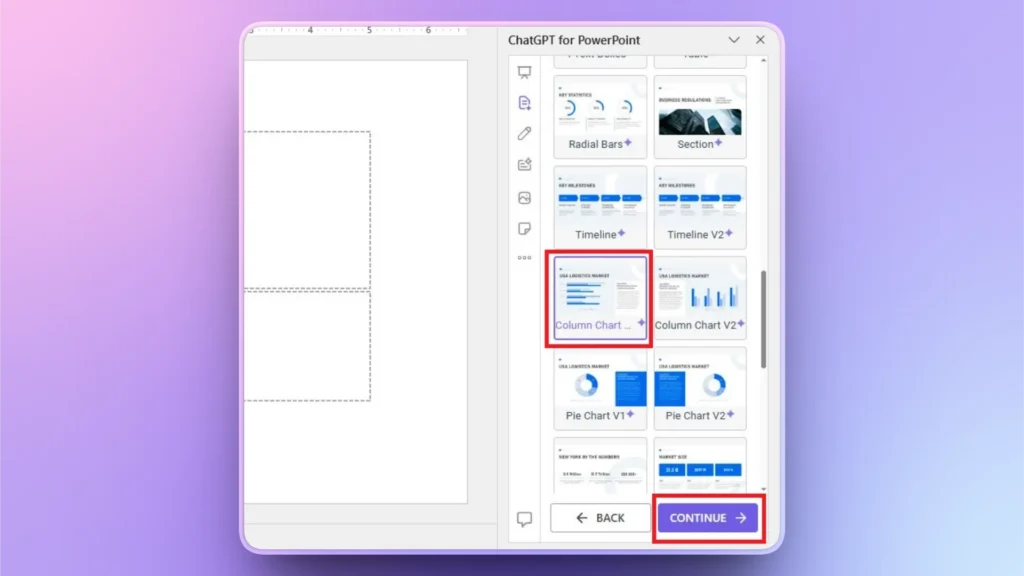
Step 2: Select Slide Layout
Twistly has some predefined slide layouts that you can select with one click. As we want a chart, we selected the chart layout from the available options. Click Continue to move to the next step.
Step 3: Input Raw Data
Paste your raw data into the Twistly window. You can explain the dataset in plain English, too, or paste a table in the text box. Click Continue and wait for a few seconds.
Step 4: Your Chart is Ready
Within a few seconds, Twistly will give you an engaging chart with text explaining the concept of data in simple language. If you want, you can make further changes to the chart with AI or PowerPoint tools.

How to Present Data with Interactive Storytelling?
Use of tools like Twistly gives you enough time to work on personal communication and delivery of the presentation. AI saves you enough time so that you can focus on things that matter the most. Here are some best practices for AI-driven data storytelling for financial reports:
- Start with clean, well-structured data
- Define your audience before generating slides
- Use AI insights as guidance, not blind conclusions
- Keep visuals simple and focused
Palabras finales
As financial data grows more complex, storytelling will become a core skill for finance professionals, and Twistly makes it simpler. Financial reporting does not need to be boring and complicated, as tools like Twistly can turn any boring table into visual charts.
Reading about the powerful AI features of Twistly may seem overwhelming, but you will love the tool while practically making presentations. Try Twistly for free by downloading the trial version from the link below. It is as simple as using ChatGPT for presentations.
Crear diapositivas de PowerPoint con IA
Crea presentaciones basadas en IA a partir de cualquier mensaje, documento o vídeo



Empieza a hacer presentaciones con IA en segundos
Acceso instantáneo
Empieza a explorar inmediatamente todas las funciones de Twistly
Sin compromisos
No necesita tarjeta de crédito y puede cancelar en cualquier momento
Asistencia dedicada
Nuestro equipo está aquí para ayudarle en cada paso del camino durante su juicio.