



Managers, CEOs, and executives cannot sit for hours to listen to long presentations; they want clarity. The executive summary slide offers an overview of the main points described in the presentation. What are the perfect AI-powered executive summary slide templates? What’s the benefit of using AI PowerPoint templates?
With tools like Twistly for PowerPoint, users don’t need to make summary slides manually. AI templates in the Twistly library have the executive summary slide covered for the managers and other executives.
What is an Executive Summary Slide?
An executive summary is a high-level overview of a detailed report or paper. The executive summary slide is designed to deliver the outcome of the presentation at a glance.
This one summary slide plays an important role in making decisions and building strategies. Many types of presentations can have executive summary slides, including:
- Board presentations
- Investor pitch decks
- Strategy reviews
- Project updates
- Sales and performance reports
Why Manual Summary Slides Fall Short
You can manually add an executive summary slide to your presentation, but you will face different challenges and issues. Designing an optimized and most important slide of the presentation will take hours.
Users need to go through all the slides to identify the most important points that are related to the managers and executives. The second challenge is to design attractive slides for easy data processing for the reader. Some common issues with conventional summary slides include:
- Overloaded text and bullet-heavy layouts
- Poor visual hierarchy
- Inconsistent messaging across teams
- Difficulty extracting key points
- Lack of design expertise
With AI-powered executive summary slide templates, you don’t need to worry about manual editing and writing. AI tools will analyze the complete presentation and then automatically generate a summary slide based on the selected template.
Why AI-Powered Executive Summary Slide Templates
AI-powered PowerPoint templates are way more flexible and optimized than normal templates. Editing and formatting AI templates is easy and fast. Twistly offers some of the best AI-powered executive summary slide templates.
Users can create an individual summary slide for a new presentation or add a summary slide to an existing presentation with one click.
Here are some practical reasons why AI-powered executive summary slide templates by Twistly are preferable for most presentations.
1. Smart and Auto Content Summarization
Depending on your input, Twistly will automatically analyze the source and presentation content to create an AI content summary. Instead of manually reviewing the entire presentation, users can add an executive summary slide to the presentation with one click.
2. Executive-friendly Slide Structure
There is a certain type of structure preferred for executive summary slide templates where managers and CEOs can easily identify the main points. The proven framework for executive summary slide templates includes:
- Objective / Context
- Key Findings
- Business Impact
- Recommendations / Next Steps
3. Professional and Clean Design
Easy-to-read text, clean layout, balanced spacing, and some other important factors shape a perfect summary slide. Twistly can generate such a slide within seconds.
4. Data-driven Highlights
Important KPIs, metrics, and other figures are also added to the executive summary slide so that key points are easily available to the readers.
How to Add an Executive Summary Slide with Twistly?
Twistly has AI features and tools that can elevate the experience of any PowerPoint user. Whether you want to add an individual slide or make a new presentation from scratch, Twistly has AI features for every purpose.
Twistly is an easy-to-use AI tool for PowerPoint presentations, and by following these simple steps, you can insert an executive summary slide into your new or existing presentation.
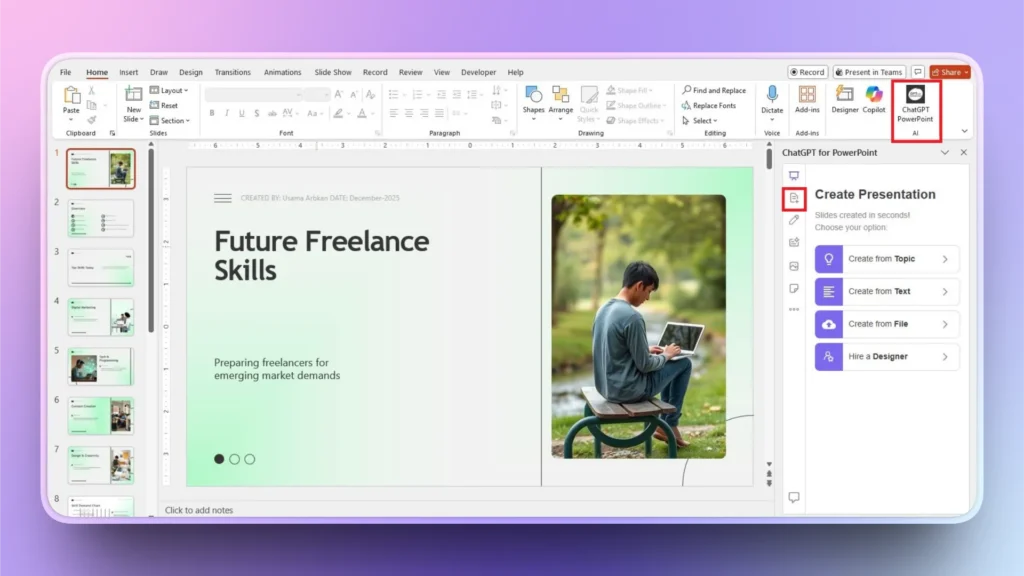
Step 1: Open PowerPoint and Twistly
Open your existing presentation where you want to add a summary slide and then launch the Twistly add-in. You will see a dedicated control window for Twistly.
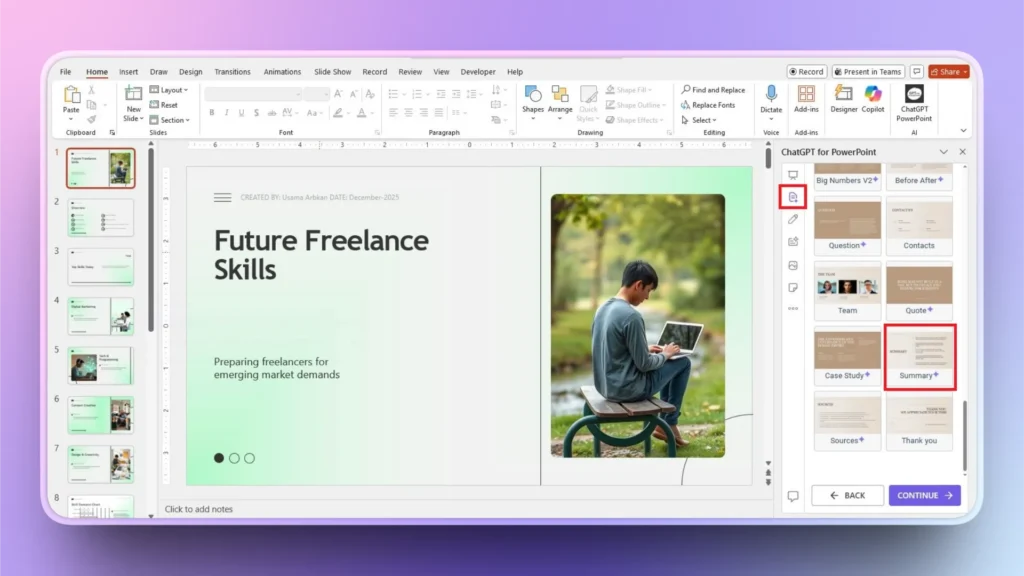
Step 2: Click Add Slide >> Add Summary Slide
From the left menu in the Twistly window, click the Add Slide button, and then from the available slide templates, choose the Summary slide and click continue. You can also choose any other AI template according to your presentation.
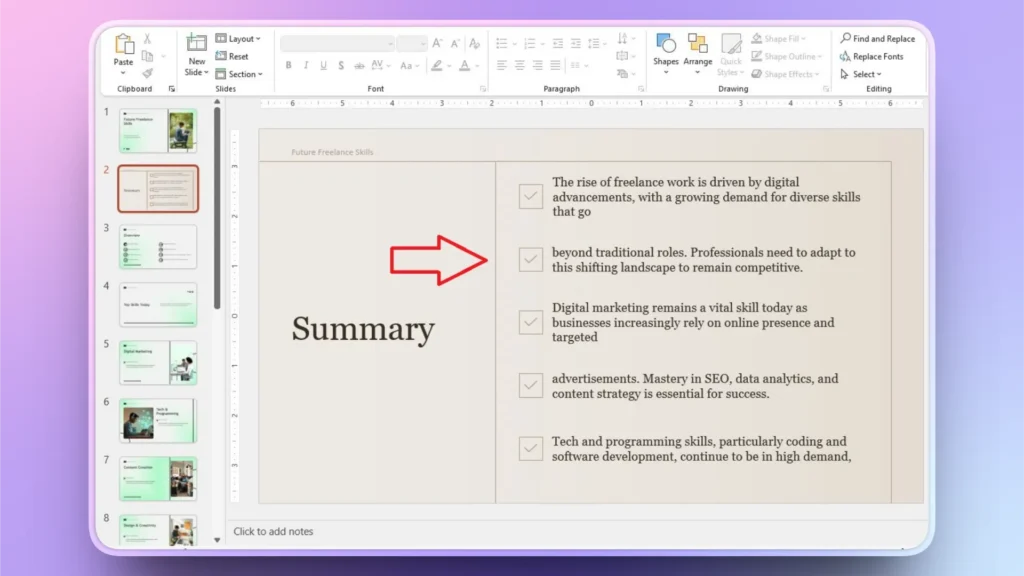
Step 3: Congratulations, Summar Slide Added
Within a few seconds, Twistly will add an executive summary slide to your presentation by analyzing the content of the entire presentation. You can review, edit, or polish this slide.
If you want to change text, improve, shorten, or extend the content, Twistly offers all these features.
Tips for Executive Summary Slide Templates
The summary slide is the most important part of your presentation, so you should pay close attention to the small details of the slide. Twistly is a smart AI presentation maker for PowerPoint, but we highly recommend using AI responsibly for the best results.
Here are some common tips that can make your executive summary slides even better for high-impact presentations.
- Keep text concise; executives prefer scannable content
- Focus on outcomes, not just activities
- Use visuals to reinforce key points
- Review and refine content for accuracy
- Align summaries with decision-making goals
Download Twistly for Free
Are you tired of making PowerPoint presentations manually? Do you want faster, more engaging, and professional AI presentations? Download Twistly free trial and start making amazing PPTs without any design, writing, or formatting.
Twistly not only designs slides but also writes content, optimizes slides, and formats the entire presentation, including visuals and images for the slides.
It is a complete AI solution for PowerPoint users. In other words, Twistly is a custom ChatGPT for PowerPoint.
Download Twistly by clicking the link below or find it on Microsoft AppSource, the Twistly website, or the PowerPoint add-in library.
Create PowerPoint
Slides with AI
Build AI-powered presentations from
any prompt, doc, or video


Conclusion
Executive summary slides are often the first, and sometimes the only, slides decision-makers read. Let Twistly help you with these slides. AI-powered templates ensure those slides are clear, focused, and professionally designed.
Save time and reduce efforts by making executive summary slides with Twistly. As businesses continue to move faster, the demand for clear, high-impact communication will only grow. Twistly ensures that you stay ahead of the competition with smart and AI-powered solutions.


Start Making AI Presentations in Seconds
Instant Access
Begin exploring Twistly’s full suite of features immediately
No Commitments
No credit card required, and you can cancel anytime
Dedicated Support
Our team is here to assist you every step of the way during your trial.