


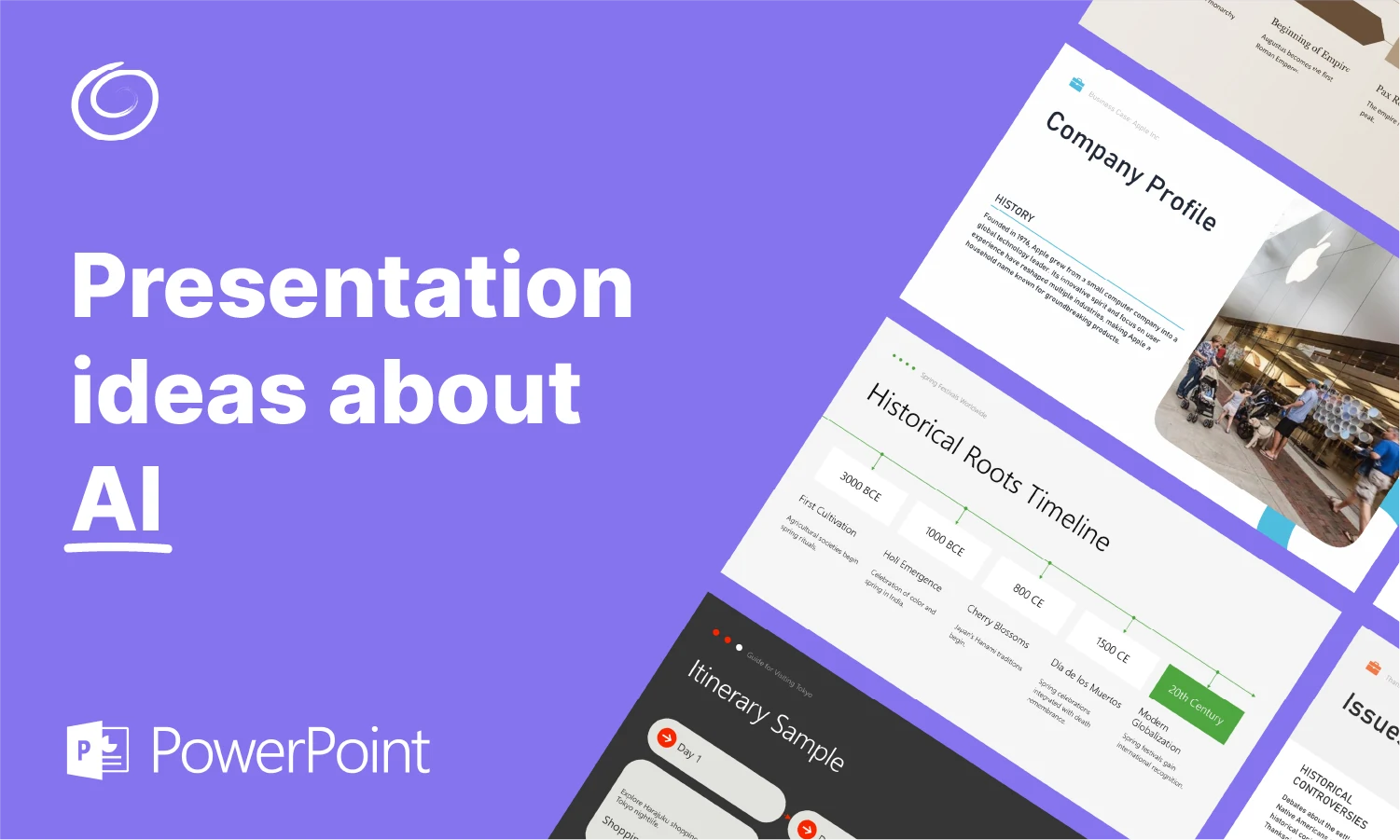
AI is reshaping and revolutionizing every aspect of life, from personal to professional and industrial aspects. Do you want to explore AI topics for PowerPoint presentations that can highlight this technology and potential applications in our lives?
We have done the hard work for you, creating this list of 30 AI topics for PowerPoint presentations that you can use for any type of event, classroom project, seminar, or tech campaigns.
Apart from choosing the best AI presentation topic, we will also walk you through detailed steps on how to make PowerPoint presentations with AI.
Choosing the Right Topic for Engaging Presentations
Presenters know that the selection of the right topic makes or breaks their presentation. A presenter can talk about a topic with confidence and authority if they have real knowledge of that discipline or topic. Here are a few steps and tips for choosing the right presentation topic.
| Tip for Topic Selection | Description |
| Choose a topic you understand | Pick a subject you are comfortable explaining to maintain clarity and confidence. |
| Consider your audience | Select a topic that matches the interests, knowledge level, and needs of your viewers. |
| Ensure the topic is relevant. | Make sure the topic fits the event, purpose, or industry you’re presenting to. |
| Keep it focused | Avoid overly broad topics—choose something specific and manageable. |
| Check available information | Ensure you have enough data, examples, and visuals to support your topic. |
| Align with your goals. | Pick a topic that helps you deliver your message or achieve your presentation objective. |
| Look for something engaging. | Choose a topic that sparks curiosity or offers value to keep your audience attentive. |
| Make it easy to present visually. | Select topics that can be supported with charts, diagrams, or AI-generated visuals (especially using tools like Twistly). |
Turning a Topic into Engaging Slides
Once you have found the best topics for PowerPoint presentations, your job is not done because making an attractive presentation is an even harder step for many. But as you are a Twistly Blog reader, we always have a real treat for you.
Our readers can enjoy a free trial of the most amazing AI presentation maker for PowerPoint that can turn any text, AI prompt, or topic into attractive presentation slides.
This AI add-in works inside PowerPoint. Grab your free trial now, and if you want to learn how to use this AI PPT maker, keep reading till the end.
Create PowerPoint
Slides with AI
Build AI-powered presentations from
any prompt, doc, or video


AI Topics for PowerPoint Presentations
Let’s see what’s happening in the AI world and what possible topics you can use to make your next PowerPoint presentation for a class project, a tech event, or any other setting. We have also provided brief guidelines to turn each AI topic into a professional presentation.
1. Introduction to Artificial Intelligence
This presentation can explain the idea of AI to a non-tech audience. Even in 2026, not everyone has a clear understanding of AI and its applications. AI refers to machines or software that can mimic human intelligence, including learning, problem-solving, and decision-making.
Presentation Boost with Twistly
Twistly is the biggest example of AI applications in daily life. You can amaze your audience with presentations made in PowerPoint with Twistly.
Use Twistly to auto-generate a clear definition slide and a visual diagram that compares human intelligence vs. artificial intelligence.
2. Machine Learning Basics
Students and teachers can use this topic for class projects, and businesses promoting robotics and automation services can also use this topic to educate their audience. ML enables computers and machines to learn from the data provided and instructions.
Twistly Slide Tip
Find a simple yet compelling online article about Machine Learning and then paste the text into Twistly, and AI will generate engaging slides based on the content. All images and other elements will be added automatically.
3. Neural Networks and Deep Learning
Deep learning uses neural networks with multiple layers to analyze complex data patterns such as images, speech, and text. As you see in movies, software using deep learning can detect and find relevant information from available data. Face detection tools also use this technology.
Data Visualization for Slides
Use tables, infographics, and other graphs to simplify complex data into clean visuals. It will be easier for the audience to process charts and graphs. Long paragraphs of text can make your slides boring.
4. Natural Language Processing
Twistly also uses the NLP technology to make a presentation based on the AI prompts provided by the users. You can explain how AI understands commands and prompts provided in simple, plain English. NLP makes it easier for users to communicate with AI.
Twistly Enhancement
Instead of using long texts, turn paragraphs into bullet lists and tables with Twistly. You can also simplify or improve any text for the selected slide with Twistly.
5. Generative AI for Images, Videos, and Text
Generative AI can generate media, text, or even other digital assets based on the AI prompts. Twistly also has a built-in AI image generator that can add relevant images and visuals to the slide. Most users are already using ChatGPT and Gemini for generating content.
Twistly Use Case
Presenters can perform a live demo of generative AI for generating slides and images in PowerPoint with Twistly. Generative AI capabilities of Twistly turn PowerPoint into a custom ChatGPT for presentations.
6. AI in Healthcare
Online healthcare tools and diagnostic applications are quite popular. Use of AI in wearables can also detect different health issues by analyzing different factors. AI assists with diagnostics, treatment planning, surgeries, and health data analysis.
Smart Slide Selection with AI
The data-to-slide feature of Twistly is an amazing resource where you can input data or upload a document about any complex topic, and Twistly will summarize text and make attractive slides.
7. AI Ethics and Challenges
AI raises questions about privacy, transparency, and fairness. Students use ChatGPT and other AI tools to write papers and their assignments.
Your presentation can highlight the positive use of AI in education and other sectors. Ethical considerations are crucial for sustainable AI adoption.
Twistly as PowerPoint Assistant
You can show that Twistly can help you boost your PowerPoint experience, but users still have control to add their custom elements. This way, a balance between AI and human touch offers perfect results.
8. Computer Vision Explained
It is one of the most important yet complicated AI topics for PowerPoint presentations. You can cover the basics of computer vision and explain how computer vision allows machines to interpret images and videos.
Boost Slides with Visuals
Add relevant images or generate custom visuals with Twistly for your slide and make your slides more engaging.
9. AI in Education and Learning
AI-driven learning platforms personalize study materials, automate grading, and improve learning outcomes. Schools can use tools like Twistly to create engaging lessons for students. Class projects also become more fun with AI tools.
Twistly Assistance in Class Projects
The AI add-in for PowerPoint takes only a few seconds to create a complete presentation, so that you have enough time for learning activities.
10. Artificial Intelligence in Finance
AI is not limited to entertainment or learning, but the financial sector is also making use of AI. Businesses offering such services can use this topic for AI presentations to advertise their product or service.
Instant Slides with Twistly
You need charts and graphs to demonstrate how AI can improve financial performance, and Twistly can help with slides and design.
11. AI and Autonomous Vehicles
Tesla has taken the concept of autonomous vehicles to a whole new level. You can create a presentation on other brands that are working on the use of AI for manufacturing driverless cars.
Process Diagrams with AI
You can use the AI features of Twistly to create timelines and process diagrams to showcase how these cars work and how brands manufacture these vehicles.
12. AI in Cybersecurity
Hackers and identity thieves are smart now, but cybersecurity measures are also improving with the help of AI. AI detects threats, prevents attacks, and strengthens digital defenses through real-time monitoring.
Text to Slides with AI
Paste any detailed article on the topic of AI in cybersecurity and get instant slides with the help of Twistly.
13. Marketing and Advertising with AI
AI helps businesses understand customer behavior, personalize ads, automate campaigns, and analyze performance. The days of print marketing are gone, and you can also promote your AI marketing tool with these AI topics for PowerPoint presentations.
Twistly Tip for Slides
Generate dynamic infographic slides with Twistly, showing consumer journey automation.
14. Robotics and Integration of AI
This is an interesting topic for educational and commercial presentations. You can educate the audience and promote your product or service at the same time.
Simple and Clean Slides
Don’t use random images but relevant visuals like charts and process diagrams to illustrate how AI works in robotics.
15. Use of AI in Online Businesses
Chatbots, personalized shopping experiences, recommendation systems, and many other aspects of the e-commerce world rely on AI. Developers can use this AI topic for promotional purposes as part of a marketing campaign.
Instant and Improved Slides
Instead of making a presentation from scratch, Twistly gives you ready-to-present slides in PowerPoint.
16. Game Development and AI
AI is a major player in modern game development. Use of AI in gaming offers a more personalized and entertaining experience. Your presentation can talk about the latest AI gaming trends.
Presentation Tip
You can ask Twistly to generate a slide about the top games that are based on AI engines. It will make the presentation process easier.
17. Environment and Climate Protection with AI
Organizations and departments have deployed many tools and monitoring devices that analyze the environment and then detect the causes of pollution. This way, it becomes easier for authorities to prevent pollution.
Slides with Data and Charts
You can add charts and other data visualization elements to the slides with AI that can showcase how AI is helping with the protection of the environment.

18. Business Automation with AI
AI can improve the workflow of any business and reduce operational costs. From corporate offices to industrial units and warehouses, almost every business is somehow using AI for business operations. Your presentation can organically introduce your business automation services and products.
Professional PowerPoint Templates
Twistly offers professional, simple, and clean templates that you can use for corporate meetings on such AI topics for PowerPoint presentations.
19. Social Media and AI
Platforms use AI for content recommendation, moderation, and user behavior analysis. Marketers use AI data analysis to run customized ad campaigns, and social media sites also use AI results to offer a more personalized browsing experience to users.
What to Cover
Your presentation slides can talk about the popular AI tools for social media marketing or explain how Meta uses AI to improve the user experience for WhatsApp, Instagram, Facebook, and other products.
20. Artificial Intelligence in Supply Chain Management
Supply chain management is a complex process, and your presentation can help businesses understand how AI can reduce delays, optimize workflow, and enhance operational efficiency.
These AI topics for PowerPoint presentations are good for developers and businesses.
Custom Illustrations for Slides
Users can make custom and personalized images for the slides so that the audience can easily understand how supply chain operations can be improved.
21. AI for Startups and Small Businesses
Starting a new business is quite challenging, but AI tools can help you analyze the market, try different approaches, and make informed decisions. SMBs are also using AI to optimize their daily business operations.
Perfect Slides for Presentation
Your slides can compare and explain top AI tools and services that entrepreneurs and small to medium businesses can use for their daily operations.
22. Voice Assistant and AI
Alexa, Siri, and Google Assistant all rely on AI for speech recognition and response generation. You can discuss possible use cases of these AI voice assistants for different businesses and industries, or even at home.
Why this Topic for Presentation
These topics for PowerPoint presentations work as informative and promotional opportunities for product and service sellers.
23. AI in Agriculture
There are AI tools and applications, or cam scanners, that can predict crop health and help farmers find the best methods to improve their production. AI-powered tools predict crop health, automate irrigation, and enhance yield.
Visually Appealing Slides
For agriculture-related presentation slides, use colorful images and visuals. With Twistly, you can change the color of the entire PowerPoint template according to the topic or your brand theme.
24. AI Tools for Human Resources Teams
From scanning and reviewing CVs to conducting screening tests, AI tools can ease the job of HR teams. Even many HR teams are now relying on Twistly for their regular presentations. AI tools are quick, more personalized, and improve workflow efficiency.
Twistly for HR Teams
HR teams can use Twistly to make PowerPoint presentations for regular policy changes or other training events. Twistly takes less time to generate slides, creates more professional presentations, and provides more accurate content and media for HR sessions.
25. Smart Homes and AI Appliances
The idea of smart homes and smart appliances is popular these days. From robot cleaners to smart fridges, AI is being used in different home appliances. Product sellers can use these AI topics for PowerPoint presentations to promote their own products related to smart homes and appliances.
Speaker Notes with Twistly
If you are not familiar with the topic and need accurate speaker notes for the PowerPoint presentation, Twistly can generate speaker notes for an individual slide or a complete presentation. You can present slides with confidence.
26. Big Data and AI
From companies to governments, AI processes massive datasets to uncover patterns, predictions, and insights. Big Data tools also use the latest AI models to make these predictions and find the desired results. Your presentation can explore the scope of AI in other fields.
Optimize Slides with AI
Once you have a basic presentation on the topic, use Twistly AI features to optimize or edit any slide with custom elements like tables, charts, and other visual aids.
27. AI for the Financial Sector and Banking
Banks and financial services are using AI-based tools and models to analyze market trends, risk assessment, and fraud detection. Your PowerPoint presentation can highlight the benefits of using AI tools to optimize business operations for financial service providers.
Making Professional Slides
As your audience consists of executives or high-level managers, make sure your presentations are flawless and check for any possible grammar or spelling mistakes with the grammar checking tool in Twistly.
28. Art and Artificial Intelligence
This might be a controversial topic for some, but the creative use of AI can result in some artistic work. AI can create drawings, music, animations, and unique digital artworks. You can either speak in favor of AI or argue that art needs to be protected against the use of AI.
Be Creative in PowerPoint
Even in PowerPoint, you can generate an AI image and support your argument with Twistly, without leaving PowerPoint or switching to other tabs and websites.
29. AI-Powered Bots in Customer Support
Almost every major brand and business has now used AI-powered bots for customer support. Human involvement is still needed, but AI chatbots can reduce the workload for human agents. Your presentation can cover safe ways to use AI in customer support.
Support your Argument with Custom Visuals
Twistly allows creating custom images and visuals inside PowerPoint so that users need no additional tools or subscriptions for images for PowerPoint presentations.
30. Future of AI
What possible changes, limitations, challenges, and developments are expected in the next few years? Your presentation can review the possible future of AI and help businesses navigate these upcoming challenges smoothly.
How to Design Slides?
Simply find a reliable online blog about the future of AI and then use the text in Twistly and automatically generate attractive and engaging slides for your PowerPoint presentation.
How AI is Elevating the PowerPoint Experience?
As we are talking about popular AI topics for PowerPoint presentations, how can we forget exploring the use of AI in PowerPoint? Microsoft’s AI solutions for PowerPoint are not that impressive and have limited capabilities.
If you want to enjoy ChatGPT-like capabilities for making presentations, download Twistly, an AI add-in for PowerPoint. This AI PPT maker unlocks the true power of AI for PowerPoint users.
Twistly supports and enhances the native PowerPoint tools by adding AI features for quick and smart operations. Instead of writing content and designing slides from scratch, you can use Twistly to create presentations within seconds.
How to Make Presentations with Twistly?
Twistly is designed for a diverse audience, including HR teams, students, teachers, marketers, speakers, instructors, corporate employees, and common PowerPoint users.
The interface is simple, clean, and straightforward so that even a new user can easily get the desired results with no prior experience. Just follow these simple steps.
Step 1: Choose Input Method
Twistly has different input methods to create presentations, including topic, AI prompt, text, document upload, or YouTube video URL. Choose any method that you like.

Step 2: Input your Data/Topic
Provide the data or topic/AI prompt and choose the right settings for your presentation. You can adjust the number of slides or let AI decide the best results automatically.
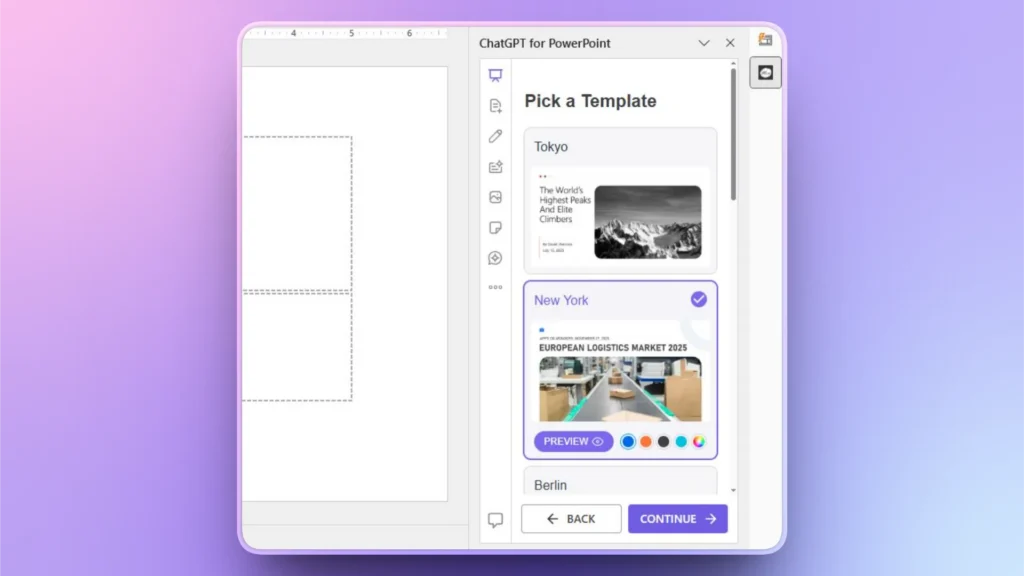
Step 3: Review Outline and Select Template
Twistly will generate an outline for the slides that you can edit, and then move to the next step, where you will be asked to choose a template for the presentation.
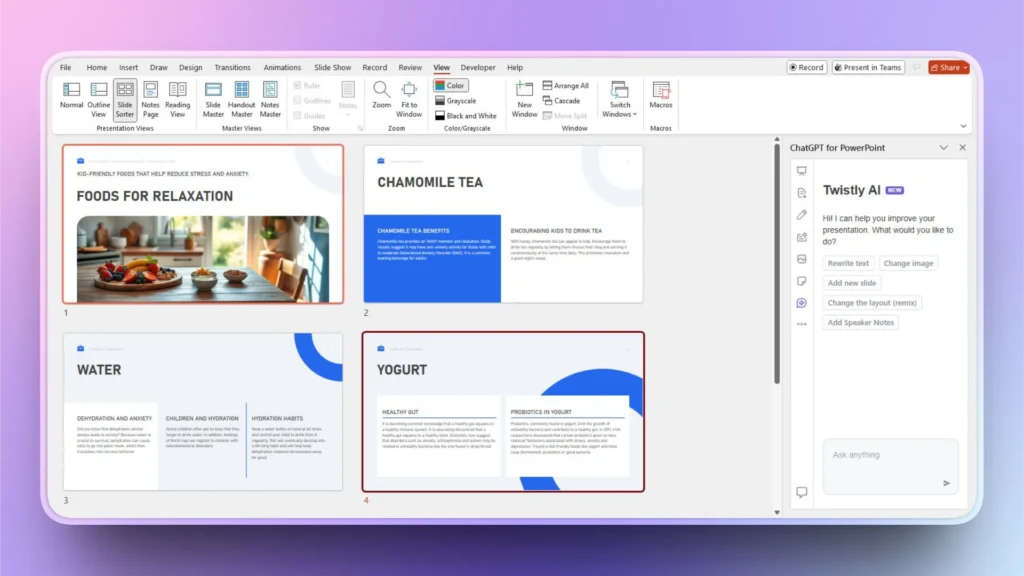
Step 4: Revise, Edit, or Present Slides
Your final presentation will be ready within a few seconds. Users can edit slides any time or present directly without exporting files or converting slides.
Final Verdict
These AI topics for PowerPoint presentations are popular these days and offer value and information for diverse audiences. Presenting AI topics becomes easier, faster, and more engaging with Twistly, the AI add-in designed specifically for PowerPoint.
Download your free trial now and start making attractive PowerPoint presentations instantly. Elevate your PowerPoint experience with your own ChatGPT for presentations.
Create PowerPoint Slides with AI
Build AI-powered presentations from any prompt, doc, or video






Start Making AI Presentations in Seconds
Instant Access
Begin exploring Twistly’s full suite of features immediately
No Commitments
No credit card required, and you can cancel anytime
Dedicated Support
Our team is here to assist you every step of the way during your trial.