



Students are the segment least likely to have source material and most likely to hand the whole task over. That is a real finding about how AI is entering education. Students actually use AI to streamline each part of presentations, including outlines, formatting, and content writing.
A presentation that used to take 5-6 hours now can be done within 5 minutes. For most users, AI tools are limited to slide design and formatting only. In reality, from research to final deck, AI can assist at every step.
Using AI to Make Presentations
The meaning of “using AI to make presentations” varies from student to student. Some students use AI to brainstorm ideas, and some rely on AI presentation tools for formatting.
According to the Twistly State of AI Presentations 2026, nearly half (46%) start with just one topic and let AI generate the content from scratch.
It is the most common starting point for most students, and one that reflects true ‘blank page’ territory.
Another 34% already have their own written text and use AI to shape it into a presentation. The remaining 20% upload an existing document and let AI convert it into slides.
Some users want outlines, and then they want to input custom data. Most students use AI to bypass repetitive tasks like formatting, designing, and similar work.
When we talk about the use of AI to make presentations, there are countless applications of artificial intelligence. Let’s see how students are using AI and how they can get the best outcome for their academic tasks.
1. Turning Messy Ideas into Structured Topics
What is the hardest part of making a presentation? Starting from a blank page. Students keep staring at the topic for hours without having a single clue about the content and structure.
At this very first step, AI tools can be extremely helpful. Students usually type their keywords and ask AI to generate possible topics. These ideas give you a head start, and you can get an idea about what to cover in the presentation.
Students More Frequently Start from Scratch
Students are less likely than other professional or academic groups to use an existing document when creating a presentation. Only 20% of students do so, compared with 32% of marketing and sales professionals.
Presentations created from existing documents account for only about 10% of students’ actual presentation-making activity. In addition, 28% of students say they do not create presentations regularly.
This may explain why many students start from scratch each time instead of building on material they already have.
How to Generate Presentation Topics with AI?
Twistly has a Generador gratuito de títulos de presentación that can generate different topic ideas based on your provided input or keywords.
- Describe the topic or write keywords.
- Select title tone: simple, professional, academic, or creative
- Set target audience and generate titles
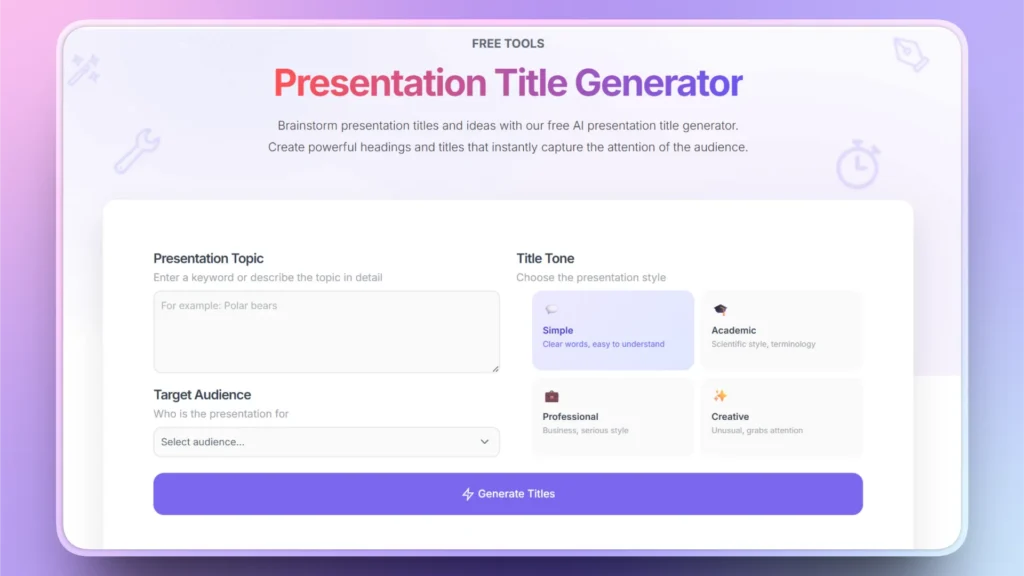
Instead of bouncing from one tool to another, Twistly offers one platform that has everything you need to create stunning presentations with AI.
2. Summarizing Readings and Lecture Notes
Finding the most important data from a lengthy lecture or article takes hours. The easiest way to summarize and learn a complex topic is to turn that data into polished slides.
Students can upload their notes or PDFs to presentation tools like Twistly and then get a summarized and easy-to-understand version of the lecture.
Nota: While using any type of AI tool for summarizing lectures, don’t forget to review and verify the numbers and facts. AI tools can make mistakes, and important data must be rechecked.
3. Writing and Editing Slides
Once the presentation structure is ready, now comes the harder part: putting words onto the slides. AI can generate content for slides based on the topic, slide layout, and context. Setting audience type, content length, and other parameters helps you get more customized responses from AI tools.
Students don’t always ask to rewrite their entire presentation, but they can use specific instructions. Let’s say you want to summarize a long paragraph, make a part more professional, or expand an idea; all this can be done inside PowerPoint with Twistly.
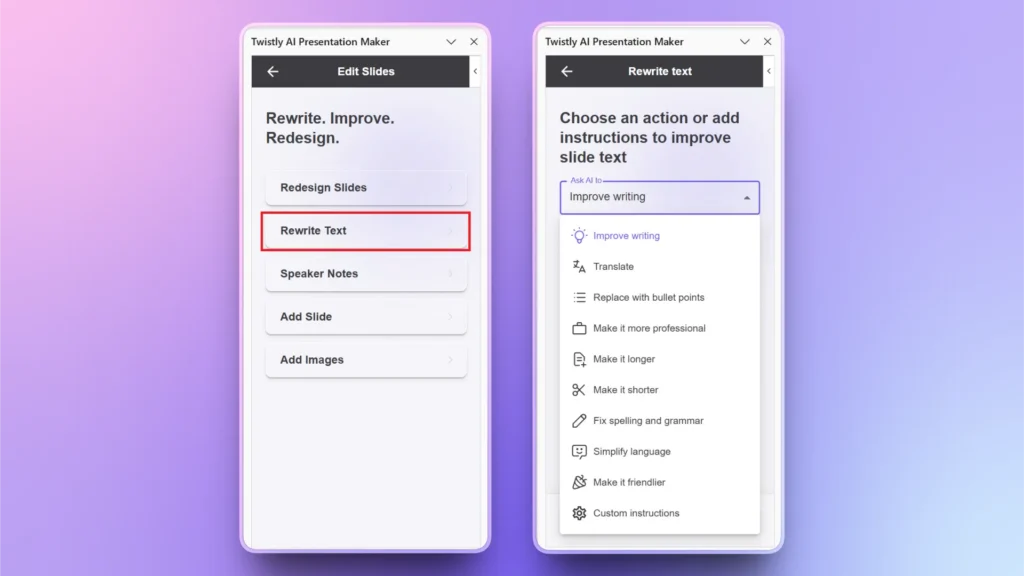
4. Designing Professional Slides without Design Skills
Content is only half of a presentation. Color, typography, layout, visual hierarchy, and other elements make up the other half of a presentation. Most students don’t have any special design skills to make their slides visually attractive.
In presentation-building, the use of AI for designing is the fastest-growing application of artificial intelligence. Tools built for this, including Twistly, let students describe a topic or paste in existing content and generate a formatted deck with consistent themes. From spacing to images and other placeholders, AI handles everything.
Working with PowerPoint AI tools does not mean handing over full control. Twistly allows users to swap images, edit content manually, and control every aspect of the slides generated by AI. You are always in control with the additional support of AI.
5. Generating Visuals and Supporting Graphics
Relevant images are an important part of every academic presentation. Sometimes, ideas are too complex, and using images helps others understand the concept in more interactive ways.
Instead of relying on generic images, students can generate customized and personalized images with AI.
Generating Custom AI Images with AI
There are two different options for generating images for PowerPoint presentations. You can either use 3rd party AI tools like ChatGPT, Gemini, or other popular platforms to generate images and then insert them into PowerPoint.
The other option is to use Twistly and get free AI images and stock images for your presentations. Here is how to do it:
- Choose the Add Image option from the Twistly window
- Choose AI images and then explain your image in a prompt
- Insert the image into the slide or generate more versions
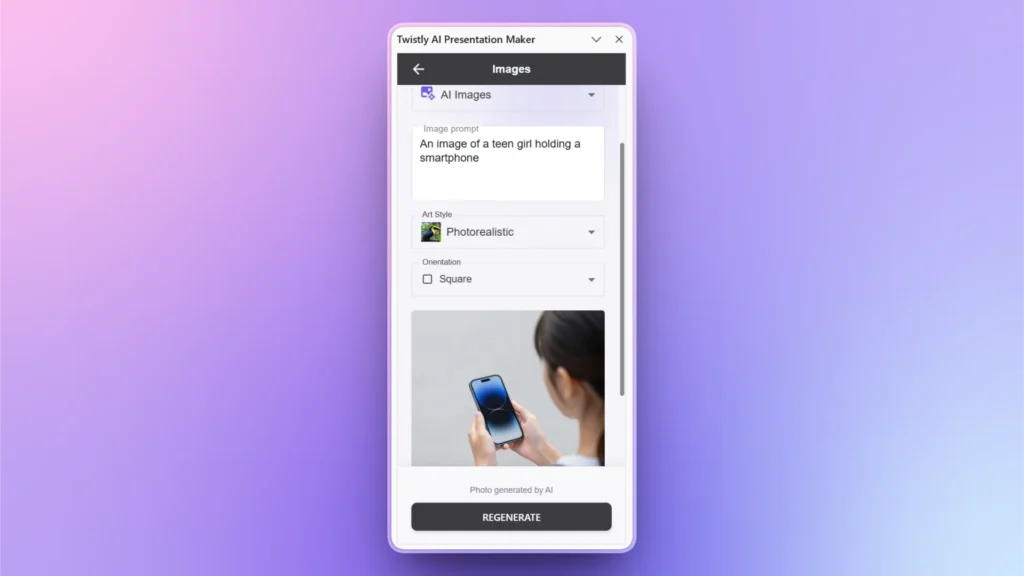
Twistly offers seamless integration of an AI image generator, so you don’t have to leave PowerPoint. While staying within your workflow, you can generate and insert AI images without additional formatting or styling.
6. Translating and Adapting for Different Audiences
Multilingual and international students use AI to make presentations in different languages for fellows from other countries. Making a presentation in a foreign language takes time, but with AI, you can translate any existing deck into another language within seconds.
Twistly has two possible ways to make multilingual presentations with AI:
- Translate any slide, text, or complete deck into another language
- Create new presentations from scratch in other languages
Not only students but marketers and business professionals also use this approach to make presentations for an international audience.
7. Creating Charts and Tables
Charts, tables, graphs, and other data visualization tools make complex data easy to digest; instead of using complex numbers, sales, performance, and other KPIs in the form of interactive charts and graphs.
AI can generate customized charts and graphs based on your provided data. Twistly supports basic chart and graph generation, but for complex values, a few manual edits may be required. Still, making charts with AI takes way less time than manual methods.
AI Presentation Tool and Workflow that Students Actually Need
Using AI as part of the presentation process makes it more useful than solely relying on it. Instead of using AI to make your presentations, use it to get personalized and relevant slides for your topics.
Before using AI tools for presentations, understand the assignment, define your audience, determine your call to action, and other important elements of a great presentation.
Right AI Tool for Academic Presentations
There are hundreds of AI presentation makers available that offer some level of automation but no integration with PowerPoint. Twistly combines the power of ChatGPT and PowerPoint. While staying inside PowerPoint, students can create complex presentations with Twistly.
The process of using AI to create presentations for students is easy, as follows:
- Elija si desea crear una presentación a partir del tema, texto, archivo, pregunta o enlace de vídeo de YouTube.
- Proporcionar el texto, la pregunta o cualquier forma de entrada
- Elija el idioma de la presentación y el número de diapositivas
- Revisar el esquema generado por la IA
- Seleccione la plantilla y listo
Your complete presentation slides with images, content, shapes, and other visuals are ready. Once the presentation is ready, all features of PowerPoint are still available to edit or optimize the slides. You can make your presentation better or customize it with the AI features of native PowerPoint tools.
What Students Should Not Let AI Do
AI can automate presentation-making and assist at different stages. There are certain limitations that students need to understand while making presentations with AI.
- Don’t blindly trust AI-generated facts.
- Don’t copy AI-generated text without understanding it
- Don’t fill slides with AI-generated paragraphs
- Don’t use visuals just because AI suggested them
- Don’t ignore academic integrity policies
If your college or university has any policy or rule against use of AI for presentations and other academic work, respect the policy. You can still use AI to get ideas or get rid of writer’s block, but don’t solely rely on tools for making academic presentations.
Conclusión
Students actually use AI to make presentations from scratch or edit existing slides, rewrite content, generate speaker notes, and create images. The most significant change AI brings to student presentations is not that it can generate slides. It is that students no longer have to start with a blank screen.
Pick the right AI tool that can automate the process while allowing students to stay within their existing workflow. This is also why tools that combine content generation with design, like Twistly, have found traction with students specifically. Students and new users can claim a free trial of Twistly without a credit card. Claim yours now.
Crear PowerPoint
Diapositivas con IA
Cree presentaciones basadas en IA a partir de
cualquier mensaje, documento o vídeo









Empieza a hacer presentaciones con IA en segundos
Acceso instantáneo
Empieza a explorar inmediatamente todas las funciones de Twistly
Sin compromisos
No necesita tarjeta de crédito y puede cancelar en cualquier momento
Asistencia dedicada
Nuestro equipo está aquí para ayudarle en cada paso del camino durante su juicio.