



Las herramientas de IA para presentaciones de PowerPoint evolucionan rápidamente. Si buscas una herramienta que vaya más allá de un simple ‘asistente de IA’, necesitas la mejor alternativa a Claude for PowerPoint.
Claude for PowerPoint es un complemento relativamente nuevo para usuarios de PowerPoint y, la verdad, los usuarios tenían expectativas bastante altas de esta herramienta de IA para PowerPoint.
¿Ha cumplido Claude for PowerPoint las expectativas de los usuarios de PowerPoint? La valoración de este complemento en Microsoft Marketplace cuenta la verdadera historia. El complemento de Claude tiene una valoración de 2,3 según 45 usuarios, y es uno de los creadores de presentaciones con IA peor valorados del marketplace en este momento.
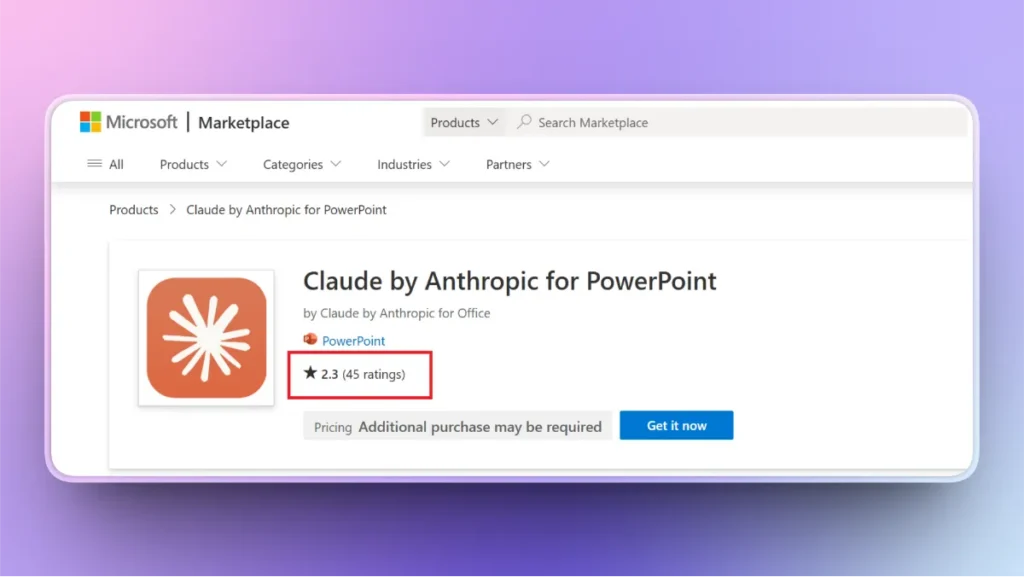
¿Qué decepciona a los usuarios de esta herramienta y qué alternativa a Claude for PowerPoint puede resolver sus problemas?
La mejor alternativa a Claude for PowerPoint
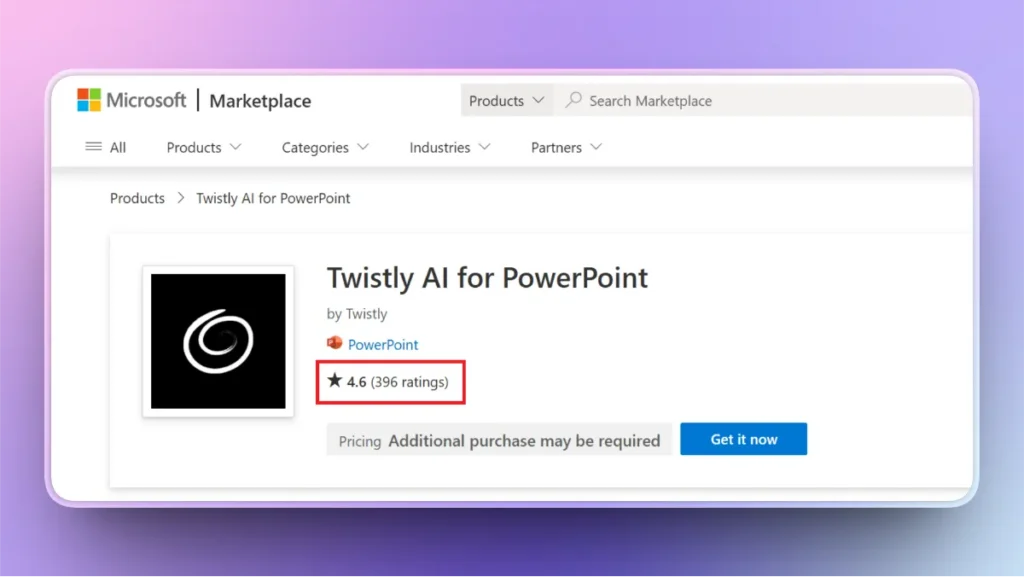
A pesar de su potente automatización en PowerPoint, los usuarios se ven obligados a buscar las mejores alternativas a Claude for PowerPoint, y Twistly ocupa el primer puesto, con una valoración de 4,6 según 396 usuarios y millones de descargas.
Si quieres una verdadera herramienta de IA para PowerPoint capaz de automatizar tu flujo de trabajo de presentaciones, prueba Twistly ahora y genera presentaciones completas en segundos.
¿Qué más ofrece Twistly y por qué es mejor que Claude for PowerPoint? Este artículo detallado incluye todo lo que necesitas saber sobre la mejor alternativa a Claude for PowerPoint en 2026.
Claude for PowerPoint: visión general completa
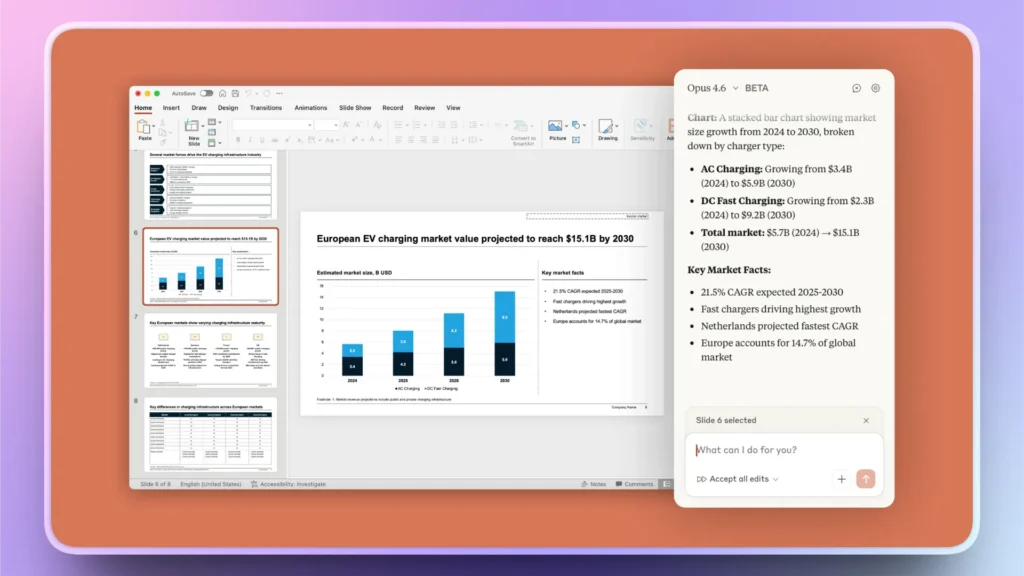
Claude for PowerPoint es un nuevo complemento de Anthropic que permite acceder a Claude directamente dentro de PowerPoint. Permite editar, crear y perfeccionar diapositivas de PowerPoint mediante indicaciones en lenguaje natural.
¿Qué hace Claude por tus presentaciones?
La función principal del complemento Claude for PowerPoint es bastante sencilla: integra Claude dentro de PowerPoint, y ya está. No tienes que saltar entre varias pestañas del navegador y apps para crear, editar u optimizar diapositivas.
Explicas lo que necesitas con palabras sencillas y el complemento de Claude ejecuta la indicación y genera los resultados. La versión beta ya está disponible para un número limitado de usuarios, y el tiempo de respuesta es bastante alto.
Una presentación sencilla tarda unos minutos, y algunos usuarios incluso se han quejado de que Claude tarda hasta 30 minutos en crear una presentación completa desde cero.
Con Twistly, el tiempo medio para crear una presentación profesional desde cero es de hasta 90 segundos. Para ediciones y otros cambios, bastan unos clics. Se nota la gran diferencia de tiempo necesario para crear presentaciones con Claude y con Twistly para PowerPoint.
Funciones clave de Claude for PowerPoint
Se esperaba que Claude resolviera distintos retos y problemas de los usuarios de PowerPoint y, hasta cierto punto, esta herramienta cumple lo que promete. Pero Claude for PowerPoint no es la solución adecuada para todo el mundo.
Es lenta, ofrece funciones limitadas y, por ahora, tiene muchos otros fallos y limitaciones conocidos. Estas son algunas de las capacidades y funciones que puedes probar actualmente para crear presentaciones de PowerPoint con este asistente de IA.
Reconocimiento de plantillas
Claude lee y analiza el patrón de diapositivas para entender la plantilla. También puede detectar fuentes, colores y otros elementos de la presentación. Los desarrolladores han intentado optimizar esta herramienta para presentaciones acordes con la marca.
También puedes crear presentaciones sin especificar ningún diseño. Si quieres crear una presentación completa, Claude seleccionará automáticamente una plantilla.
Edición precisa
¿Quieres hacer cambios concretos en una diapositiva en lugar de rehacer toda la presentación? Claude te permite seleccionar una diapositiva y editar solo esa. No puedes elegir entre opciones predefinidas, así que necesitarás un enfoque creativo para obtener los resultados deseados.
Con Twistly tienes una interfaz interactiva en la que puedes elegir cualquier diseño de diapositiva entre las opciones disponibles. Para los gráficos hay varios diseños disponibles y, del mismo modo, puedes previsualizar distintos elementos y elegir el que quieras.
Generación nativa de diapositivas
En cuanto a la generación de diapositivas, Claude for PowerPoint hace un trabajo aceptable. Los gráficos y otros elementos se crean como objetos de PowerPoint, lo que facilita cambiar y editar todos los gráficos, tablas y demás elementos de visualización de datos generados.
Conectores e integración de contexto
Para presentaciones avanzadas y con muchos datos, Claude también puede extraer datos e información de otras fuentes. Hay otros conectores disponibles que puedes instalar para ampliar la funcionalidad del complemento.
Ventajas e inconvenientes de Claude for PowerPoint
Como el complemento está en fase de desarrollo, hay muchos aspectos que mejorar. Con la versión final, cabe esperar una versión de Claude for PowerPoint más ágil y estable.
Ahora mismo no puedes confiar en Claude para crear presentaciones importantes, ya que el complemento puede bloquearse o dejar de responder en cualquier momento. Estas son algunas de las ventajas e inconvenientes de Claude for PowerPoint que más molestan (según las reseñas de los usuarios en Microsoft Marketplace).
| Pros | Contras |
| Integración profunda dentro de PowerPoint | Acceso limitado para nuevos usuarios |
| Sólida generación y estructuración de contenido | Todavía en versión beta, con muchos fallos y errores |
| Mantiene automáticamente las plantillas de marca | El sistema suele estar saturado |
| Elementos nativos de PowerPoint editables | Respuestas con retraso |
| Adecuado para flujos de trabajo empresariales | Curva de aprendizaje pronunciada para nuevos usuarios |
Principales limitaciones que odian los usuarios
Hay ciertas cosas que pueden hacerte considerar Twistly como la mejor alternativa a Claude for PowerPoint. ¿Se resolverán estos problemas en la versión final? Todavía no podemos asegurarlo.
Inteligencia de diseño limitada
Los usuarios esperaban milagros de diseño del complemento de Claude AI, pero esta herramienta solo ofrecía lo básico en diseño de plantillas. Muchos usuarios se han quejado de tener que editar mucho después por errores y problemas del diseñador de IA.
Si esperas una presentación en la que no tengas que editar ni pulir las diapositivas a mano, Claude for PowerPoint todavía no está a la altura.
Todavía en beta
¿Estás preparado para bloqueos y problemas inesperados? Es de esperar que falten funciones y aparezcan avisos aleatorios. Por ahora, no deberías esperar al último momento para crear una presentación con Claude for PowerPoint.
Para presentaciones importantes y urgentes, usa Twistly y crea presentaciones en segundos. A diferencia de Claude, Twistly ofrece funciones estables y fiables en las que puedes confiar.
Problemas de inicio de sesión y fiabilidad
Has proporcionado todos los datos y una indicación detallada y, de repente, Claude deja de funcionar porque hay demasiadas solicitudes de otros usuarios. Por desgracia, no puedes reenviar ni reutilizar una indicación una vez que el proceso se detiene.
Si ocurre algo así, tendrás que empezar todo desde cero. Tras estos errores no se puede continuar el proceso. Algunos usuarios sufren fallos de autenticación y errores de carga, sobre todo durante la configuración. Durante las pruebas, tuvimos que iniciar sesión cada vez que cerrábamos PowerPoint. Puede resultar bastante frustrante.
No está pensado para la rapidez
Imagina que tienes un plazo ajustado y necesitas resultados rápidos, por ejemplo, 10 presentaciones sobre temas distintos en pocos minutos. ¿Puede Claude for PowerPoint con algo así?
Tendrás que esperar varios minutos a que se complete cada presentación. E incluso después de una larga espera, puede que haya que editar a mano. Las agencias necesitan creadores de presentaciones con IA más rápidos y fiables, y Claude for PowerPoint no está hecho para estas tareas.
Por qué considerar alternativas a Claude para PowerPoint
La idea de usar IA para presentaciones de PowerPoint es acelerar el proceso y optimizar el flujo de trabajo. Claude es una herramienta increíble, pero es solo un asistente de IA para PowerPoint, no un creador de presentaciones con IA completo como Twistly. Las agencias y las empresas modernas quieren:
- Crear presentaciones más rápido (no solo editarlas)
- Coherencia de marca en todos los equipos
- Menos formato manual
- Flujos de trabajo escalables para agencias y empresas
Twistly lleva mucho tiempo en el mercado y sus desarrolladores no dejan de añadir nuevas funciones y herramientas para responder a las necesidades de las empresas y presentaciones actuales. Los desarrolladores de Twistly ya han abordado y resuelto todos los problemas que plantea Claude for PowerPoint.
Crear PowerPoint
Diapositivas con IA
Cree presentaciones basadas en IA a partir de
cualquier mensaje, documento o vídeo


¿Por qué Twistly es la mejor alternativa a Claude for PowerPoint?
¿Qué esperas de una herramienta de IA para PowerPoint? Quieres crear presentaciones más rápido y con menos esfuerzo manual, y obtener siempre diapositivas profesionales y precisas.
Pues bien, Twistly lo consigue a la perfección y con más precisión. Estas son algunas de las funciones clave que convierten a Twistly en la mejor alternativa a Claude for PowerPoint en 2026.
| Característica | Complemento Claude para PowerPoint | Twistly |
|---|---|---|
| Generación de diapositivas con IA | Sí | Sí (más rápido y estructurado) |
| Funciona dentro de PowerPoint | Sí | No (presentaciones listas para exportar) |
| Inteligencia de diseño | Limitado | Avanzado |
| Gestión de plantillas | Usa las plantillas existentes | Crea y aplica plantillas maestras |
| Velocidad | Moderado | Alto |
| Creación en bloque | Limitado | Potente |
| Facilidad de uso | Medio | Muy fácil |
| Estabilidad | Beta | Más preparado para producción |
Fiable, preciso y estable
Twistly lleva mucho tiempo en el mercado y tiene cientos de reseñas positivas de usuarios. También es una de las herramientas de IA para presentaciones de PowerPoint mejor valoradas, en la que confían y que usan millones de personas.
No tienes que preocuparte por problemas inesperados ni errores de conexión. Obtienes una respuesta perfecta cada vez. Es una alternativa a la mayoría de las herramientas de IA, y la gente confía en Twistly y en el equipo que hay detrás.
Creado para presentaciones versátiles
Tanto si quieres editar una presentación existente como crear una completa desde cero, Twistly lo hace todo. En lugar de limitarse a asistirte dentro de PowerPoint, Twistly genera presentaciones completas y listas para presentar en segundos.
Presentaciones realmente acordes con tu marca
Seguir la plantilla de marca con herramientas de IA no es fácil, pero Twistly ha introducido la función de plantillas personalizadas, con la que puedes subir tu propia plantilla o extraer un tema de una presentación de marca y usarlo en futuras presentaciones.
Puedes crear plantillas maestras una sola vez, y todas las presentaciones las siguen a la perfección. Todas las presentaciones creadas por distintos miembros del equipo tienen un aspecto coherente y profesional.
Un flujo de trabajo más rápido
Con Twistly te esperan un mejor flujo de trabajo, presentaciones optimizadas y muchas más ventajas. En lugar de escribir indicaciones largas, puedes subir cualquier documento, pegar un artículo de internet o convertir cualquier tema en una presentación detallada.
Claude for PowerPoint solo ofrece comunicación por chat, mientras que Twistly te permite:
- Crear presentaciones a partir de temas
- Crear presentaciones a partir de indicaciones de IA
- Crear presentaciones subiendo documentos
- Crear presentaciones a partir de texto
Con varias opciones de entrada, tienes más flexibilidad y libertad para crear presentaciones increíbles.
Pensado para quienes no son diseñadores
Aunque no tengas ni idea de diseño y formato de presentaciones, Twistly puede ayudarte a crear diapositivas profesionales. Hay plantillas de PowerPoint con IA que puedes previsualizar antes de elegirlas.
Claude no tiene esta opción, y tienes que explicar tus requisitos de diseño con todo detalle. Twistly tiene una amplia biblioteca de plantillas de presentación listas para usar.
También puedes subir plantillas personalizadas y presentaciones de marca. A diferencia de Claude, tienes un acceso más fácil a plantillas que siguen las reglas y tendencias actuales de las presentaciones.
¿Basta con Claude para PowerPoint?
Claude es una gran incorporación a la familia de herramientas de IA para PowerPoint, pero aún queda trabajo por hacer antes de que los profesionales puedan confiar en este complemento para tareas importantes. Si necesitas un asistente de IA para tus diapositivas de PowerPoint, Claude es suficiente.
Twistly es la única opción cuando necesitas automatización completa, resultados más rápidos y diapositivas más personalizadas y acordes con tu marca. Claude es como una versión reducida de Twistly con funciones limitadas. No, la versión beta de Claude no es suficiente para los usuarios de PowerPoint.
Descarga Twistly y disfruta de verdadera IA para PowerPoint
Twistly es la alternativa a Claude for PowerPoint con más reseñas y mejor valorada, con millones de usuarios activos. Si quieres probar Twistly gratis, descárgalo para PowerPoint y consigue tu prueba gratuita. En la era de la IA, no te conformes con un simple asistente de IA: hazte con Twistly ya.
Crear diapositivas de PowerPoint con IA
Crea presentaciones basadas en IA a partir de cualquier mensaje, documento o vídeo













Empieza a hacer presentaciones con IA en segundos
Acceso instantáneo
Empieza a explorar inmediatamente todas las funciones de Twistly
Sin compromisos
No necesita tarjeta de crédito y puede cancelar en cualquier momento
Asistencia dedicada
Nuestro equipo está aquí para ayudarle en cada paso del camino durante su juicio.