



Puedes crear un pitch deck perfecto con IA aprovechando el poder de la IA generativa. El reto está en elegir la herramienta de IA perfecta que te ayude a impresionar a las partes interesadas y a los inversores con menos tiempo y recursos limitados.
Un pitch deck ideal se centra sobre todo en soluciones claras a un problema, datos de mercado, pruebas sólidas del equipo y una petición clara al público o a los inversores. Los pitch decks son muy distintos de las presentaciones normales, y crear uno requiere entender bien su propósito específico.
La cultura de las startups eficientes en capital exige diapositivas basadas en datos que ayuden a los inversores a entender tu aportación y lo que ganarán invirtiendo en tu proyecto. Puedes crear con IA un pitch deck perfecto que tenga un gran impacto en el resultado de la financiación, la alineación de las partes interesadas y la velocidad de salida al mercado.
Características de un pitch deck “perfecto”
Centrarse en el diseño no basta para crear un pitch deck perfecto con IA. Todo depende de la precisión narrativa, la claridad de los datos y la psicología del inversor. Esto es lo mínimo que debe ofrecer un pitch deck perfecto:
- Comunicar claramente tu propuesta de valor en 30 segundos
- Definir el problema y la solución en los primeros instantes
- Explicar el tamaño del mercado con hechos y estadísticas
- Demostrar el crecimiento y las métricas de tracción
- Presentar un modelo de negocio escalable
- Generar credibilidad mediante el trabajo del equipo y una ejecución impecable
Conseguir todos estos objetivos con un pitch deck hecho a mano puede llevar días. Una sola diapositiva de un pitch deck perfecto requiere horas de investigación, edición y diseño.
Nota: cada momento cuenta
Los datos del mercado muestran que los inversores dedican inicialmente entre 2 y 4 minutos a revisar un pitch deck. Una estructura narrativa clara puede elevar la participación hasta el 40%. Los pitch decks con apoyo visual tienen 2.5X más probabilidades de conseguir reuniones de seguimiento.
En una ronda de financiación tienes muy poco tiempo para presentar a tus inversores el problema, la solución, el valor y tus propuestas. Aprovecha cada segundo y, si los pitch decks no son lo tuyo, deja que Twistly te ayude a aprovechar cada oportunidad de conseguir inversión.
Cómo crear un pitch deck perfecto con IA
Twistly es la herramienta de IA ideal para presentaciones de PowerPoint: te permite definir el público objetivo, el tipo de presentación y otras opciones para personalizar tus presentaciones.
Como Twistly funciona dentro de PowerPoint, siempre tienes acceso a todas las funciones de PowerPoint junto con las funciones de IA de Twistly. Sigue estos pasos para crear un pitch deck perfecto con IA en PowerPoint.
Crear PowerPoint
Diapositivas con IA
Cree presentaciones basadas en IA a partir de
cualquier mensaje, documento o vídeo


Paso 1: define tu narrativa principal
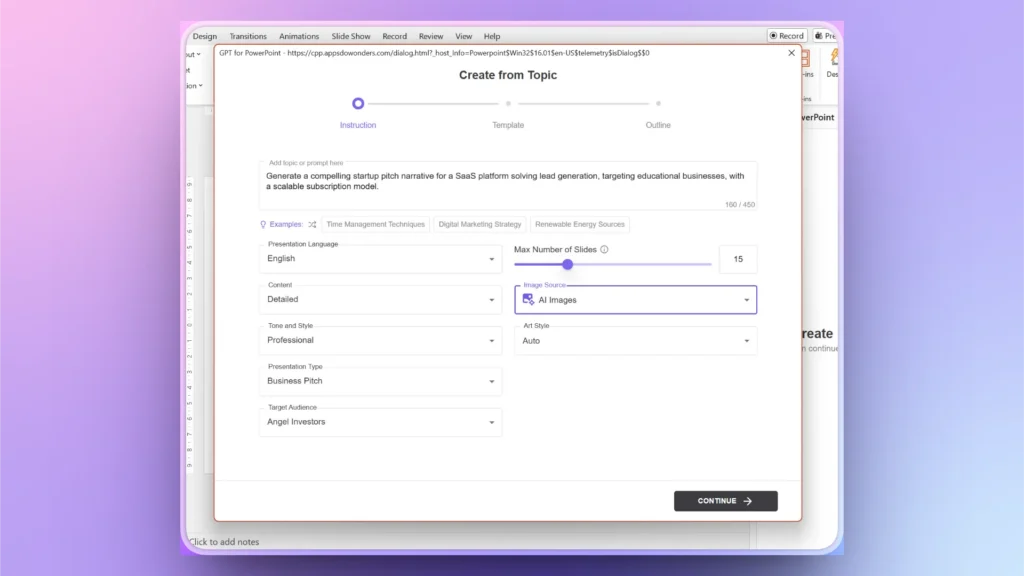
Abre una presentación de PowerPoint en blanco e inicia Twistly. Elige la opción Create Presentation y después Create from Topic. Ahora explica tu tema y tu solución de forma que encaje con las expectativas de los inversores.
Para obtener una respuesta y un resultado más detallados de la IA, configura lo siguiente:
- Contenido: detallado
- Tono y estilo: profesional
- Tipo de presentación: pitch de negocio
- Público objetivo: inversores ángel
- Número máximo de diapositivas: 12-15
- Origen de las imágenes: imágenes con IA
Paso 2: selecciona una plantilla de PowerPoint con IA
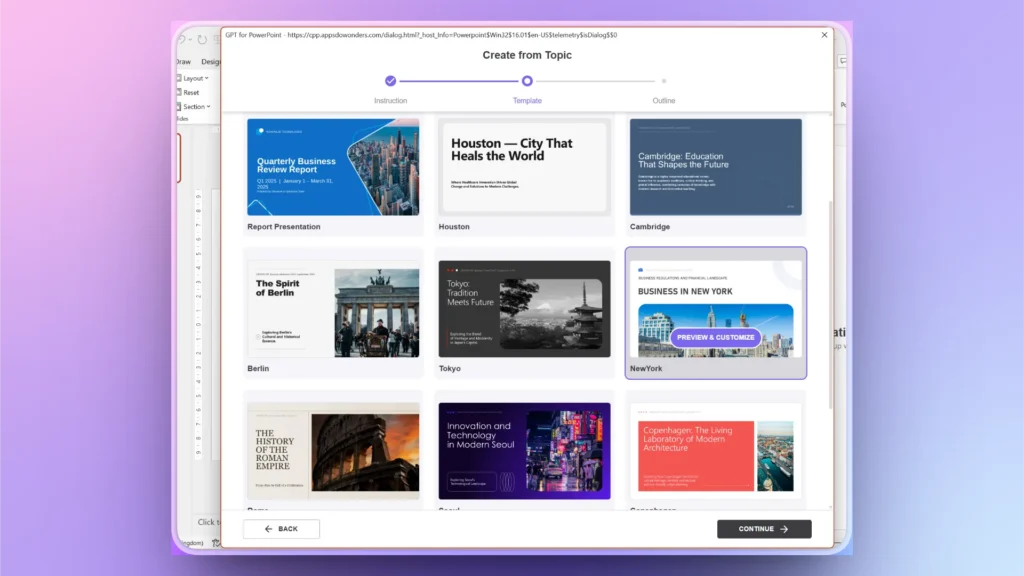
Twistly tiene varias plantillas de PowerPoint con IA ideales para pitch decks perfectos. Están diseñadas para cubrir todos los aspectos de una presentación para conseguir financiación. Desde el tamaño del mercado hasta la hoja de ruta y otros elementos clave, Twistly genera cada diapositiva automáticamente.
Paso 3: verifica la estructura del pitch deck
Existe un marco probado para pitch decks perfectos que funciona en la mayoría de las rondas de financiación y suele tener entre 10 y 14 diapositivas. Las diapositivas principales son:
| Diapositiva | Propósito / enfoque clave |
|---|---|
| Título Diapositiva | Identidad de marca + eslogan |
| Problema | Problema respaldado con datos |
| Solución | Oferta clara y diferenciada |
| Oportunidad de mercado | TAM, SAM, SOM |
| Producto | Funciones y casos de uso |
| Modelo de negocio | Fuentes de ingresos |
| Tracción | Métricas de crecimiento, KPI |
| Competencia | Matriz de posicionamiento |
| Estrategia de comercialización | Captación de clientes |
| Proyecciones financieras | Previsión a 3–5 años |
| Team | Encaje fundador-mercado |
| Petición | Financiación + asignación |
Paso 4: usa la IA para crear contenido de alto impacto
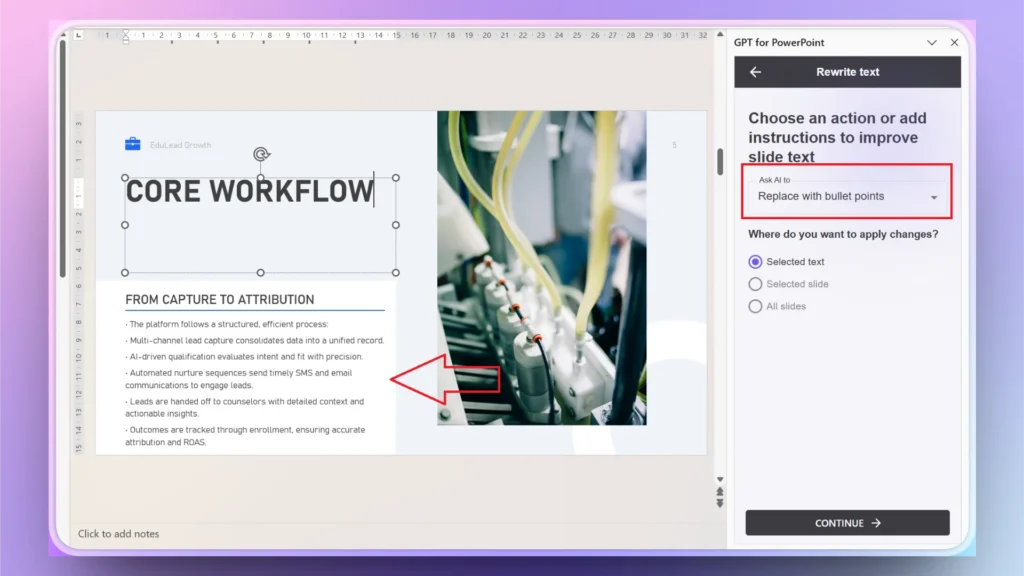
En pocos segundos, Twistly te dará un pitch deck detallado y perfecto que sigue el mismo marco probado descrito en el paso 3. Puede que algunas diapositivas tengan demasiado contenido. Twistly te ayuda a:
- Convertir párrafos largos en viñetas concisas
- Sugerir formulaciones respaldadas por datos
- Optimizar la legibilidad para la forma en que los inversores leen en diagonal
Puedes usar “La base de usuarios creció un 120% trimestre a trimestre, con una retención mensual del 35% y $50K de MRR alcanzados en 6 meses” en lugar de “Estamos creciendo rápido y ganando usuarios.”
Paso 5: Añadir diapositivas personalizadas
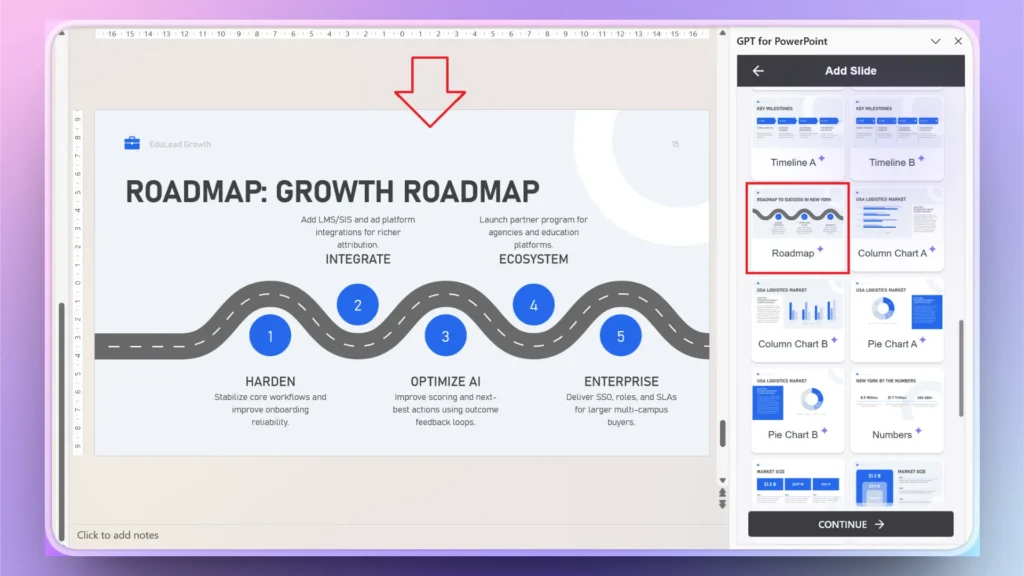
Si falta alguna diapositiva concreta en la estructura que quieres, siempre puedes añadir más tarde una diapositiva personalizada con Twistly.
Edit Slides >> Add Slide >> elige un diseño de diapositiva >> explica el contenido de la diapositiva.
En pocos segundos, Twistly generará y añadirá una diapositiva personalizada a tu pitch deck sin ningún diseño ni edición manual.
Paso 6: presenta con confianza
Puedes seguir modificando tu pitch deck con las funciones de IA de Twistly o con las herramientas nativas de PowerPoint. No tienes que preocuparte por exportar ni convertir tus diapositivas: puedes presentar de inmediato.
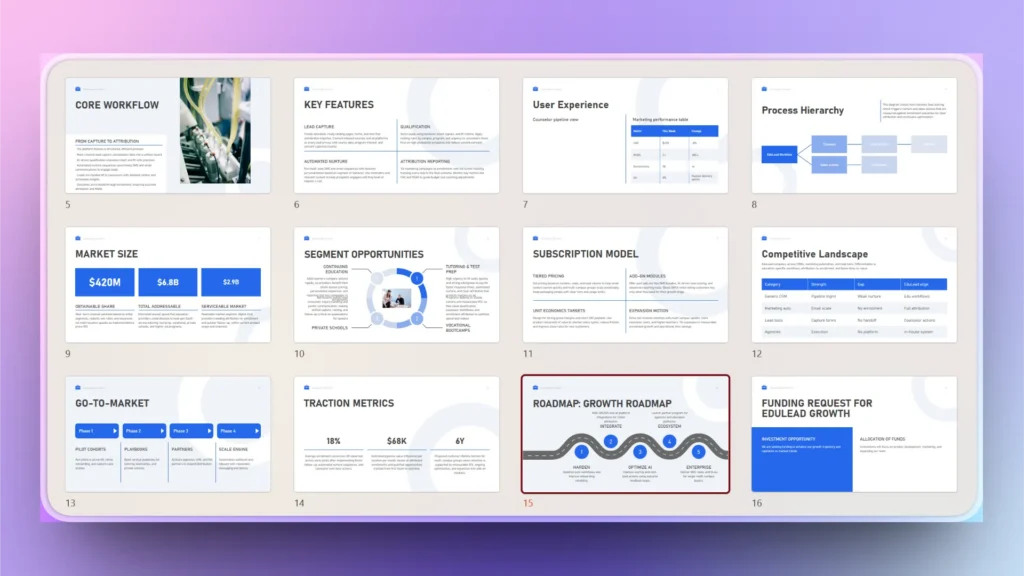
Transforma la creación de pitch decks con Twistly
Twistly no es un simple generador de presentaciones con IA, sino una completa suite de IA que cubre todas tus necesidades de presentaciones en PowerPoint. Sus opciones de personalización te ayudan a crear diapositivas a medida para cada situación o evento.
Twistly destaca entre las herramientas de IA más populares para crear pitch decks gracias a:
- Generación de diapositivas con IA
- Optimización inteligente del contenido
- Motor de inteligencia visual
- Automatización integral del flujo de trabajo
- Resultados de calidad profesional
Desde la idea hasta la presentación final, Twistly reduce el tiempo de creación hasta un 70%, para que los fundadores puedan centrarse en la estrategia.
Consigue la mejor herramienta de IA para pitch decks
Millones de usuarios usan y confían en PowerPoint, y Twistly es un complemento de IA imprescindible para cualquier usuario de PowerPoint. Si eres nuevo en la IA para PowerPoint, prueba Twistly gratis.
Los nuevos usuarios tienen disponible una versión de prueba gratuita de Twistly. Pruébala y, cuando veas cómo puede mejorar tu experiencia con PowerPoint, pásate a la versión premium por un precio razonable. Consigue tu propio ChatGPT para pitch decks.
Crear diapositivas de PowerPoint con IA
Crea presentaciones basadas en IA a partir de cualquier mensaje, documento o vídeo

Conclusión
Twistly te ayuda a crear un pitch deck perfecto con IA en pocos minutos, sin editar, diseñar ni escribir nada manualmente. Twistly analiza los prompts de IA del usuario y el contexto de las diapositivas para generar los elementos del pitch deck.
Puedes crear un pitch deck completo siguiendo esta guía o generar la presentación diapositiva a diapositiva para lograr un pitch deck más personalizado. Herramientas como Twistly cubren esta necesidad y permiten a los fundadores crear pitch decks listos para inversores, claros, convincentes y orientados a la conversión.










Empieza a hacer presentaciones con IA en segundos
Acceso instantáneo
Empieza a explorar inmediatamente todas las funciones de Twistly
Sin compromisos
No necesitas tarjeta de crédito y puedes cancelar cuando quieras
Asistencia dedicada
Nuestro equipo te ayudará en cada paso durante tu periodo de prueba