


El coste oculto de una marca incoherente en las presentaciones supone un desgaste para los recursos de la empresa, su eficiencia operativa, sus ingresos y la confianza del mercado. La marca no es algo que se hace una vez y se olvida: es un proceso continuo que no deja de aportar valor.
Una imagen de marca coherente en tus presentaciones ayuda a que los clientes confíen en tu marca, producto o servicio y la reconozcan. Si no te esfuerzas por mantener la coherencia en todas las presentaciones, prepárate para sufrir una caída de hasta un 23 % en ingresos, retención de clientes e identidad visual.
Problemas de una marca incoherente en las presentaciones
Muchas marcas y profesionales pasan por alto los retos y problemas que provoca una imagen de marca incoherente en las presentaciones. Usar colores distintos, fuentes al azar y logotipos colocados en sitios diferentes no solo da lugar a diapositivas desordenadas, sino que también pasa factura a la productividad, a los resultados del negocio y a la percepción de la marca.
La coherencia de marca en las presentaciones garantiza que todas las diapositivas tengan el mismo aspecto y que el público reconozca tu marca con facilidad al verlas. Estos son algunos elementos importantes para la marca en las presentaciones:
- Colores de la marca
- Tipografía
- Ubicación del logotipo
- Estructura del diseño
- Estilos de visualización de datos
Si no mantienes una imagen de marca coherente en todos estos elementos, estás perdiendo varias oportunidades de crecimiento ahora mismo. Corrige estos problemas cuanto antes para evitar más daños.
Una marca coherente hace que tu empresa o servicio transmita profesionalidad, autoridad y confianza. La coherencia de marca es igual de importante para las pymes que para las multinacionales.
Crear PowerPoint
Diapositivas con IA
Cree presentaciones basadas en IA a partir de
cualquier mensaje, documento o vídeo


El coste oculto de una marca incoherente en las presentaciones
Las formas tradicionales de crear diapositivas en PowerPoint ya no funcionan bien en 2026. Los entornos de trabajo modernos exigen resultados rápidos y más productividad. Con PowerPoint, sin duda necesitas entre 4 y 5 horas para crear una presentación profesional.
Con los métodos manuales es más probable que cometas errores que generen incoherencias entre las diapositivas. Estos problemas de diseño son retos importantes, y los costes reales van mucho más allá.
Se pierde tiempo corrigiendo diapositivas
Revisar o corregir diapositivas a mano puede llevar horas. Para los equipos, solucionar estos problemas es todavía más complicado. Las empresas que presentan con frecuencia no pueden permitirse perder horas en ajustes manuales. Entre las tareas habituales para corregir diapositivas están:
- Cambiar las fuentes
- Corregir los colores
- Ajustar la posición del logotipo
- Alinear los elementos
- Volver a dar formato a los gráficos
Los ponentes acaban dedicando más tiempo a corregir el diseño que a centrarse en el relato y el contenido. Un diseño bonito sin una historia atractiva no sirve de nada.
Una identidad de marca debilitada
Construir una marca es un proceso complejo en el que cada pequeño elemento suma al reconocimiento. Al público le cuesta más recordar tu marca cuando cada presentación tiene un aspecto distinto. Las diapositivas dispares diluyen tu identidad de marca.
Imagina que Apple usara colores o logotipos distintos para cada producto. Los consumidores dejarían de reconocer sus productos. Tu empresa está en la misma situación: cada elemento debe formar parte de su identidad visual.
Falta de confianza del público
La primera impresión es fundamental cuando un cliente interactúa con tu marca por primera vez. Si percibe falta de atención a los detalles de diseño o ve fuentes al azar en las diapositivas, su confianza en tu servicio o en tus datos puede caer en picado.
Más carga de trabajo para los diseñadores
Los equipos de diseño internos tienen muchas otras tareas importantes. Cuando se quedan atascados corrigiendo diapositivas, no les queda tiempo para centrarse en otras cosas importantes. Otros departamentos siguen cometiendo errores y los diseñadores tienen que corregirlos. Esto lleva tiempo:
- Corregir errores de formato
- Ajustar los diseños
- Sustituir colores incorrectos
- Rehacer diapositivas
¿Cómo solucionar los problemas de marca en tus presentaciones?
La forma más sencilla de corregir una marca incoherente en las presentaciones es automatizar el proceso de diseño. En lugar de usar plantillas manuales, apuesta por plantillas de presentación con IA.
Si no sabes cómo usar plantillas de PowerPoint con IA ni cómo mantener el mismo diseño en todas tus presentaciones de empresa, prueba Twistly.
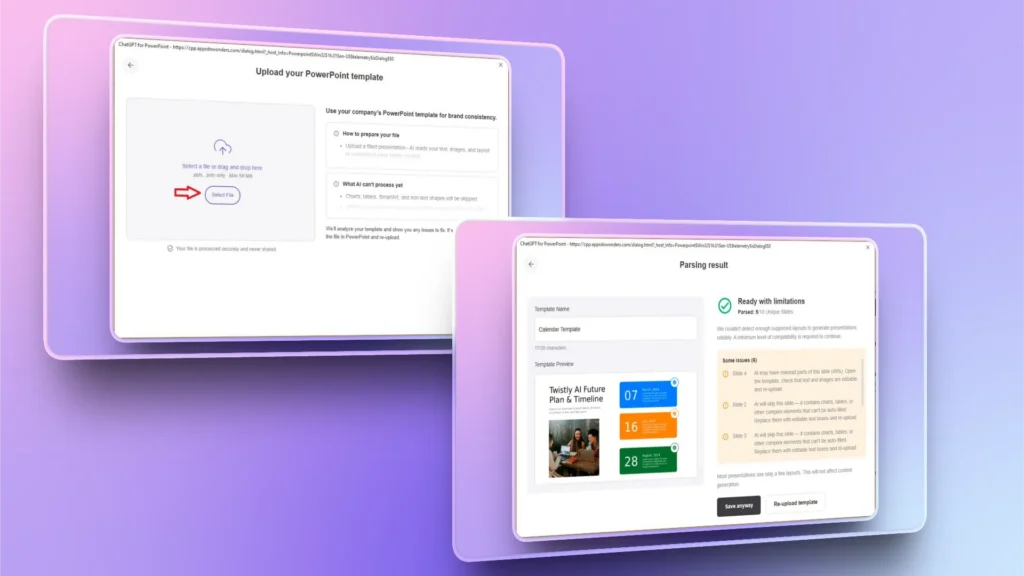
Es un complemento de IA que te ayuda a crear presentaciones en pocos minutos. También puedes subir cualquier presentación existente y Twistly extraerá el diseño y los diseños de página de las diapositivas para darte una plantilla personalizada para tus futuras presentaciones.
Cómo resolver los problemas de coherencia en presentaciones con Twistly
Twistly automatiza el diseño y el estilo de las presentaciones manteniendo la coherencia de marca. “Plantillas personalizadas” o “Mis plantillas” es la función más reciente que han lanzado los desarrolladores para resolver este problema.
En lugar de usar plantillas estáticas, limitadas y ya disponibles, Twistly convierte tu presentación de marca actual en una plantilla personalizada reutilizable. Si una presentación de marca incluye:
- Colores de la marca
- Ubicación del logotipo
- Tipografía
- Estilos de diseño
Twistly extraerá estos elementos y generará una plantilla personalizada en la biblioteca de Twistly, y podrás usar ese diseño en futuras presentaciones. Si aún no has probado la función “Mis plantillas”, pruébala; por ahora solo está disponible para quienes tienen la suscripción Team.
Ventajas de usar las plantillas personalizadas de Twistly
No tienes que pagar por cada plantilla premium, ya que Twistly te permite guardar hasta 5 plantillas personalizadas para ti y los miembros de tu equipo. Cualquier miembro del equipo puede usar esas plantillas dentro de Twistly. Algunas de las principales ventajas de esta función son:
- Refuerzo automático de la marca
- Crea presentaciones de forma más rápida y cómoda
- Ideal para empresas y marcas que crean presentaciones con frecuencia
- Extrae fácilmente todos los elementos importantes de la presentación existente
- Acceso sencillo a plantillas con IA para futuras presentaciones
¿Cómo crear una plantilla de PowerPoint reutilizable?
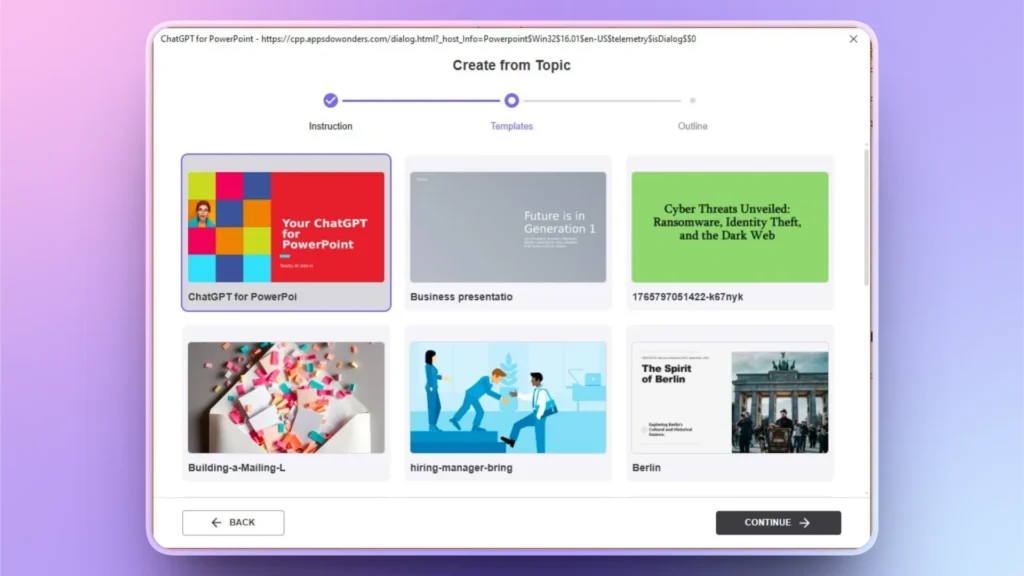
Para generar una plantilla personalizada y reutilizable a partir de una presentación existente, solo tienes que seguir estos sencillos pasos:
- Abre Mis plantillas en Twistly y sube tu presentación
- Confirma la acción o haz los cambios que te indique Twistly
- La nueva plantilla personalizada se guarda en la biblioteca
- Crea presentaciones con las plantillas recién guardadas o con otras plantillas de IA disponibles
Conclusión
Una marca incoherente en las presentaciones puede parecer un problema menor, pero tiene costes ocultos que afectan a los ingresos, la eficiencia y el reconocimiento. Si no quieres que estos problemas frenen el crecimiento de tu empresa, prueba Twistly.
Si eres nuevo en las herramientas de IA para presentaciones de PowerPoint, descarga ahora la versión de prueba gratuita de Twistly y empieza a crear diapositivas increíbles con una marca coherente. Con la función de plantillas personalizadas de Twistly, las empresas pueden convertir sus presentaciones de marca en sistemas reutilizables.
Crear diapositivas de PowerPoint con IA
Crea presentaciones basadas en IA a partir de cualquier mensaje, documento o vídeo











Empieza a hacer presentaciones con IA en segundos
Acceso instantáneo
Empieza a explorar inmediatamente todas las funciones de Twistly
Sin compromisos
No necesitas tarjeta de crédito y puedes cancelar cuando quieras
Asistencia dedicada
Nuestro equipo te ayudará en cada paso durante tu periodo de prueba