


Si tu empresa ya tiene una presentación profesional y quieres usar esa misma plantilla en todas tus futuras presentaciones, puedes crear una plantilla de PowerPoint reutilizable a partir de ella. Los métodos manuales para crearla no están al alcance de todos: llevan tiempo, esfuerzo y experiencia.
La forma más sencilla de crear una plantilla de PowerPoint reutilizable a partir de tu presentación es usar la IA para extraer el logotipo, los colores, las fuentes y los diseños de la presentación original.
¿Cuál es la mejor herramienta de IA para crear plantillas de PowerPoint reutilizables? ¿Cómo crear al instante una plantilla de PowerPoint escalable? En este artículo respondemos a todas estas preguntas.
Ventajas de una plantilla de PowerPoint reutilizable
Crear una presentación desde cero puede llevar entre 4 y 5 horas. Con una plantilla de presentación de marca, modificarla lleva menos tiempo, porque ya tienes los diseños, las fuentes, los logotipos y otros marcadores de posición de las diapositivas.
Además de ahorrar tiempo, las plantillas de PowerPoint reutilizables tienen muchas otras ventajas:
- Coherencia de marca
- Creación de diapositivas más rápida
- Menos errores de diseño
- Estándares de presentación profesionales
- Escalabilidad entre equipos
Al hacerlo a mano, puedes colocar mal los logotipos, usar fuentes equivocadas en distintas diapositivas, aplicar diseños incoherentes o desperdiciar recursos creando presentaciones desde cero. Para evitar todos estos problemas, crea una plantilla de PowerPoint reutilizable a partir de tu presentación.
Crea una plantilla personalizada inteligente a partir de una presentación con Twistly
Las empresas y agencias que crecen rápido no pueden permitirse dedicar recursos y talento valiosos a crear presentaciones a mano. Quieren formas más rápidas y cómodas de crear presentaciones coherentes con su marca.
En lugar de crear un archivo .POTX y guardarlo para usarlo en el futuro dando formato a mano, las marcas más inteligentes confían en la creación automatizada de plantillas personalizadas de Twistly.
El complemento de IA Twistlypuede extraer fuentes, logotipos, diseños y otros elementos de presentaciones existentes y guardarlos automáticamente como una plantilla de PowerPoint personalizada. Las plantillas de PowerPoint con IA guardadas sirven para crear presentaciones al instante con IA, para cualquier sector, tema o entrada.
Crear PowerPoint
Diapositivas con IA
Cree presentaciones basadas en IA a partir de
cualquier mensaje, documento o vídeo


¿Qué tiene Twistly de especial?
Crear una plantilla en PowerPoint es difícil, pero Twistly automatiza todo el proceso dentro de PowerPoint, sin tener que cambiar entre varias aplicaciones.
Puedes subir tus presentaciones existentes y Twistly extraerá:
- Colores de la marca
- Estilos de fuente
- Estructura del diseño
- Componentes visuales
- Formato de los gráficos
Y Twistly guardará todo como My Template dentro de PowerPoint. En futuras presentaciones, cualquier miembro del equipo podrá acceder a esta plantilla de marca y usarla, lo que garantiza la coherencia de marca en todas las presentaciones.
Pasos para crear una plantilla reutilizable con Twistly
No necesitas extraer nada a mano para crear una plantilla de PowerPoint reutilizable a partir de tu presentación: la IA lo hace todo por ti.
Para empezar con Twistly, necesitas una presentación existente a partir de la que quieras crear una plantilla y tener instalado el complemento Twistly en PowerPoint.
Cuando tengas listas estas dos cosas, el resto del proceso es sencillo. Sigue estos pasos para obtener plantillas de PowerPoint con IA automáticas para tus futuras presentaciones.
Paso 1: Inicie una presentación en blanco y ejecute Twistly
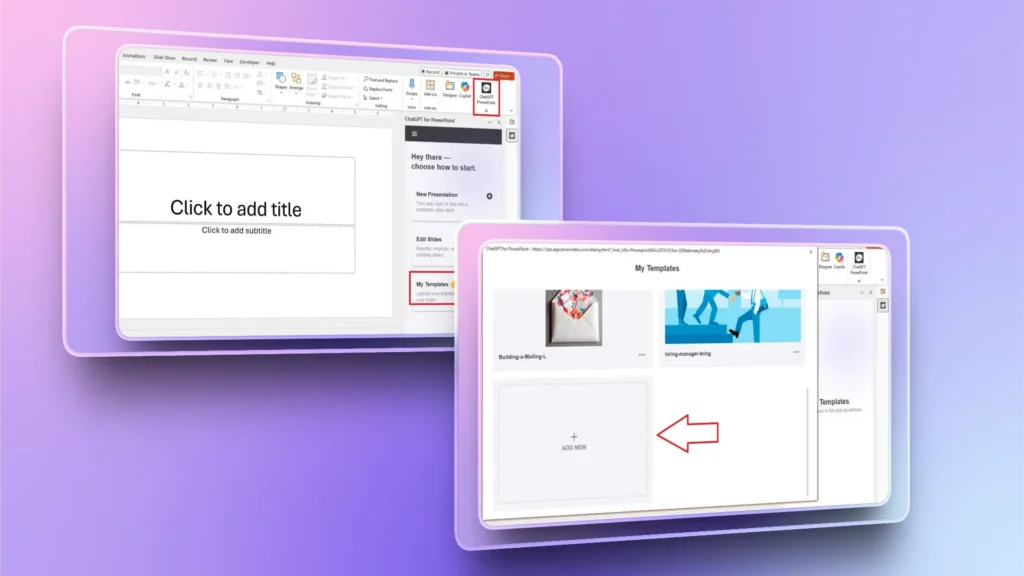
Inicia una presentación de PowerPoint en blanco o abre Twistly y haga clic en el botón función My Templates en la ventana de Twistly.
En la nueva ventana, haz clic en el botón Add New y podrás añadir tu presentación existente para que la IA use ese archivo para crear una plantilla.
Paso 2: Sube tu presentación existente
Haga clic en el botón Select File para elegir tu presentación existente desde tu ordenador. Una vez subido el archivo, Twistly analizará la presentación en busca de posibles limitaciones o diapositivas que no se guardarán en la plantilla personalizada.
Puedes hacer los cambios recomendados y volver a subir la presentación, o hacer clic en el botón Save Anyway para guardar la presentación como plantilla personalizada.
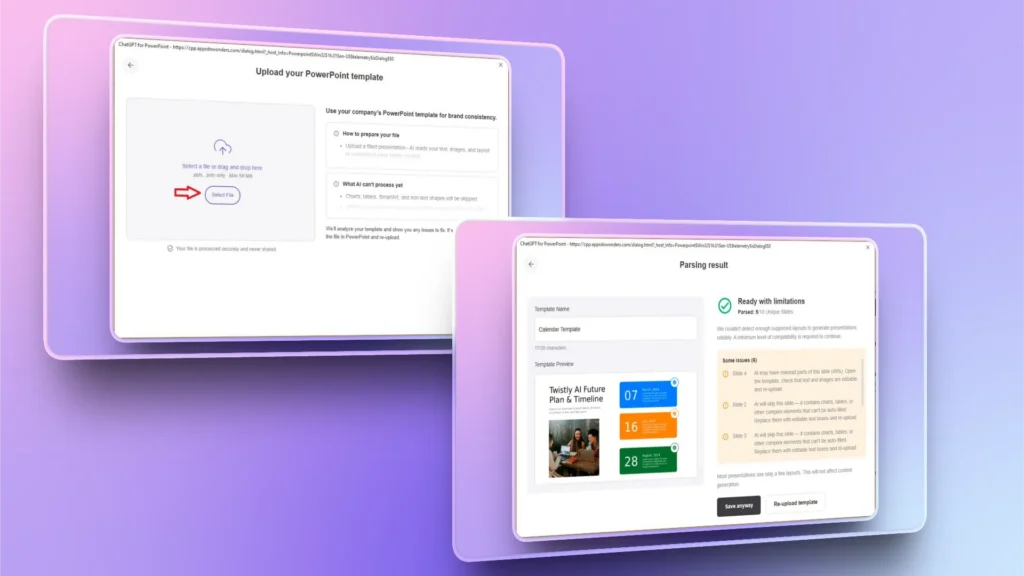
Tu plantilla personalizada se guarda en función My Templates y puedes acceder a ella cuando crees una presentación nueva.
Paso 3: Crea una presentación nueva
Ve a la ventana de Twistly y crea una presentación nueva eligiendo cualquier método de entrada: un prompt de IA, un tema, un texto o un documento.
Paso 4: Selecciona tu plantilla personalizada
Twistly tiene varias plantillas de PowerPoint con IA de diseño profesional, y ahora verás en la biblioteca las plantillas que has guardado recientemente. Elige tu plantilla personalizada y haz clic en Continue.
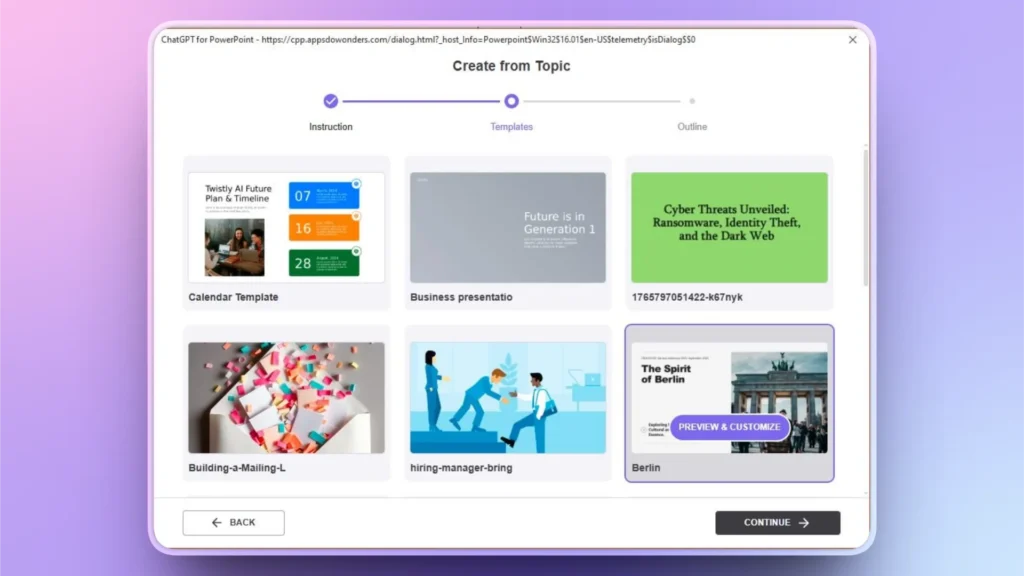
Revisa el esquema de diapositivas generado por la IA y haz cambios si es necesario. Haz clic en Continúe en y espera unos segundos.
Paso 5: Revisa las diapositivas finales de tu presentación
En pocos segundos, Twistly creará las diapositivas finales a partir de la plantilla personalizada. Desde la redacción hasta el formato y los diseños, todo sigue los mismos principios de diseño de la presentación original. Aquí tienes una imagen con la nueva presentación y la original.
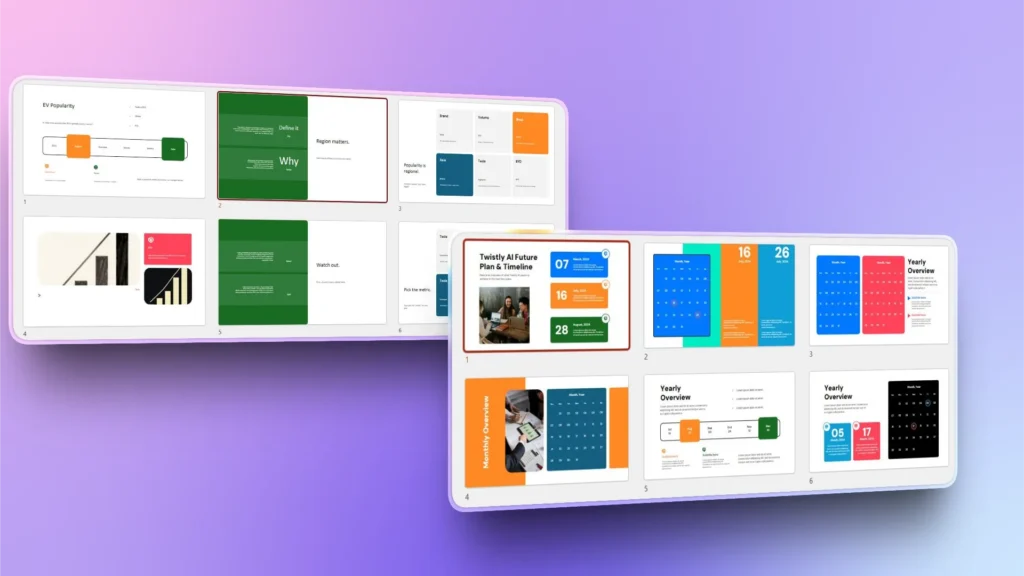
Plantillas de PowerPoint con IA frente a plantillas tradicionales
Twistly convierte tu antigua presentación en una herramienta escalable de automatización de marca en minutos, sin edición manual. Crear una plantilla de PowerPoint a mano no es tan fácil.
Si hasta ahora lo hacías todo a mano en PowerPoint, veamos cómo Twistly puede mejorar tu productividad y tu experiencia con PowerPoint.
| Característica | Plantilla de PowerPoint tradicional | Plantilla personalizada de Twistly |
|---|---|---|
| Requiere formato manual | Sí | No |
| Extrae la marca de la presentación existente | No | Sí |
| Genera automáticamente diapositivas de marca | No | Sí |
| Protege la coherencia de marca | Débil | Potente |
| Se adapta a informes periódicos | Limitado | Excelente |
| Ideal para agencias | No | Extrae la marca de la presentación existente |
Ideal para agencias y equipos
Por ahora, la función My Templates solo está disponible con la suscripción Team. Es decir, si formas parte de un equipo que necesita mantener la coherencia de marca en todas sus presentaciones, Twistly es la mejor herramienta para ti. Si creas presentaciones a menudo para clientes o proyectos:
- Guarda una plantilla personalizada para cada cliente
- Cambia de un sistema de marca a otro al instante
- Genera en minutos presentaciones totalmente adaptadas a la marca de cada cliente
No hace falta pasar horas haciéndolo todo desde cero cuando puedes usar las funciones de IA de Twistly para crear presentaciones profesionales en segundos.
¿Quieres probar Twistly gratis? Descarga ahora la versión de prueba gratuita y empieza a crear presentaciones increíbles con un ChatGPT para PowerPoint hecho a medida. Sin rediseños. Sin confusiones. Sin errores de marca.
Crear diapositivas de PowerPoint con IA
Crea presentaciones basadas en IA a partir de cualquier mensaje, documento o vídeo

Conclusión
Con Twistly, crear una plantilla de PowerPoint reutilizable a partir de tu presentación solo lleva unos clics y te permite mantener la coherencia de marca en todas tus presentaciones.
Tu presentación ya contiene tu identidad de marca. Twistly simplemente la convierte en un sistema de presentaciones escalable y automatizado. Prueba Twistly ahora y únete a una comunidad más inteligente en la que la productividad lo es todo y la automatización está redefiniendo las tareas diarias y las operaciones de negocio.










Empieza a hacer presentaciones con IA en segundos
Acceso instantáneo
Empieza a explorar inmediatamente todas las funciones de Twistly
Sin compromisos
No necesitas tarjeta de crédito y puedes cancelar cuando quieras
Asistencia dedicada
Nuestro equipo te ayudará en cada paso durante tu periodo de prueba