



Seamos realistas: no todas las presentaciones fracasan por un mal contenido. La mayoría no consigue impresionar al público porque el tema no despierta curiosidad. Antes incluso de ver las diapositivas, los datos y tus conclusiones, el público ve el título de la presentación.
No queremos que tu presentación pase desapercibida, y por eso hemos preparado esta lista de 18 ideas de presentación únicas. Si necesitas más ideas y temas o títulos de presentación como estos, prueba nuestro nuevo Generador gratuito de títulos para presentaciones AI.
Los títulos de presentación genéricos, aburridos y previsibles ya no funcionan. El margen para captar la atención del público es cada vez más corto. Te recomendamos usar palabras clave e ideas para conseguir títulos sorprendentes e interesantes con esta herramienta de IA.
Ideas de presentación únicas
Hacer una presentación única empieza por elegir un título adecuado y original. Veamos algunas ideas de presentación únicas que despiertan la curiosidad y garantizan la máxima participación.
1. Lo que nadie te cuenta sobre
Esta presentación despierta la curiosidad del público por secretos internos que no son de dominio público. Es una idea que sirve para presentaciones muy diversas: empresas, marketing, educación y eventos en general.
2. Presentaciones centradas en errores
¿Cuáles son los errores más comunes que comete la gente en un tema concreto? En lugar de enseñar qué hacer, cuéntales qué no hacer.
- 7 errores de presentación que salen caros (y cómo evitarlos)
3. Presentación de historias basadas en datos
Tienes los datos: convierte los números en historias interesantes con elementos visuales, tablas y gráficos. Las historias y los elementos visuales hacen que los datos sean más fáciles de recordar para el público.
4. Presentaciones sobre “lo que viene”
Este tipo de temas explora predicciones, cambios próximos y posibles oportunidades y retos.
- El futuro de la IA en el trabajo diario
- ¿Qué viene ahora para el marketing digital?
5. Presentaciones para resolver problemas
Céntrate en los principales problemas de tu público objetivo y luego presenta de forma natural tu servicio o producto como una solución viable. Este tipo de títulos funciona muy bien para empresas.
6. Presentaciones que desmontan mitos
En cualquier sector, nicho o aspecto de la vida hay rumores, mitos y conceptos erróneos. Tu presentación puede centrarse en revelar la verdad sobre esos mitos.
7. Guías paso a paso
Explica con elementos visuales cómo funciona tu producto o servicio para que el público pueda seguir las instrucciones paso a paso en tus diapositivas.
8. Presentaciones de casos de estudio
¿Has investigado recientemente sobre algún tema concreto? Comparte tus hallazgos y reflexiones con el público.
- Cómo un pequeño cambio aumentó las ventas un 40%
9. Presentaciones de antes y después
¿Tu servicio o producto ha supuesto algún cambio para tus clientes? Muestra los datos, elementos visuales y conclusiones del antes y el después para promocionarlo.
10. Presentaciones entre bastidores
¿Cómo funciona una empresa o qué pasos se siguen para lograr resultados? Comparte con el público momentos entre bastidores. Este tipo de diapositivas puede apoyarse en elementos visuales.
11. Presentaciones basadas en preguntas
Para presentaciones más interactivas, usa un formato basado en preguntas. Puedes hacer preguntas al público, y el público puede preguntarte sobre los problemas a los que se enfrenta.
- ¿Sigue funcionando la educación tradicional?
- ¿De verdad necesitamos más reuniones?
12. Diapositivas comparativas
Estas presentaciones pueden comparar herramientas, servicios, productos u otras opciones. Así el público obtiene una visión clara antes de tomar decisiones.
- IA frente a creatividad humana: ¿qué funciona de verdad?
13. Presentaciones de “lecciones aprendidas”
Los ponentes pueden compartir ideas y conocimientos aprendidos de distintas experiencias y fracasos. Estos temas ayudan a crear una relación más sólida con el público.
14. Presentaciones que analizan tendencias
¿Cuáles son las tendencias más populares del sector y por qué existen? En lugar de limitarte a explicar las tendencias, explica su lógica, sus causas y sus efectos.
15. Diapositivas minimalistas
Crea diapositivas breves, precisas y minimalistas, con menos elementos visuales y texto. A veces conviene dedicar una diapositiva a un solo concepto.
16. Presentaciones centradas en lo visual
En lugar de usar los elementos visuales como material de apoyo, añade más fotos a las diapositivas y breves descripciones para explicarlas.
17. Presentaciones “Si tuviera que empezar de nuevo”
¿Qué cambiarías de tu vida actual si pudieras reiniciarla? Comparte ideas y experiencias que podrían funcionar mejor si las replantearas.
- Si tuviera que volver a crear una startup, esto es lo que haría de otra manera
18. Las mejores herramientas de IA para el trabajo
Puedes compartir detalles e ideas sobre herramientas de IA populares en oficinas y empresas. Por ejemplo, puedes hablarle al público de Twistly, una herramienta de IA que genera presentaciones dentro de PowerPoint.
¿Cómo generar ideas de presentación únicas?
Buscar el título adecuado para una presentación puede ser agotador. Pero herramientas de IA como el Generador gratuito de títulos para presentaciones te facilitan el trabajo. Esta herramienta sugiere los títulos más adecuados y relevantes según lo que escribas.
¿Cómo usar el Generador de títulos para presentaciones?
No necesitas descargar ningún software, herramienta ni archivo. Es una herramienta web a la que accedes con un solo clic. Una vez en la web oficial, sigue estas instrucciones:
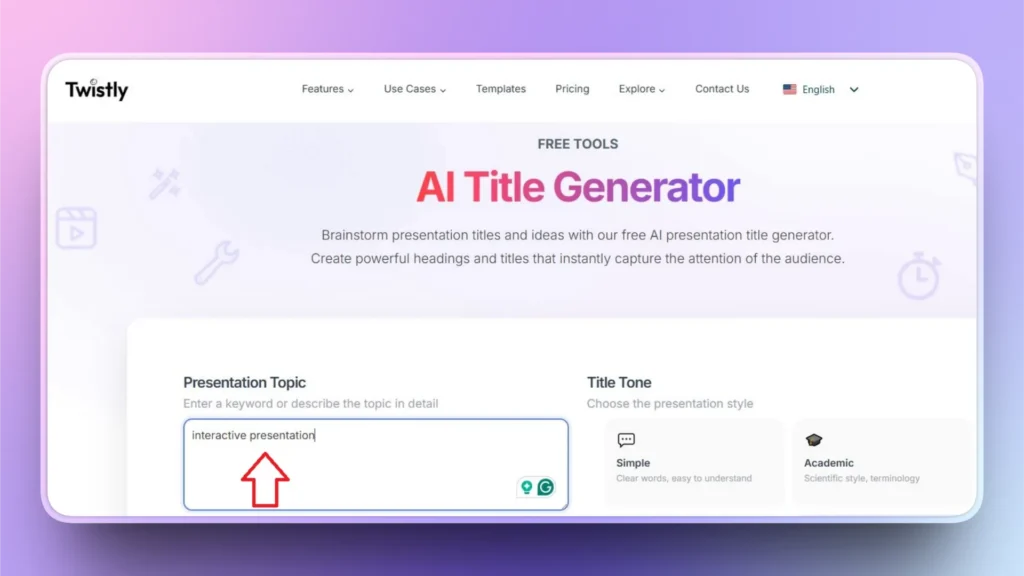
Paso 1: Introduce una palabra clave o una idea
En el espacio indicado, escribe la palabra clave en la que quieras centrarte o, si lo prefieres, comparte una idea cualquiera. Usa un lenguaje sencillo; no hace falta complicarse.
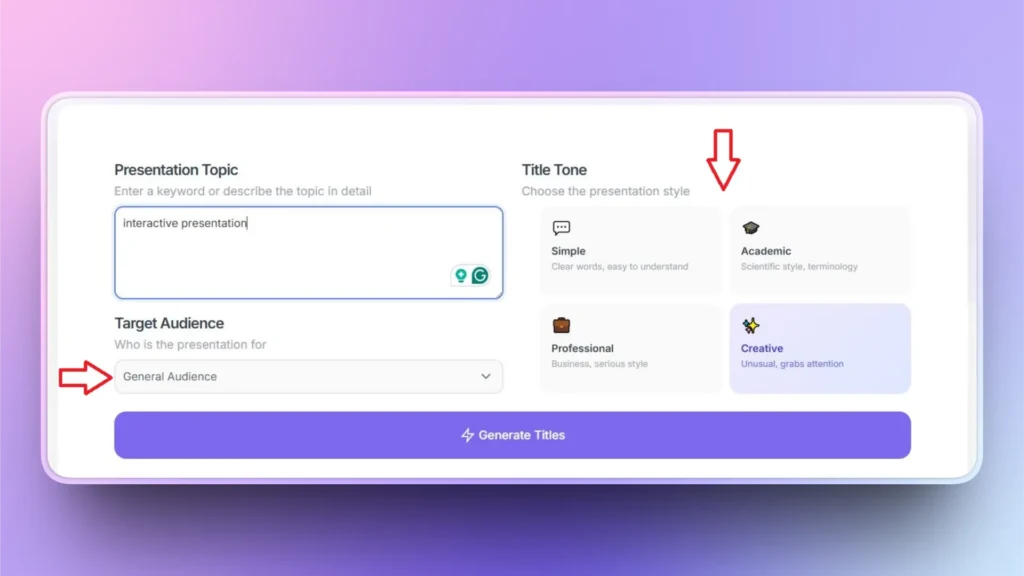
Paso 2: Configura tus preferencias
Puedes elegir el tono del título y el público objetivo para obtener sugerencias de títulos más personalizadas.
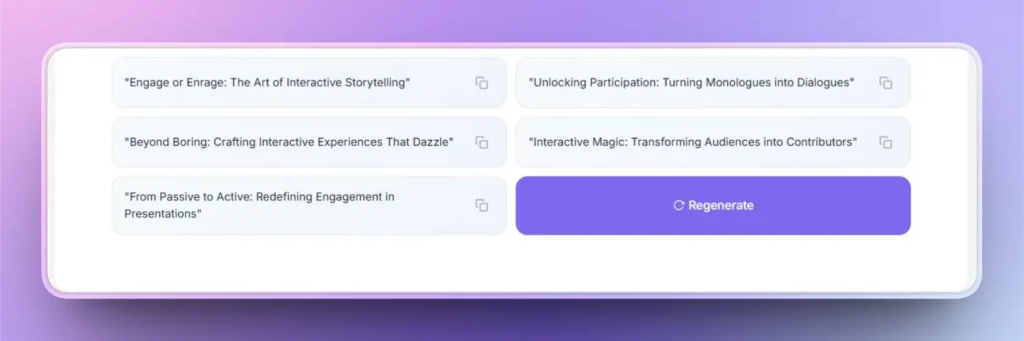
Paso 3: Usa o vuelve a generar los títulos
Puedes copiar los resultados con un clic o conseguir más sugerencias haciendo clic en el botón Regenerate.
Palabras finales
Unas ideas de presentación únicas marcan la diferencia en la participación del público. Genera todos los títulos que quieras con nuestra herramienta. Una gran presentación empieza con un título único.
Cuando tengas claro el título de tu presentación, pégalo en Twistly y convierte ese tema en una presentación profesional en segundos.
El generador de títulos con IA es totalmente gratuito, y nuestros lectores también pueden conseguir una versión de prueba gratuita de Twistly. Haz clic en el botón de abajo para descargarla.
Crear PowerPoint
Diapositivas con IA
Cree presentaciones basadas en IA a partir de
cualquier mensaje, documento o vídeo












Empieza a hacer presentaciones con IA en segundos
Acceso instantáneo
Empieza a explorar inmediatamente todas las funciones de Twistly
Sin compromisos
No necesitas tarjeta de crédito y puedes cancelar cuando quieras
Asistencia dedicada
Nuestro equipo te ayudará en cada paso durante tu periodo de prueba